Author: tutorac

  • Cancellation policy: when you (the learner) cancel on Tutorac

    If you’re the one stopping a hire, the size of your refund depends on which flow you’re in. The Withdraw flow (before the tutor accepts) always gives a full refund. The Cancel class flow (after the tutor accepts) uses a milestone-completion-percentage bracket. Here’s the exact policy for both, plus how it applies to multi-milestone batches.

    In this article

    Which flow applies

    • Tutor hasn’t accepted your offer yet? Use the Withdraw flow — 100% refund, no bracket logic.
    • Tutor has accepted and the batch exists? Use the Cancel class flow — the milestone-completion-percentage bracket below applies.

    Step-by-step on both: How to cancel a hire or batch and get your refund on Tutorac.

    Withdraw (pre-acceptance) — always 100%

    Before the tutor accepts, you can pull the offer back from Trainings > All Contracts > Sent Offers > View Details > Withdraw. Because no work has started:

    • You receive a 100% refund of the amount you funded.
    • The tutor gets nothing — they never accepted the offer.
    • If the tutor doesn’t accept within 2 days, the offer expires on its own and the refund happens automatically.

    The bracket table below does not apply to withdraw. It only applies once the tutor has accepted and a milestone exists.

    Cancel class (post-acceptance) — the bracket table

    Once the tutor has accepted and you’re inside the batch, your refund is determined by the active milestone’s completion percentage at the moment you click Cancel class:

    Milestone completion at cancellationYour refundTutor keeps
    0% (not started)100%0%
    1–10%80%20%
    11–30%50%50%
    Above 30%0%100%

    The cancellation dialog previews this number before you confirm — if it doesn’t match what you expect, close the dialog and check the milestone activity log first.
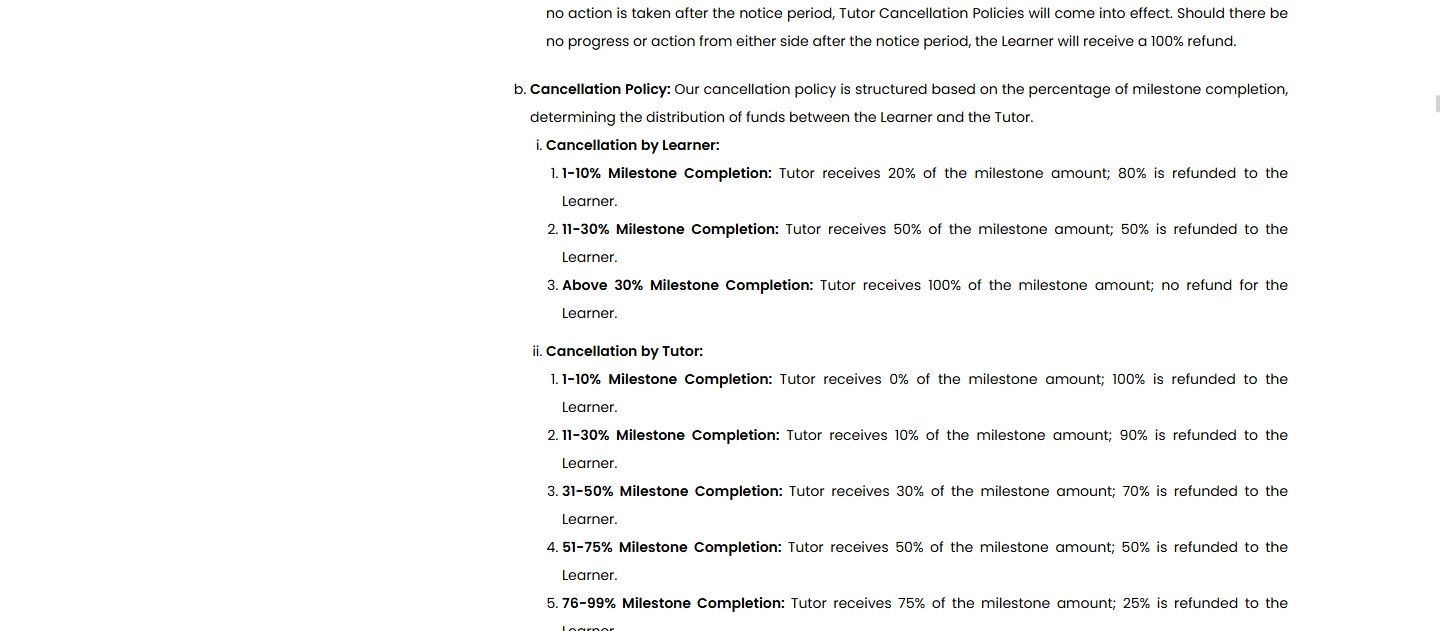
    Tutorac Cancellation Policy section in the User Agreement, showing the refund brackets when the learner cancels after the tutor has accepted.

    Multi-milestone batches

    The bracket only applies to the currently active milestone — the one in progress when you cancel. For other milestones in the same batch:

    • Future milestones you funded but haven’t started: 100% refund.
    • Already-released milestones (you clicked Release Payment): not refundable — the money has left escrow.
    • Completed but unreleased milestones: usually released to the tutor when you cancel, since the work is done. If you believe a completed milestone wasn’t actually delivered, raise it with Support before cancelling.

    How the milestone percentage is calculated

    • Each milestone has a defined scope — classes, deliverables, or session count.
    • The completion percentage is the share of that scope that has been delivered when you click Cancel class.
    • You can see it on the Payment tab in the milestone card’s progress bar (e.g., 0%, 15%, 60%).
    • For session-based milestones, missed sessions aren’t counted as delivered — only sessions you actually attended or that the tutor delivered count.

    If you disagree with the percentage

    Don’t click Cancel class yet — once you do, the refund per the displayed bracket is locked in.

    1. Check the milestone activity log on the Payment tab to see what Tutorac is counting as delivered.
    2. Talk to the tutor on Messages first — sometimes a sync resolves it (e.g., a session was logged that didn’t happen).
    3. If you can’t agree, contact Tutorac Support with screenshots before cancelling. Support can adjust the percentage if there’s clear evidence either way.

    If the cancellation is because the tutor is at fault (no-shows, going silent), see Tutorac dormancy policy — you may get a full refund regardless of the milestone percentage.

    FAQs

    Does the bracket apply when I withdraw an offer?

    No. Withdraw is pre-acceptance — it’s always 100%. The bracket only applies once a milestone exists, i.e., after the tutor accepted.

    What counts as “Above 30%”?

    Anything from 31% upward. At 31%, the policy treats the milestone as substantially delivered and you receive no refund for it — future milestones you haven’t started are still refundable in full.

    If I cancel at 10%, do I get 80% or 50%?

    At exactly 10% you’re in the 1–10% bracket, so 80%. The 50% bracket starts at 11%.

    Can I get back milestones I already released?

    No — releasing a milestone means you signed off on it and Tutorac paid the tutor. That’s why we recommend not releasing a milestone you have any concerns about until it’s resolved.

    Does this policy apply to Video Courses too?

    No. Video Courses (pre-recorded) have their own refund window — usually based on the date of purchase, not milestone completion. See the Video Courses section for details.


    Related articles

    Last updated: 29 May 2026

  • How cancellations and refunds work on Tutorac

    Tutorac protects both learners and tutors by holding payment in escrow and giving each side a clear, in-product way to back out. There are two cancellation flows depending on the state of your hire: Withdraw (before the tutor accepts) for a full refund, and Cancel class (after acceptance) where the refund follows a milestone-completion-percentage policy. This article gives you the big picture; the linked guides cover each flow step by step.

    In this article

    The two cancellation flows at a glance

    • Withdraw — you used Hire Now on a tutor’s profile and the tutor hasn’t accepted yet (status: Awaiting Approval). You can pull the offer back at any time before they accept. Refund is always 100% because no work has started.
    • Cancel class — the tutor has accepted, the batch exists (status: Upcoming or Ongoing), and a milestone is now in play. You cancel from the batch’s Payment tab. The refund follows the milestone-completion-percentage policy — how much you get back depends on how far the active milestone has progressed.

    Whichever flow applies, you handle it yourself in the dashboard — there’s no Support ticket to file for routine cancellations. The step-by-step walkthrough for both flows is in How to cancel a hire or batch and get your refund on Tutorac.

    Flow 1: Withdraw (pre-acceptance)

    When you submit a hire, the offer goes into Awaiting Approval and the tutor has 2 days to respond. While in that state:

    • You can withdraw the offer from Trainings > All Contracts > Sent Offers, then View Details > Withdraw.
    • The Withdraw dialog asks for one of 8 reasons (sent by mistake, found another tutor, etc.).
    • On confirmation, Tutorac shows “Offer Withdrawn… Your refund will be processed” and starts the full refund to your original payment method.
    • If the tutor doesn’t respond within 2 days, the offer expires and refunds automatically.

    Because nothing has started, no milestone-completion bracket applies — you get all of it back.

    Flow 2: Cancel class (post-acceptance)

    Once the tutor accepts, the contract becomes a Training Batch with one or more milestones. Tutorac releases payment to the tutor milestone by milestone — not all at once. When you cancel here:

    • You open Trainings > My Training Batches > View Details > Payment and click Cancel class next to the active milestone.
    • The refund preview is calculated from the active milestone’s completion percentage at the moment you cancel:
      • 0% → 100% refund of that milestone
      • 1–10% → 80% refund
      • 11–30% → 50% refund
      • Above 30% → 0% refund
    • Future milestones in the same batch that you funded but hadn’t started yet are refunded in full.
    • Already-released milestones aren’t refundable — that money has left escrow.

    Full table and edge cases: Cancellation policy: when you (the learner) cancel.

    When the tutor is the one cancelling

    Tutors only have the post-acceptance flow (there’s no “withdraw” for them once they’ve agreed). If they cancel, the bracket is tilted in the learner’s favour — the further the milestone has progressed, the larger the tutor’s share they have to forfeit. See Cancellation policy: when your tutor cancels for the full table.

    Tutors also can’t cancel a batch they’ve simply gone quiet on — if a tutor stops showing up, the Tutorac dormancy policy kicks in and protects you.

    How the money flows

    • Escrow — every milestone you fund is held by Tutorac, not paid to the tutor up-front.
    • Release — you click Release Payment on a milestone when you’re satisfied; only then does the tutor receive it.
    • Refund — whatever Tutorac is still holding for that hire (per the policy) returns to your original payment method automatically.
    • Currency — ₹ INR for India accounts; $ USD for accounts elsewhere. The refund comes back in the same currency you paid in.
    • Timing — Tutorac initiates immediately; your bank/card issuer usually credits within 5–10 business days.
    Tutorac Cancellation Policy section in the User Agreement showing the milestone-completion brackets that determine refund amounts.

    FAQs

    Why is there no “Cancel” button next to my hire?

    You’re probably looking in the wrong place. If the tutor hasn’t accepted yet, the button is labelled Withdraw on the contract details page (Sent Offers). If the tutor has accepted, it’s Cancel class inside the batch’s Payment tab.

    Will the tutor know I cancelled?

    Yes, in both flows. Withdrawing closes the offer and notifies the tutor. Cancelling a class marks the batch as Cancelled and notifies them with the reason you provided.

    Can I cancel only a single class within a batch?

    No — cancellation always operates at the batch level. If you just want to skip a session, talk to your tutor on Messages and reschedule.

    What if the tutor and I disagree about the milestone percentage?

    Raise it through Tutorac Support before cancelling. They can review the milestone activity log and adjust the percentage if there’s clear evidence in either direction.


    Related articles

    Last updated: 29 May 2026

  • What to do if you suspect your Tutorac account is compromised

    If something feels off about your Tutorac account — an action you don’t recognise, a sign-in alert you didn’t trigger, a contract you didn’t accept — treat it as a possible compromise and act fast. This guide walks through the warning signs, the immediate steps to lock the account down, and how to recover.

    In this article

    Warning signs of a compromised account

    • You receive an email about a password change you didn’t make.
    • You receive an OTP or sign-in code you didn’t request.
    • Notifications mention actions (sent a proposal, accepted a contract, paid a milestone) you don’t recognise.
    • A new payment card or billing address you didn’t add appears in your profile.
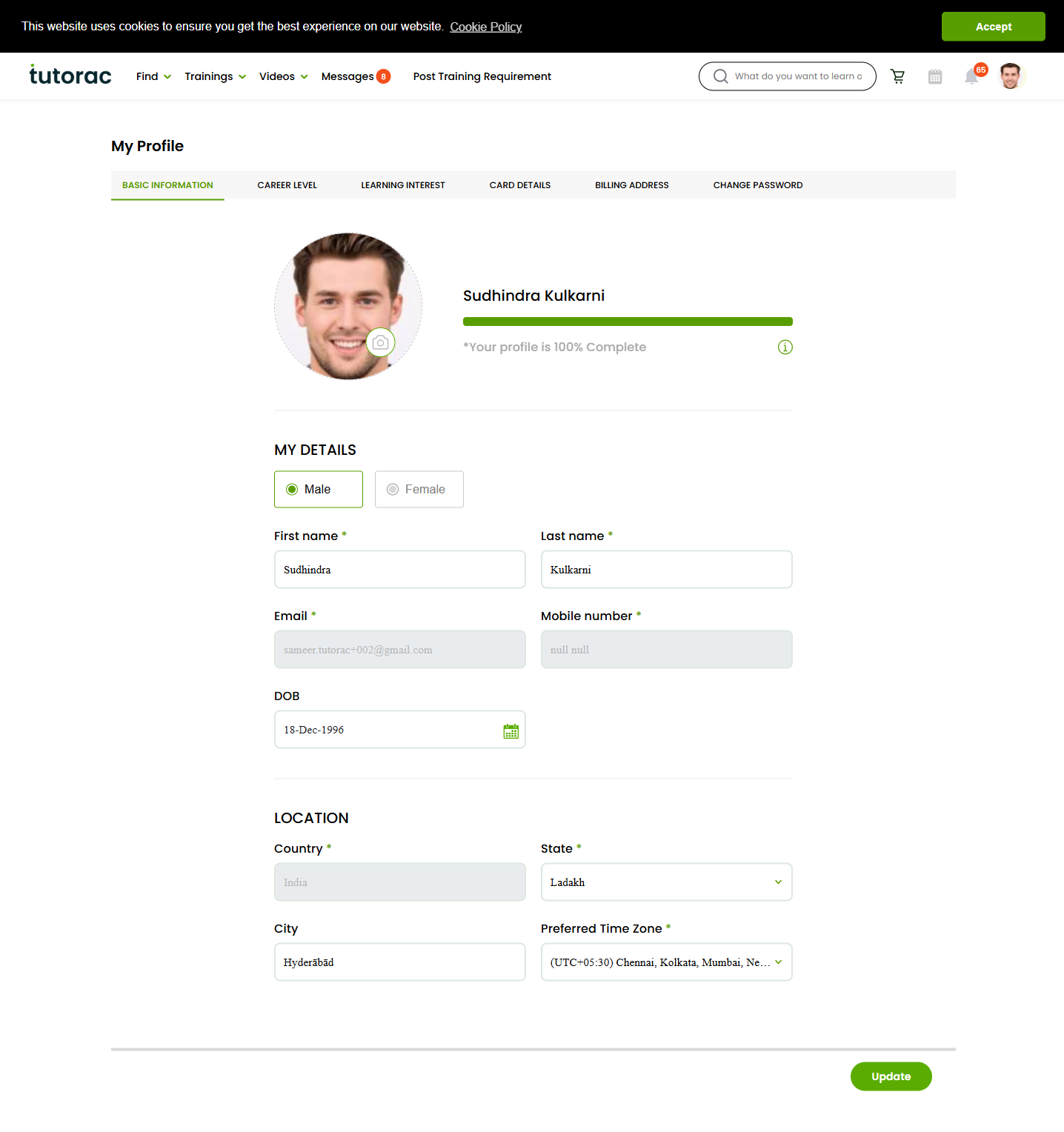
    • Your profile details (name, email, phone, DOB) have been changed without you doing it.
    • Sessions appear on devices or locations you don’t recognise.
    • You can no longer sign in with your usual password.
    • Your Tutorac email starts bouncing or your recovery email has changed.

    Any one of these is enough to act on — you don’t need to be certain.

    Step 1 — Change your Tutorac password immediately

    If you can still sign in, go to Profile → CHANGE PASSWORD and set a brand-new password — one you haven’t used anywhere else. This will sign the intruder out of any active session.

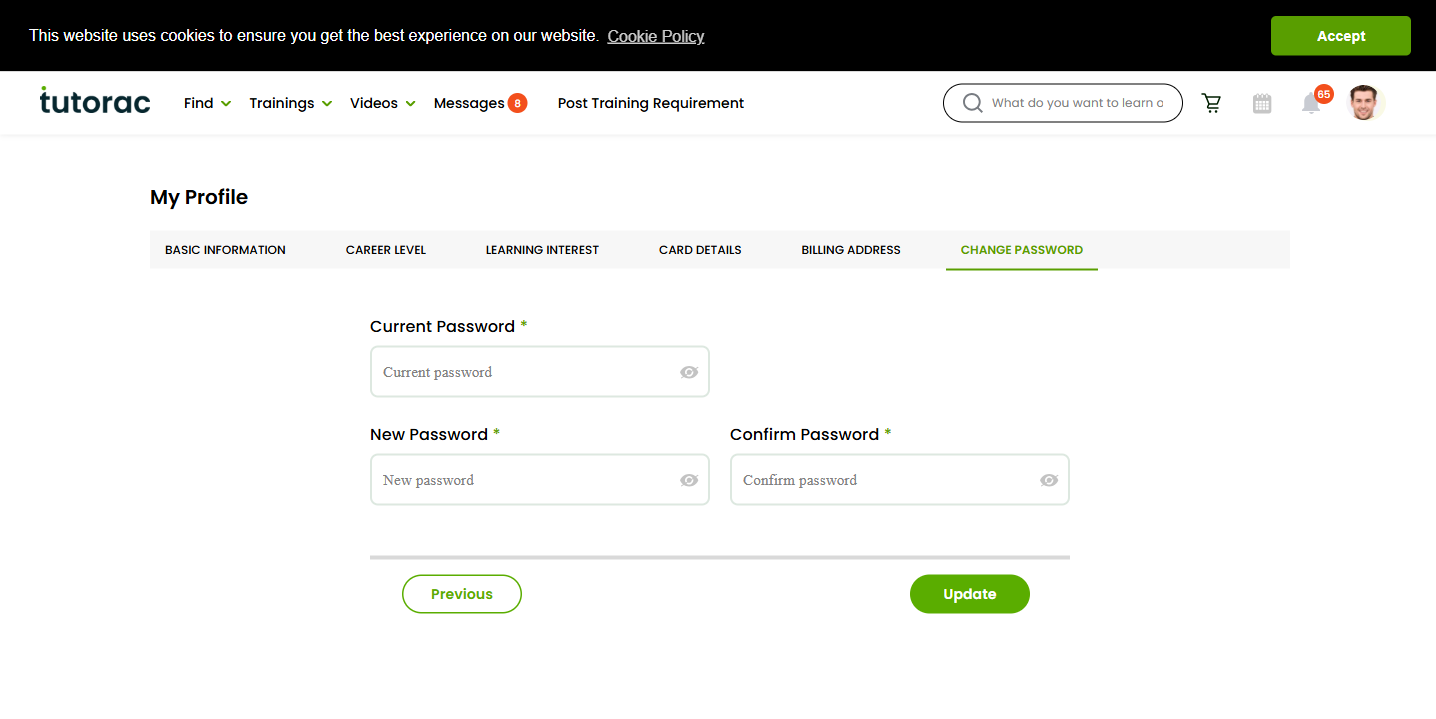
    Tutorac Change Password page \u2014 the fastest way to lock an attacker out.

    If you can’t sign in (the attacker already changed the password), go to tutorac.com/forgot-password and reset via your email. If the attacker has also changed the email on file, jump straight to Step 4 and contact Tutorac Support — they can verify your identity through other means.

    Full instructions: How to change your password on Tutorac.

    Step 2 — Secure the email on the account

    If your Tutorac password was guessed because of a leak elsewhere, the email account that received the leak (or the one you signed up to Tutorac with) is likely at risk too.

    • Change the password on the email account itself.
    • Turn on 2FA on the email provider.
    • Check that no forwarding rules / auto-replies have been added without your knowledge — attackers use those to silently siphon your future mail.
    • Check the email’s “recent activity” / “last sign-in” page for unfamiliar devices.

    Step 3 — Review activity

    Once you’re back in control of the account, do a quick audit:

    • Notifications — scroll back; anything you didn’t do?
    • Training Batches — are there any active batches you don’t recognise?
    • Sent / Received Contracts — any contract you didn’t initiate or accept?
    • Payment cards on file (Profile → Card Details) — remove any you don’t recognise.
    • Billing address — make sure it’s yours.
    • Profile info — name, email, phone, DOB — reset anything that’s been changed.
    • Recent payments — flag anything you didn’t authorise.

    Document what you find (screenshots, timestamps) before changing anything — this is useful evidence for both Tutorac Support and your bank if money was involved.

    Step 4 — Contact Tutorac Support

    Reach out via the Contact Us page or the Tutorac Support email. Give them:

    • Your account email and (if you remember) the rough sign-up date.
    • What made you suspect a compromise (the signal from the warning-signs list).
    • What unauthorised actions / contracts / payments you found.
    • What you’ve already done (password change, email security, etc.).
    • Whether you still have access to the account or are locked out.

    Tutorac Support can:

    • Lock the account from further sign-ins while investigation continues.
    • Pause unauthorised contracts or in-flight milestone payments.
    • Help recover access if the attacker has changed the email.
    • Investigate the tutor side if a contract was forged in your name.

    If unauthorised money has already left your card, contact your bank in parallel — chargeback windows are time-limited and your bank’s side moves independently of Tutorac’s side.

    Preventing it from happening again

    • Set a strong, unique Tutorac password (no reuse from any other site).
    • Strengthen the email account — long unique password + 2FA.
    • Use a password manager so future passwords are unique by default.
    • Never share OTPs, even with someone claiming to be Tutorac.
    • Sign out from shared devices, and review the account once a week or so.
    • If a leak ever exposes your email + password combo (you may be alerted by Have I Been Pwned or similar), change your Tutorac password right away.

    The full habit list is in Account security best practices for Tutorac learners.

    FAQs

    An attacker accepted a contract using my account — am I liable for that payment?

    Report it to Tutorac Support and your bank as soon as possible. Tutorac can often pause the milestone payment if it’s still in escrow. For already-released payments, recovery depends on circumstances, evidence, and timing — act fast.

    I changed my password but the attacker came back the next day. What now?

    This usually means they still control your email (since they can reset the Tutorac password from there) or a device of yours is infected. Lock down the email first (Step 2), then run a malware scan on your phone / computer, then change the Tutorac password again.

    The attacker changed my email on the account — I can’t use forgot-password. Help?

    Contact Tutorac Support directly via the Contact Us page or by emailing Support from any email address you can prove is yours (e.g., the one previously associated with the account). Provide identifying details — account creation date, recent training batches, tutor names you worked with, last successful payment — so Tutorac can verify it’s really you and restore access.

    Is my data still safe on Tutorac after a compromise?

    Tutorac doesn’t store full card numbers (only tokens), and passwords are hashed, not stored in plain text. The risk is mainly from what an attacker could do while signed in — act on your behalf, change contact details, see payment history. Closing their access (password change + email lockdown) ends that risk.

    Should I delete my Tutorac account after a compromise?

    Usually no — once you’ve regained control and reviewed activity, the account is safe to continue using. Deleting is only necessary in extreme cases and you may lose access to training records, payment history, and ongoing batches. Talk to Tutorac Support before doing anything irreversible.


    Related articles

    Last updated: 29 May 2026

  • Account security best practices for Tutorac learners

    Your Tutorac account holds your contracts, payment history, training schedule, and personal information. Treating it like any other important account — banking, email, work — goes a long way. Here are the practical security habits worth keeping.

    In this article

    Use a strong, unique password

    • Length over complexity: 12+ characters beats 8 characters with weird symbols.
    • Unique to Tutorac. Don’t reuse the password from your email, your bank, or any other site. If any of those leak, your Tutorac account is exposed too.
    • Avoid obvious patterns: your name, birthdate, “Tutorac@123”, sequential numbers.
    • Use a password manager (1Password, Bitwarden, your browser’s built-in one). It generates a strong unique password and fills it for you — you only have to remember one master password.

    You can change your Tutorac password anytime under Profile → CHANGE PASSWORD. Full steps: How to change your password on Tutorac.

    Tutorac Change Password page with Current, New, and Confirm Password fields.

    Secure the email you signed up with

    Your email is the recovery key to your Tutorac account — password resets, billing receipts, and security alerts all go there. If that mailbox is compromised, your Tutorac account effectively is too.

    • Use a strong unique password on your email account itself.
    • Turn on two-factor authentication (2FA) on the email provider (Gmail, Outlook, etc.) if available.
    • Be wary of forwarding rules you didn’t set up — attackers sometimes silently forward your email elsewhere.

    Never share OTPs or codes

    Any one-time password (OTP) or verification code — sent by SMS, email, or an authenticator app — is for you only. Tutorac will never call, message, or email asking you to read an OTP back to them. Nor will any legitimate company.

    If you receive an OTP you didn’t request, it may mean someone is trying to access your account or password-reset flow. Don’t share it, don’t click any links in the same message, and consider changing your Tutorac password as a precaution.

    Recognise phishing

    Phishing is the most common way accounts get hijacked. Watch for:

    • Sender domain mismatch. A real Tutorac email comes from a tutorac.com address. tutorac-support.io, tutorac.help-mail.com, or any free-mail address claiming to be Tutorac is phishing.
    • Suspicious links. Hover over a link before clicking; if it points to tutoracc.com, tutorac.payments-now.net, or any URL that isn’t tutorac.com / tutorac.org, don’t click.
    • Urgent or threatening tone. “Your account will be deleted in 1 hour”, “Verify now or lose access”. Real account actions don’t happen on countdowns.
    • Requests to confirm password or card. Tutorac never emails asking you to type or send these details.
    • Attachments you didn’t expect. Don’t open them.

    When in doubt, ignore the email and sign in directly via your browser at tutorac.com (or tutorac.org for non-India accounts). Anything important will be visible inside your account — you don’t need the email’s link.

    What never to share with a tutor

    • Your Tutorac password (or password to any account).
    • OTPs or 2FA codes.
    • Full card number, CVV, expiry date.
    • Net-banking username / password / transaction PINs.
    • Government IDs (PAN / Aadhaar / SSN / passport) unless a verified, official Tutorac process requires it.
    • Remote-access invitations (TeamViewer, AnyDesk, etc.) — no legitimate tutor needs control of your computer to teach.

    Tutors don’t need any of these to teach you. If they ask, decline, end the conversation, and report them.

    Devices and public Wi-Fi

    • Sign out from shared devices (a friend’s laptop, a cyber-cafe, a hotel business centre).
    • Don’t save your password in someone else’s browser.
    • On public Wi-Fi (airports, cafes), prefer using mobile data or a trusted VPN for anything involving sign-in or payments.
    • Keep your OS and browser updated — security patches close known attack paths.

    Review your account regularly

    • Glance at your dashboard once a week — do you recognise every active batch and every recent payment?
    • Check the email associated with your account — is it still correct?
    • Open the Notifications page now and then — anything you didn’t expect?

    Catching anything off early makes recovery far easier than discovering it months later.

    FAQs

    Does Tutorac have two-factor authentication?

    Tutorac may use email-based or OTP-based verification on certain flows (sign-up, password reset). Strengthen the security around your email account too, since email is your recovery channel.

    I use Google / LinkedIn sign-in. Is that more secure than a password?

    Generally yes — especially if your Google or LinkedIn account has 2FA enabled. You inherit those providers’ security and don’t introduce a new password to guard. The trade-off is that if that provider account is lost, your Tutorac access is too.

    My phone was lost / sold. Should I do anything?

    Yes — from another device, sign in to Tutorac and change your password (this forces a sign-out on the lost phone). Also reset the password on the email account associated with Tutorac, and on any password manager.

    I got an SMS from “Tutorac” with a payment link. Should I pay?

    Almost certainly phishing. Tutorac payments only happen inside your Training Batch’s payment tab when you’re signed in via your browser. Ignore SMS links; sign in directly and check there.

    How do I know if my account has been accessed by someone else?

    Common signals: notifications you didn’t generate, contracts or batches you didn’t accept, password changes you didn’t make, profile fields you didn’t update. If you see any of these, go to the next article: What to do if you suspect your account is compromised.


    Related articles

    Last updated: 29 May 2026

  • How to report a tutor or content issue on Tutorac

    If a tutor pushes you off-platform, behaves inappropriately, sends spam, or anything else feels wrong, Tutorac wants to know. Reports help Tutorac investigate and act against accounts that break the rules — protecting you and other learners.

    In this article

    When to report

    Report a tutor (or any content on Tutorac) when any of the following happens:

    • The tutor asks you to pay outside Tutorac (UPI, bank transfer, wallet, crypto, gift cards, etc.).
    • The tutor pressures you to move chats to WhatsApp / Telegram / personal email.
    • The tutor asks for sensitive information they shouldn’t need (your Tutorac password, full card number, OTP, banking credentials).
    • The profile, description, or training content includes misleading credentials, plagiarised material, hate speech, harassment, sexual content, or anything that violates the Tutorac User Agreement.
    • The tutor doesn’t show up for paid sessions repeatedly, or stops responding entirely after a milestone is paid.
    • You suspect the tutor account is impersonating someone else.
    • You receive an email or SMS claiming to be from Tutorac but the link or sender looks suspicious (phishing).
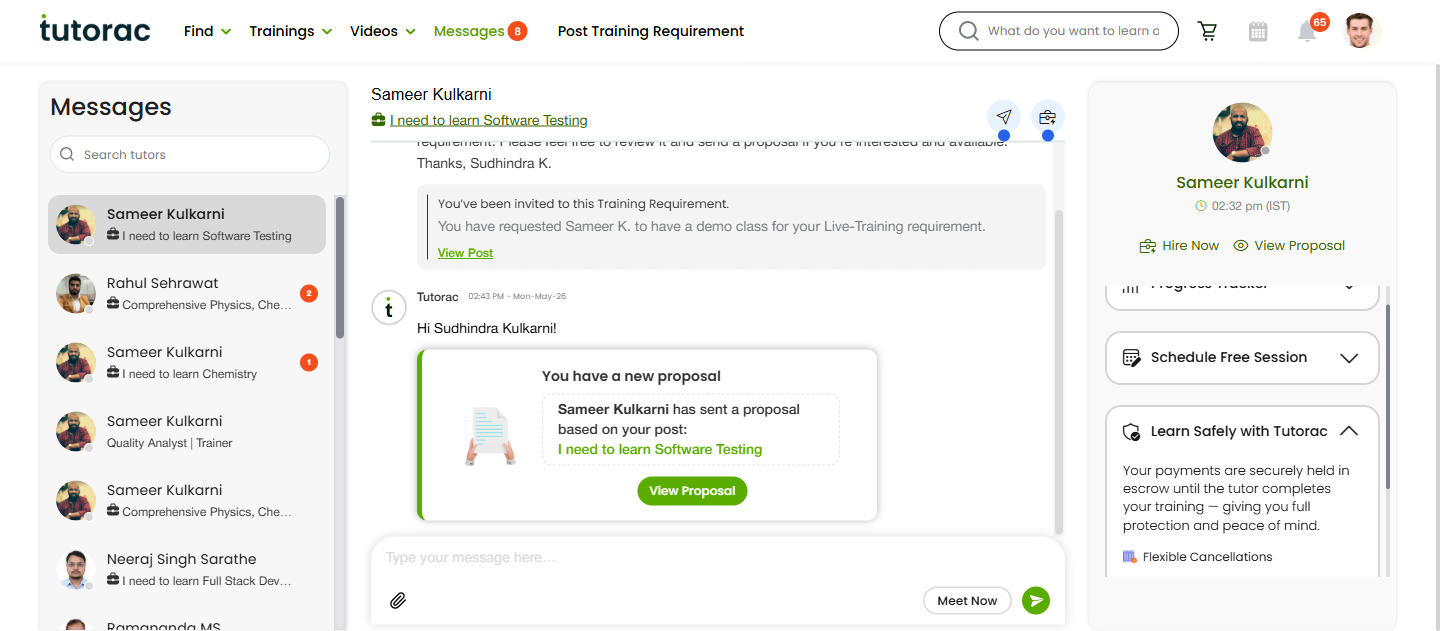
    Learn Safely with Tutorac safety panel reminding learners to communicate and pay through Tutorac.

    How to report

    The most reliable channel is Tutorac Support. Reach out via:

    • The Contact Us page on tutorac.com.
    • The official Tutorac Support email address listed on the Help Center.
    • From within the platform — many flows surface a Support link from the avatar menu / footer.

    If you’re unsure where to send a report, use the Contact Us form — Support will route it internally.

    What to include in your report

    Make the report easy to act on. Include:

    • Tutor name and profile URL — copy from the address bar when you’re on the tutor’s profile.
    • Training batch name and contract ID, if the issue is in an active engagement.
    • What happened, in 3–5 short paragraphs. Stick to facts and times.
    • Screenshots of the relevant chat messages, emails, payment requests, etc.
    • Dates and times of the incidents.
    • What you’ve already tried — e.g., asked them politely to stay on-platform, refused the off-platform payment.
    • What outcome you want — refund, account review, contract cancellation, just a record on file, etc.

    Don’t share sensitive financial data (full card number, CVV, OTP, banking password) in the report — Tutorac Support never needs these to investigate.

    What happens after you report

    • Tutorac Support acknowledges the report and assigns it to the relevant team.
    • They review the evidence and may follow up with you for clarification.
    • If the report concerns an active contract or paid milestone, Tutorac may pause the related transaction while investigating.
    • Action against the tutor can range from a warning, to suspension, to permanent removal from the platform, depending on severity.
    • You’ll be updated on the resolution where appropriate. Some internal details may not be shared for privacy reasons.

    Confidentiality and retaliation

    • Reports are treated confidentially. Tutorac doesn’t forward your message verbatim to the tutor.
    • Retaliation by a reported tutor (negative reviews, harassment, public posts) is itself a violation and can be reported too.
    • If you ever feel unsafe, contact Tutorac Support immediately and, if appropriate, your local authorities.

    FAQs

    Will the tutor know I reported them?

    Tutorac doesn’t reveal who reported a tutor. If the report leads to action against the tutor (warning, suspension), they may guess based on context, but Tutorac itself won’t name you.

    Can I report and continue training with the same tutor?

    Yes — reporting doesn’t automatically cancel your contract. If you want to continue while the review happens, you can. If you’d rather cancel, follow the cancellation flow — Tutorac applies the standard refund split per the User Agreement.

    How long do investigations take?

    Simple cases (clear off-platform payment requests with screenshots) resolve within a few business days. Complex cases involving disputed facts or active contracts can take longer.

    I reported but nothing visibly happened — was it ignored?

    Not necessarily. Tutorac handles enforcement privately for legal reasons; you may not see the outcome publicly. Follow up with Support if you need confirmation that the report was reviewed.

    What about reviews — can I just leave a negative review instead?

    Reviews and reports serve different purposes. A negative review warns other learners; a report triggers internal investigation and possible action against the account. For policy violations (especially safety / payment issues), file a report — reviews alone don’t lead to enforcement.


    Related articles

    Last updated: 29 May 2026

  • Avoid scams: always communicate and pay through Tutorac

    Tutorac’s safety guarantees — escrow, refunds, dispute resolution — only work for activity that happens on the platform. The moment money or important conversations move off Tutorac, every protection is gone. This guide explains why, the most common scam patterns to watch for, and what to do if a tutor pushes you off-platform.

    In this article

    Why off-platform = no protection

    Tutorac Payment Protection covers payments made through Tutorac and conversations held on Tutorac Messages. If you pay via UPI, bank transfer, wallet, or any other channel directly to a tutor, Tutorac has:

    • No record of the transaction.
    • No way to refund the money.
    • No leverage with the tutor — they’ve already been paid in full.
    • No basis for a dispute or chargeback.

    Same goes for chats: a conversation on WhatsApp, Telegram, personal email, or any external app is invisible to Tutorac. If the tutor later denies promises or refuses to deliver, Tutorac can only see what happened in Tutorac Messages. Without that evidence, there’s no case to make.

    Learn Safely with Tutorac safety panel showing the scam warning at the bottom.

    Common scam patterns

    These are the patterns to recognise — not all are obvious malice; sometimes a well-meaning tutor just wants to skip the platform. The risk to you is the same either way.

    • “Pay directly and I’ll give you a discount” — the “saving” vanishes the moment something goes wrong. There’s already zero platform fee for learners.
    • UPI / bank account / GPay request in the chat — legitimate Tutorac payments never happen this way.
    • Gift cards / crypto / wire transfers — classic scam channels because they’re irreversible. No legitimate tutor will ask for these.
    • “Move our chat to WhatsApp / Telegram” — if they want a back-channel, ask why. Promises made there can’t be enforced by Tutorac.
    • Fake invoices / payment links sent over email claiming to be from Tutorac — only pay via the Tutorac batch payment tab. Tutorac doesn’t email payment links.
    • Urgency tactics — “Pay now, the seat is closing”, “the discount expires in an hour”. Real Tutorac contracts don’t expire in minutes.
    • Tutor asks for personal financial info — card numbers, OTPs, banking passwords, your Tutorac password. Never share any of these, with anyone, ever.
    • Free demo extending into “just a couple more free sessions” — once the contract is set up, all paid work goes through milestones. Endless free extensions are a red flag.

    Red-flag phrases

    If a tutor sends any of these, treat it as a clear signal something’s off:

    • “Tutorac takes too much commission, just pay me directly.”
    • “I’ll give you my UPI / IBAN / wallet for the payment.”
    • “Let’s continue on WhatsApp, it’s easier.”
    • “Send the money first, I’ll create the contract after.”
    • “Send your card details / OTP / Tutorac password so I can set it up for you.”
    • “Pay in cryptocurrency / via gift card to lock the discount.”

    What to do if a tutor asks you off-platform

    1. Decline politely but firmly, in Tutorac Messages: “I’d like to keep everything on Tutorac for safety. Please send a contract through the platform.”
    2. Do not share any payment, banking, or password info, even “just to test”.
    3. Screenshot the chat if anything pressured or suspicious was said — useful evidence later.
    4. Report the tutor to Tutorac Support with the screenshot and a short description.
    5. If you’re uncomfortable continuing, find a different tutor. The Find Tutors page has many options for any skill.

    There’s nothing to save by going off-platform

    A common pitch is “going direct saves you the platform fee”. This is misleading on Tutorac:

    • Learners pay zero platform fee. The amount on the contract is the entire amount you owe.
    • The demo is already free. You don’t need to negotiate around it.
    • Refunds, escrow, dispute resolution — these are valuable and they vanish off-platform. The risk vastly outweighs any “discount”.

    If the price is the issue, negotiate on the contract, not around the platform. Tutors can offer Tutorac-side discounts via lower milestone amounts when sending the offer.

    FAQs

    A tutor I trust says off-platform is fine. Why is Tutorac warning me?

    Tutorac isn’t doubting the tutor — it’s protecting you. Even genuine tutors don’t have escrow, refund flows, or dispute systems on UPI / WhatsApp. If anything goes wrong (illness, schedule change, a misunderstanding), you have no fallback. Keep it on-platform and the tutor gets paid the same.

    I already paid a tutor outside Tutorac. Can Tutorac help me get it back?

    Unfortunately no — Tutorac can’t access or refund money that didn’t go through it. Report the tutor so Tutorac can review their account, but the only path for the lost money is directly with your bank (chargeback) or local consumer-protection authorities. Don’t pay more in the hope of recovering the original payment.

    Is it OK to add a tutor on LinkedIn or follow their YouTube?

    Yes — following public content is fine. The line is around money and training-related promises: those have to be on Tutorac to be protected. Casual professional follow-up isn’t the issue.

    My tutor wants to email me PDFs and resources directly. Is that off-platform?

    Use Tutorac’s in-batch Drive for course materials so they’re archived against the contract. One-off emails are fine if it’s a quick share, but anything you might need to reference in a dispute should go through the platform.

    A site claiming to be Tutorac sent me a payment link. Is it real?

    Almost certainly phishing. The only place to make a Tutorac payment is from inside your batch’s payment tab, while signed in to tutorac.com (or tutorac.org for non-India accounts). Never pay from a link in an email or SMS without first signing in directly via your browser and confirming the payment lives in your batch.


    Related articles

    Last updated: 29 May 2026

  • Tutorac Payment Protection: how Tutorac keeps you safe

    When you hire a tutor on Tutorac you’re trusting a stranger with both your money and your time. Tutorac Payment Protection is a set of platform guarantees designed to make that trust safe — escrow, refunds, demos, and zero platform fees. This article walks through what each piece means and where to see it in the app.

    In this article

    The “Learn Safely with Tutorac” panel

    Open any chat thread in Messages. On the right side of the conversation you’ll see a panel titled Learn Safely with Tutorac. Click the header to expand it — it summarises Tutorac’s payment protection in four bullet points and one important reminder about scams.

    Learn Safely with Tutorac safety panel in chat, expanded showing escrow protection and four features.

    The panel reads:

    Your payments are securely held in escrow until the tutor completes your training — giving you full protection and peace of mind.

    • Flexible Cancellations  • Instant Refunds  • Zero Platform Fees  • Try Before You Hire

    Avoid scams — always communicate and pay through Tutorac.

    Escrow: payments held until training is done

    The core of Tutorac Payment Protection is escrow. When you pay for a milestone, Tutorac holds the money in a neutral account — it doesn’t go to the tutor straight away. The tutor sees that you’ve paid, so they know it’s safe to teach. Funds only reach the tutor after you click Release Payment at the end of the milestone (or after an automatic release window if you forget).

    This protects you from upfront-only scams and protects the tutor from teaching without payment. Read the full mechanics in How payments work on Tutorac.

    Flexible cancellations

    You can cancel a milestone partway through if the tutor isn’t a fit, doesn’t deliver, or your circumstances change. The escrowed amount is then split between you and the tutor based on the percentage of the milestone already completed, per the rules in the Tutorac User Agreement (“Cancellation by Learner” / “Cancellation by Tutor”). The earlier you cancel, the more you get back — a very early cancel typically returns most or all of the milestone amount.

    Instant refunds

    When a refund is owed (failed transaction, approved cancellation, tutor-side cancel), Tutorac initiates it within 1–2 business days. The actual credit on your bank statement depends on your card issuer (typically 5–10 business days). Refunds always go back to the original payment method in the original currency — ₹ INR for India accounts, $ USD for accounts elsewhere.

    Zero platform fees

    Tutorac advertises zero platform fee for learners. The amount shown on the contract is what you pay — nothing extra is added at checkout for using the platform. The tutor’s side handles its own fees with Tutorac, so the price you see is the price you owe.

    Try before you hire (free demo)

    Before you commit any money you can book a free 30-minute demo session with most tutors. Open a tutor’s profile from Find Tutors and click Book Free Session — you can check teaching style, pace, and communication before paying for anything. If they’re not a fit, simply don’t hire them.

    Always pay and communicate through Tutorac

    None of these protections apply if you pay or talk to a tutor outside Tutorac. Off-platform payments are unrecoverable — Tutorac cannot mediate, refund, or dispute money that didn’t go through it. If anyone asks you to pay via UPI directly, bank transfer, gift cards, crypto, or any external wallet — that’s a red flag. Stay on platform.

    Same with conversations: use Tutorac Messages so disputes have a record. WhatsApp / Telegram / personal email chats can’t be referenced in a Tutorac dispute.

    FAQs

    Is Tutorac Payment Protection automatic?

    Yes — it applies to every milestone payment you make on Tutorac. You don’t opt in or buy anything extra; it’s built into how payments work.

    Does Payment Protection cover the demo session?

    The 30-minute demo is free, so there’s nothing to protect. Payment Protection kicks in the moment you pay for your first milestone.

    What if the tutor and I agreed on something special that isn’t in the contract?

    If it’s not on the contract, Tutorac can’t enforce it. Get any custom arrangement (extra sessions, custom assignment review, post-training mentoring) written into the contract milestones before you pay.

    A tutor said off-platform is cheaper because there’s no platform fee. Should I do it?

    No. There’s already zero platform fee for learners on Tutorac — the tutor’s pitch is misleading. Worse, going off-platform means zero escrow, zero refund rights, and zero dispute resolution. The “savings” vanish the moment something goes wrong.

    How do I know my payment is actually in escrow?

    Open your Training Batch → payment tab. A paid milestone that hasn’t been released shows as “in escrow” (or equivalent), and the Release Payment button is active. Once you click Release, the status updates to released / completed.


    Related articles

    Last updated: 29 May 2026