Tutorac shows every price in your account’s local currency and applies the right tax for your region. This article explains how that works, what taxes you may see at checkout, and how to download your tax invoice.
Your account currency is set when you sign up, based on the country you select. India accounts use Indian Rupees (₹ INR). Accounts from all other countries use US Dollars ($ USD). Currency cannot be switched after signup — it is tied to your billing region.
Taxes applied at checkout
Tax is calculated based on your billing address and shown as a separate line item before you pay. You will see the tutor’s fee, the Tutorac service fee, and the applicable tax broken out on the payment screen and on every invoice.
India accounts (₹ INR + GST)
If your billing address is in India, all prices show in ₹ INR. GST at 18% is added to the Tutorac service fee at the time of milestone funding. The GST amount appears as a separate line on your invoice, with Tutorac’s GSTIN, so you can claim it as input tax credit where eligible.
US and other regions ($ USD + local tax)
If your billing address is in the US or any country outside India, prices show in $ USD. Local sales tax or VAT is added at the time of payment when your jurisdiction requires it. The amount and rate are calculated automatically from your billing address.
FX conversion when paying from a different country
Tutorac charges your card in your account currency only. If your card is issued in a different currency, your bank or card network handles the foreign exchange conversion. Tutorac does not add an FX markup. Any conversion fee you see on your bank statement is set by your bank.
Tax invoice and receipts
You can download your tax invoice from Profile > Billing Address > Invoices, or from the Payment tab inside any batch. Each invoice lists the invoice number, batch ID, milestone reference, fee breakdown, tax, currency, and payment method. India accounts get a GST-compliant invoice with Tutorac’s GSTIN.
FAQs
Can I switch my account from INR to USD?
No. Currency is tied to your signup country and cannot be changed. If you have moved, contact support — in most cases you will need a new account with your new billing address.
Why is GST only on the service fee, not the tutor’s fee?
GST applies to Tutorac’s platform service in India. The tutor’s fee goes directly to the tutor and is handled separately for tax purposes.
I’m in the US — why don’t I see sales tax on my invoice?
Sales tax depends on your state. Some US states do not require sales tax on digital services. If your state requires it, the tax appears as a separate line at checkout.
Will my bank charge me extra for paying in USD/INR?
If your card is in a different currency, your bank may charge an FX fee. This is set by your bank, not Tutorac. Check with your card issuer for exact rates.
How do I update my billing address?
Go to Profile > Billing Address and update your details. Future invoices will use the new address. Existing invoices keep the address you had at the time of payment.
Tutorac operates across multiple regions, and the currency, taxes, and exact charges you see depend on where your account is based. Here’s how Tutorac handles currency, what taxes get added on top of milestone amounts, and how foreign-exchange is handled when your card and account currencies differ.
India accounts — everything is shown and charged in ₹ INR.
All other countries — shown and charged in $ USD.
Your account currency is locked at signup, based on the country you sign up from. You can’t switch currencies later by changing your address.
Tutors set their rates in their own account currency. If a learner and tutor are in different regions, Tutorac shows you the amount in your currency throughout the hire flow.
Taxes for India accounts (GST)
India accounts pay 18% GST on top of the milestone amount at the time of payment, in line with Indian tax law for online education services.
GST is shown as a separate line item on your invoice, never bundled inside the milestone price.
If you have a GSTIN (business GST registration number), add it under Profile > Billing Address before you fund. Your GSTIN will appear on the invoice and is required to claim input tax credit.
GST is collected by Tutorac and remitted directly to the Indian government — it’s not part of the tutor’s earnings.
Taxes for accounts outside India
The applicable sales tax, VAT, or GST is determined by your billing jurisdiction.
If your jurisdiction requires Tutorac to collect tax (e.g., certain US states, EU VAT in some scenarios, Australian GST), it’s shown clearly at checkout and on your receipt.
If your jurisdiction doesn’t require collection (most US states for individual learners, many other regions), no tax is added — you pay the milestone amount and nothing more.
You’re responsible for any local tax obligations you may have on educational services in your own country if Tutorac doesn’t collect for that jurisdiction.
Foreign-exchange conversion
If your card is denominated in a currency different from your account currency (e.g., an INR card on a USD Tutorac account, or vice versa), your bank or card network handles conversion at their rate.
Tutorac doesn’t add a markup on top of FX. The amount you authorize is exactly the milestone + tax in your account currency.
Your card may add a foreign-transaction fee on top of the FX conversion — that’s between you and your bank, not a Tutorac fee.
For best rates, paying with a card in the same currency as your Tutorac account is usually cheapest.
Tax invoices & receipts
Every payment generates a receipt, emailed to you immediately.
India accounts also receive a GST tax invoice with your GSTIN (if added) for tax-credit purposes.
If you need a corrected invoice (e.g., GSTIN added retroactively, billing-address fix), contact Support within 30 days of payment.
FAQs
I moved from India to the US. Can I switch my account currency to USD?
Account currency is fixed at signup and can’t be changed by editing your address. If you want a USD account, create a new account from a US billing address — you’ll keep your old account’s history but new hires can be in USD.
Why does GST apply to me — isn’t education tax-free in India?
GST applies to online education services delivered by private providers (which Tutorac is). Traditional school/college fees with formal accreditation are typically exempt; private online tutoring is not, under Indian tax law.
Can I get an exchange rate guarantee?
No — FX rates change constantly and are set by your bank, not Tutorac. The price you see in your account currency is fixed; the equivalent in your card currency depends on the rate the day you pay.
A common question when you see a tutor’s rate or get a milestone amount: is there extra on top? On Tutorac, the answer for learners is simple — you pay the agreed amount and nothing more. The service fee that runs the platform is taken from the tutor’s earnings, not added to your bill. Here’s the full picture.
For a live training, you pay the milestone amount shown in the hire form — nothing more.
If the milestone says ₹5,000 (or $60), that is the amount that gets charged to your card or UPI.
There is no separate “learner service fee” added at checkout.
Applicable taxes (e.g., GST in India) are collected at payment time and shown clearly on your receipt.
Where the service fee comes in (tutor’s side)
Tutorac runs the platform, the escrow, the dispute resolution, the Drive, the messaging, and everything else — that costs money to run. The service fee is what keeps it going. But on Tutorac, that fee is paid by the tutor out of their earnings, not by you:
When you click Release Payment on a milestone, Tutorac takes its service fee from the milestone amount before transferring the rest to the tutor’s payout balance.
The tutor sees both the gross (what you paid) and the net (what they receive) in their own dashboard.
The exact percentage is in the tutor’s agreement. As a learner, you don’t need to track it — it doesn’t affect what you pay.
Payment processing & taxes
Payment processor charges — absorbed by Tutorac. The amount you fund doesn’t change because you used a credit card vs UPI vs net banking.
India accounts — GST is added on top of the milestone amount at payment time per Indian tax law and shown on your invoice.
US / other accounts — sales tax/VAT applies based on your jurisdiction; if applicable, it’s shown at checkout and on the invoice.
Foreign-exchange conversion — if your card’s currency differs from your account currency (e.g., USD card on an INR account), your bank/network handles conversion at their rate. Tutorac doesn’t mark this up.
Video Courses pricing
Video courses (pre-recorded) work the same way — the listed price is what you pay, plus any applicable tax.
The tutor’s share is paid out of the listed price minus the service fee, just like a milestone release.
Example breakdown
India learner hiring at ₹5,000 / milestone (GST 18%):
You see at checkout: ₹5,000 milestone + ₹900 GST = ₹5,900 total charge.
Tutorac holds ₹5,000 in escrow; the GST is remitted to the tax authority.
When you release the milestone, the tutor receives ₹5,000 minus their service fee (paid out of their share).
Your card statement shows ₹5,900; your invoice shows the GST split out.
US learner hiring at $60 / milestone:
You see at checkout: $60 milestone + any applicable state sales tax = total charge.
Tutorac holds the $60 milestone; the tax (if any) goes to the relevant authority.
When you release, the tutor receives $60 minus their service fee.
FAQs
Do I pay any fee on refunds?
No — refunds processed through Tutorac don’t charge you anything additional. Your bank may take a day or two longer than the deposit to credit the refund, but the amount they credit is the full eligible refund per the cancellation policy.
Why are some tutors’ profile rates lower than their final hire amounts?
Profile rates are usually for hourly work — if your scope is custom (specific deliverables, certifications, bigger commitment), tutors often quote a different total. This isn’t a hidden fee; it’s a negotiated price.
Can the tutor pass their service fee onto me by raising their rate?
Effectively, the tutor sets a rate that works for them after fees — just like any service provider on any platform. From your side, the amount is the amount. The structural protection is that you can compare tutors and rates openly.
When you’re satisfied with what the tutor delivered for a milestone, you click Release Payment to move the money out of escrow to them. It’s a one-click action, but it’s also irreversible — once released, the money is gone from your refund-able balance. Here’s how to do it confidently and what to check first.
The tutor has finished the scope of that milestone (completion percentage is at 100%).
You’ve reviewed what was delivered — sessions attended, assignments graded, code working, etc.
You’re comfortable that the next milestone’s scope is clear (so releasing this one doesn’t feel like you’ve closed off a discussion).
You don’t have to release the moment a milestone hits 100% — you can take a day or two to review. There’s no penalty for waiting a reasonable amount of time. But sitting on a completed milestone for weeks isn’t fair to the tutor and can be flagged.
How to release a payment
Go to Trainings > My Training Batches and open the batch.
Click the Payment tab in the secondary nav.
Find the milestone you want to release. It should show Payment Status: Funded and the completion percentage at 100% (or close to it — it’s your call when to release).
Click the Release Payment button on that milestone’s card.
Confirm in the dialog that asks “Are you sure you want to release this payment?”
That’s it — the release is instant from your side. The tutor sees the funds reflected in their payout balance within a few minutes.
What happens after you release
The milestone’s Payment Status flips from Funded to Released.
The amount (minus Tutorac’s service fee, deducted on the tutor’s side) moves to the tutor’s payout balance.
The next milestone in the batch (if any) becomes the active milestone — the tutor can start work, and you may need to fund it if you hadn’t funded all milestones upfront.
A receipt is emailed to you with the milestone reference, amount, and date.
The action is permanent — you cannot reverse a release on your own. (Tutorac Support can intervene only in cases of fraud or clear misrepresentation by the tutor.)
Pre-release checklist
Before clicking Release Payment, take 60 seconds to confirm:
All sessions or deliverables for this milestone are actually done.
Any homework, code, or materials the tutor was supposed to share are in the batch’s Drive or Messages.
Recordings (if your tutor records sessions) are accessible.
You don’t have an open dispute about quality or scope for this milestone.
You’re fine with the next milestone’s scope and have funded it (or plan to).
When NOT to release
You have open quality concerns. Raise them on Messages first. If unresolved, you can cancel the batch — once you release, you forfeit refund eligibility on that milestone.
The tutor is asking you to release before completing the milestone. That defeats the entire escrow protection — politely decline and release once the work is actually done.
The completion percentage is below 100% and there’s no agreement to close the milestone short. Wait for completion or formally adjust scope.
No — release is all-or-nothing for a given milestone. If you want to pay for only part of the work, ask the tutor to revise the milestone scope/amount and resubmit it (or split it into two milestones).
What if I forget to release after the tutor finishes?
The tutor can request release on Messages. If you don’t respond for a long time after the milestone is at 100%, Tutorac may auto-release it after a notice period — that’s the dormant-learner side of the dormancy policy. See dormancy policy.
Can I get a released payment back if the tutor was actually bad?
Generally no — that’s the design of the escrow system. The window to challenge quality is before you release. If you released and then discovered something serious (e.g., the tutor lied about credentials, content was plagiarised), contact Support; they may intervene in clear-cut cases.
When you click Hire Now on a tutor’s profile, Tutorac asks you to propose the structure of the training — including how to split the total cost into milestones. Getting this right at the start protects you, keeps the tutor motivated, and saves a lot of back-and-forth later. Here’s how to do it.
Milestones are defined at the moment of hire — they go into the offer the tutor reviews before accepting. The hire form is what you fill in after clicking Hire Now on a tutor profile.
Both you and the tutor see the full milestone structure before the tutor accepts. If the tutor wants different milestones, they can counter-propose on Messages before accepting — once accepted, the structure is locked.
Filling out the hire form
The hire form (opened from the tutor’s Hire Now button) asks for:
Course title / topic — what you want to learn (e.g., “Python for data analysis”).
Course description — a few sentences on goals, your starting level, any deliverables.
Number of sessions & session duration — e.g., 12 sessions of 60 minutes.
Tutorac creates the Training Batch with the milestones you proposed.
You fund the first milestone immediately. The tutor sees it as Funded in their dashboard and starts work.
Subsequent milestones can be funded as you go — or all up-front, your choice.
Each milestone’s scope, amount, and status are visible on the batch’s Payment tab.
If you need to change milestone amounts or scope after acceptance, the tutor can propose a revised milestone on Messages and you fund it like a new one. Original milestones stay frozen.
FAQs
Can the tutor change milestone amounts before they accept?
Not from inside the offer — but they can ask you on Messages to revise it. You’d withdraw the original hire and resubmit with the agreed numbers.
Can I fund all milestones up-front?
Yes — many learners pay the full amount in one go for convenience. Tutorac still holds each milestone in escrow separately; the tutor only receives them as you release each.
What if I don’t know the scope clearly when I hire?
Book a free demo session with the tutor first — their profile usually has a Schedule 30-Min Free Session link. Use it to clarify scope, then come back to Hire Now with confidence.
A milestone is the basic unit of payment on Tutorac — a chunk of scope with its own amount, schedule, and status. Understanding how milestones flow through their lifecycle is the key to using Tutorac confidently: when to release payment, when to wait, what each status indicator means, and how the numbers tie back to refunds if things go sideways.
A milestone is one self-contained block of training with three things attached:
Scope — what the tutor will deliver (sessions, modules, deliverables).
Amount — how much you pay for that scope, in your account currency.
Status — where the milestone is in its lifecycle (more on this below).
You fund milestones one at a time (or all at once if you prefer). Money you fund goes into escrow with Tutorac — the tutor doesn’t receive it until you release it. That’s what makes refunds work even mid-training.
The milestone lifecycle
Every milestone moves through this flow:
Funded — you paid the milestone amount; Tutorac is holding it.
In progress — the tutor has started delivering the scope. Completion percentage starts moving up from 0%.
Completed — the tutor has finished the milestone’s scope (100% completion). The Release Payment button is now active.
Released — you clicked Release Payment. The amount (minus the tutor’s service fee) moves out of escrow to the tutor.
Two off-ramps can occur instead of Released:
Cancelled — you (or the tutor) cancelled the class. The refund is calculated using the active milestone’s completion percentage at the moment of cancellation. See how to cancel a hire or batch.
Refunded — the cancellation has been processed and the agreed portion of funds returned to your original payment method.
The status indicators
On the batch’s Payment tab, each milestone card shows three pieces of state. Read them together to know what’s going on:
Payment Status — Funded (in escrow), Released (paid to tutor), or Refunded (returned to you).
Milestone Status — Not started, In progress, Completed, or Cancelled.
Completion percentage — the progress bar on the card (0% → 100%).
Common combinations and what they mean:
Funded + Not started + 0% — tutor hasn’t started this milestone yet.
Funded + In progress + 40% — tutor is mid-way through; don’t release yet.
Released + Completed + 100% — you released; the tutor has been paid; milestone is closed.
Refunded + Cancelled + 0% — the class was cancelled at 0% completion and you got a full refund.
Completion percentage explained
The completion percentage isn’t something the tutor types in arbitrarily. It’s tied to the actual scope:
For session-based milestones (e.g., 10 sessions of 1 hr), each delivered session typically counts as 10%.
For deliverable-based milestones (e.g., 3 assignments), each delivered piece counts proportionally.
Sessions you missed (not the tutor) aren’t counted — the tutor was available, so they count as delivered for completion purposes.
Sessions the tutor missed (no-shows) don’t count toward completion either — see dormancy policy.
This number drives the cancellation refund bracket. If you’re uncertain, check the milestone activity log on the Payment tab to see what’s being counted.
Single vs multi-milestone batches
A single-milestone batch behaves like a fixed-price training — the whole engagement is one milestone, released at the end.
A multi-milestone batch splits the training into 2+ chunks. Only one milestone is active at a time; the next unlocks only after you release the previous (or it’s explicitly opened by the tutor for a parallel scope).
Multi-milestone is generally safer for longer engagements — you keep more leverage and refund flexibility throughout the training. For short trainings, single-milestone is fine and simpler.
FAQs
Can a tutor change a milestone’s scope after I’ve funded it?
Not unilaterally. Scope can only change with your agreement on Messages. If a tutor is pushing for scope changes without you agreeing, that’s worth raising with Support.
What if a milestone is taking longer than expected?
That’s normal — milestones have scope, not a strict deadline. As long as the work is happening, it’s fine. Long stretches with no progress (no sessions, no Messages reply) tip into dormancy — see that policy.
Can I see how much I’ve paid across all milestones in a batch?
Yes — the Payment tab shows a summary at the top of the batch with total funded, total released, total refunded, and the in-escrow balance.
Tutorac supports a few different ways of paying for learning, and the one that applies to you depends on what you’re hiring — a live tutor, a recorded video course, or a custom training. This guide explains each pricing model, when it applies, and what you can expect to see at checkout.
Milestone-based — the whole training is split into chunks (milestones), and you fund and release each one separately. This is Tutorac’s default for live, custom trainings hired through Hire Now.
Fixed price — a single agreed amount for a whole training, paid up-front. Used mostly for short, well-defined courses.
Hourly rate — the tutor charges per hour of teaching; you pay weekly or per session depending on the agreement.
Whatever model is used, your money goes into escrow with Tutorac first — the tutor only receives funds when you (or the policy) release them. That’s what makes the refund system in cancellations and refunds work.
Milestone-based pricing (default for live tutors)
The total training cost is divided into 2 or more milestones, each with its own scope (e.g., “Module 1: Fundamentals” — ₹5,000 / $60) and an amount.
You fund the first milestone when the tutor accepts your hire. Tutorac holds it in escrow.
You click Release Payment when satisfied with a milestone — that funds the tutor and unlocks the next milestone.
If something goes wrong, the cancellation refund is calculated on the active milestone’s completion percentage. Future milestones you funded but haven’t started yet are refunded in full.
A single amount for the entire engagement, funded at the start.
Used by tutors who offer well-defined, short trainings (e.g., a 4-hour bootcamp).
Cancelling is treated as a single milestone — the same percentage-based refund bracket applies based on how much of the training has been delivered.
No mid-way release: payment moves to the tutor once you mark the training complete or the schedule ends without disputes.
Hourly-rate pricing
Tutor lists an hourly rate on their profile (e.g., ₹1,500/hr or $25/hr).
When you hire, you and the tutor agree on a session schedule and an estimate of total hours.
Hours are typically grouped into weekly milestones for funding/release rhythm — you don’t literally pay after every single session.
If the actual hours used differ from the estimate, the milestones can be adjusted on Messages and reflected in the batch.
Video Courses pricing
Pre-recorded courses sold at a fixed price on the tutor’s listing.
Paid up-front in full — there are no milestones for video courses.
Once purchased, you have access for the duration stated on the listing (often lifetime, sometimes time-bound).
Different refund rules apply — see the Video Courses section for details.
Who sets the price
Tutors set their own rates — Tutorac doesn’t fix prices.
Tutors can quote a different price for your specific hire than the one shown on their profile — that’s a negotiated rate, captured in the hire form.
You can negotiate before the tutor accepts — once accepted, the agreed amount and milestones are locked in.
India accounts are billed in ₹ INR; all other accounts in $ USD. The tutor sees the amount in their own account currency.
FAQs
Does Tutorac add fees on top of the price I see?
For learners, the amount you fund is the amount agreed in the hire — service fees are deducted on the tutor’s side from their earnings, not added on top of yours. See Tutorac service fees for the exact breakdown.
Can I negotiate the milestone amounts after hiring?
The original milestones are locked once the tutor accepts. To adjust scope or amounts mid-batch, discuss on Messages — the tutor can propose a revised milestone, which you fund separately.
Why do some tutors charge much more or much less than others?
Tutor rates reflect their experience, certifications, country, niche, and demand. Cheaper isn’t always worse — many highly capable tutors offer competitive intro rates.
Tutorac handles cancellations entirely inside the platform — there’s no Support ticket to raise. There are two flows depending on where you are in the process: Withdraw an offer the tutor hasn’t accepted yet (full refund), or Cancel class on a batch that’s already running (refund per the milestone-completion policy). This guide walks through both, screen by screen.
Tutorac splits cancellations into two distinct states, and the button you’ll see depends on which state your hire is in:
Tutor hasn’t accepted yet (status: Awaiting Approval) — you’ll see a Withdraw link on the contract details page. Withdrawing returns the full amount — nothing has started yet.
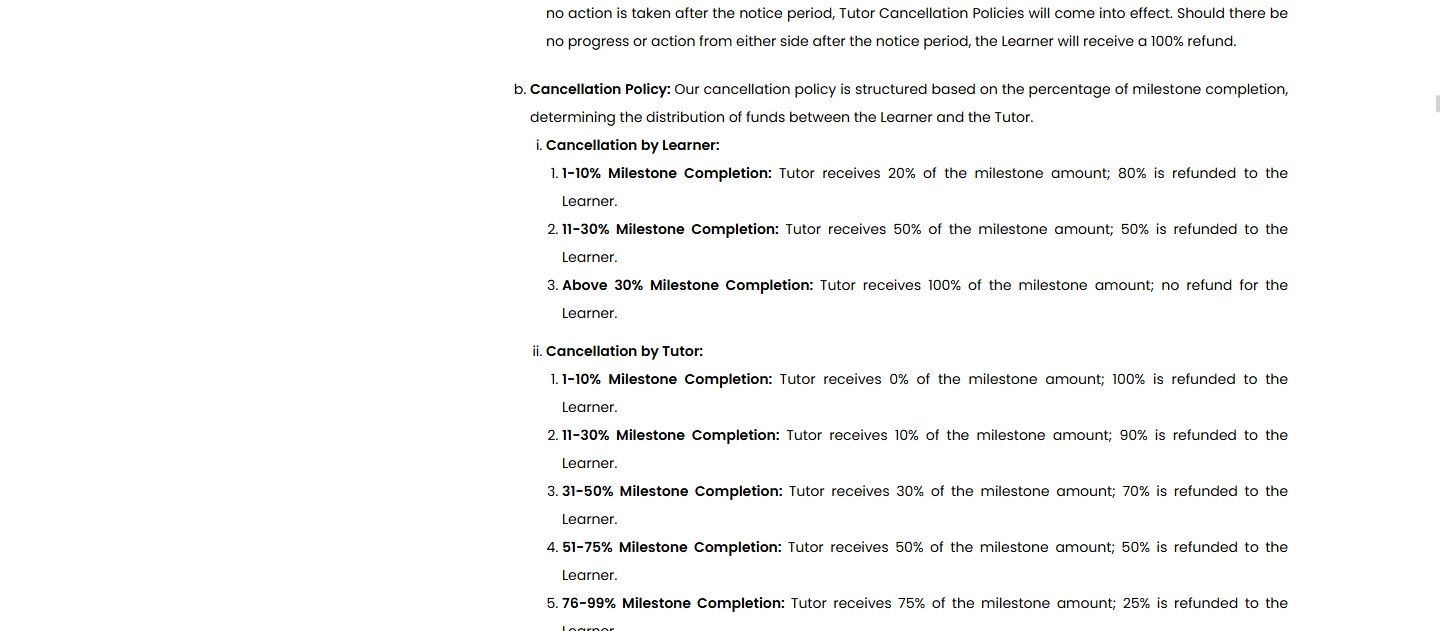
Tutor has accepted and the batch is running (status: Upcoming or Ongoing) — you’ll see a Cancel class link inside the batch’s Payment tab, next to the active milestone. The refund follows the milestone-completion-percentage policy (full table in Cancellation policy: when you (the learner) cancel).
There is no email-Support route for routine cancellations — both buttons live in your dashboard.
Case 1: Withdraw an offer (before the tutor accepts)
When you click Hire Now on a tutor’s profile and complete the hire form, Tutorac sends the offer to the tutor and holds your payment in escrow. The tutor has 2 days to respond, or the offer expires automatically. While the offer is in Awaiting Approval, you can withdraw it at any time for a full refund.
Step 1: Open the contract
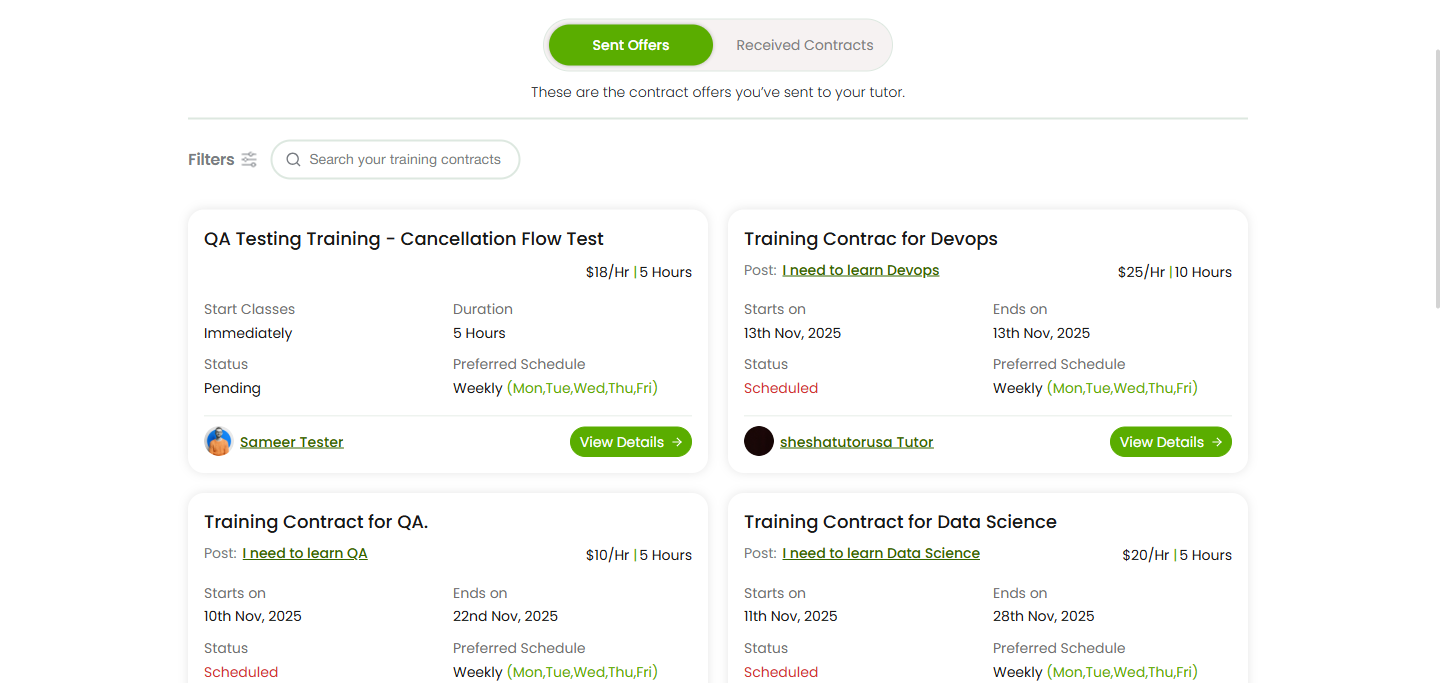
From your dashboard avatar menu (or the side nav), go to Trainings > All Contracts.
Switch to the Sent Offers tab.
Find the contract you want to cancel — its status will read Pending.
Click View Details.
Step 2: Withdraw the offer
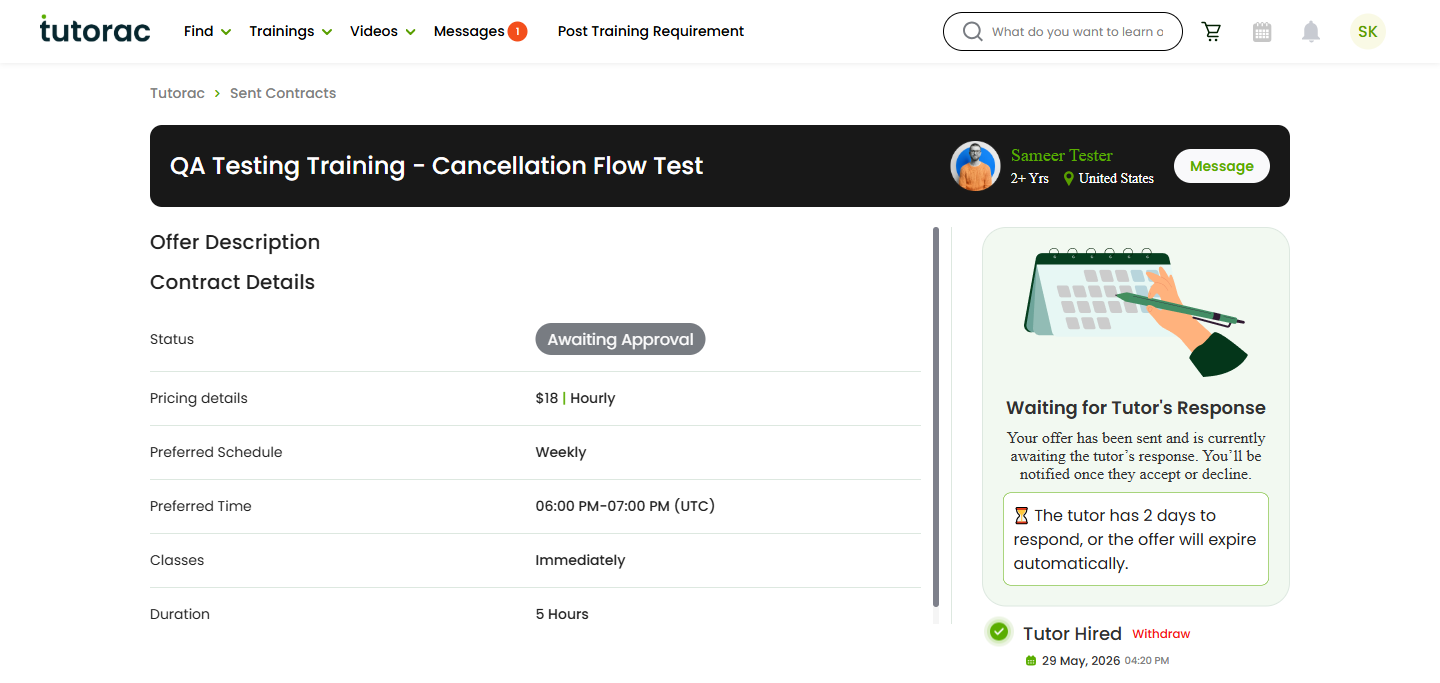
On the contract details page you’ll see Status: Awaiting Approval, the message “Your offer has been sent and is currently awaiting the tutor’s response”, and below it a Tutor Hired section with a Withdraw link on the right.
Click Withdraw.
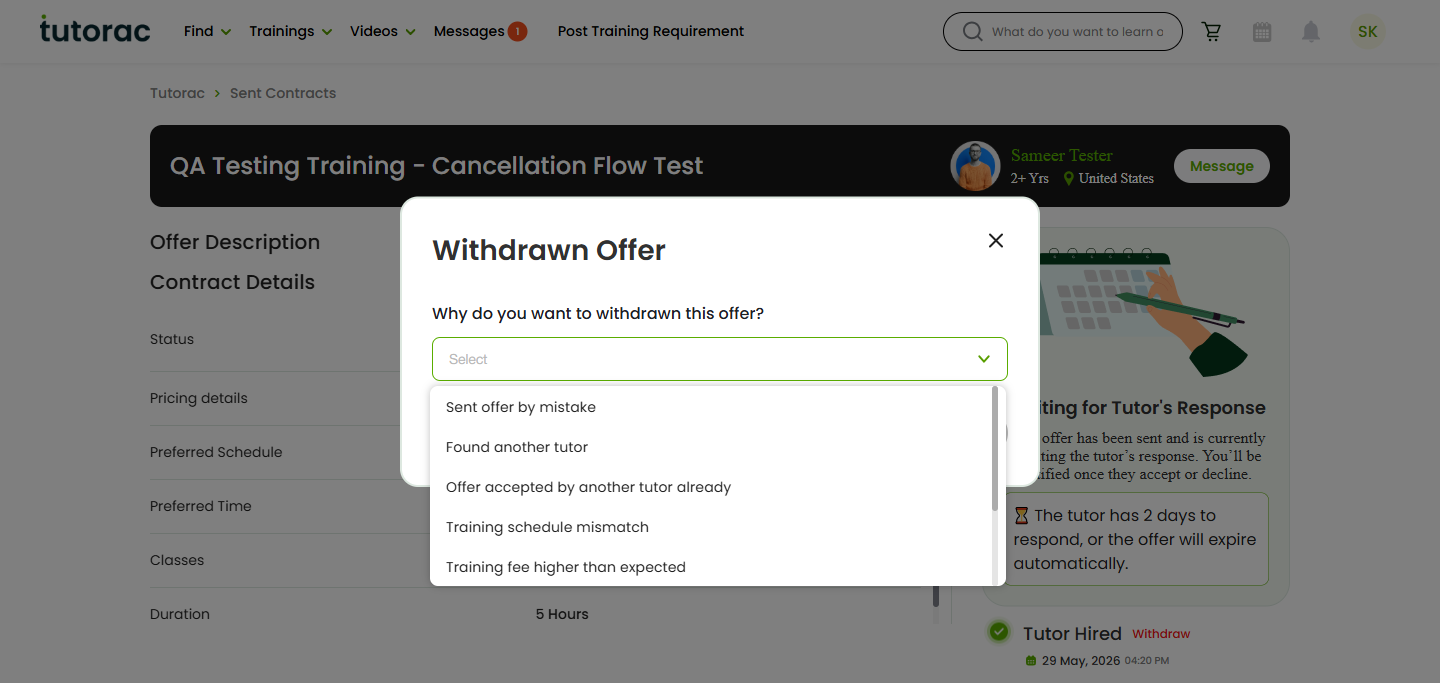
A Withdrawn Offer dialog opens asking “Why do you want to withdrawn this offer?”
Pick a reason from the dropdown. Available reasons:
Sent offer by mistake
Found another tutor
Offer accepted by another tutor already
Training schedule mismatch
Training fee higher than expected
Course content not suitable
No longer need this training
Other (please specify)
Click Withdraw in the dialog to confirm. (Cancel closes the dialog without changes.)
Step 3: Confirmation
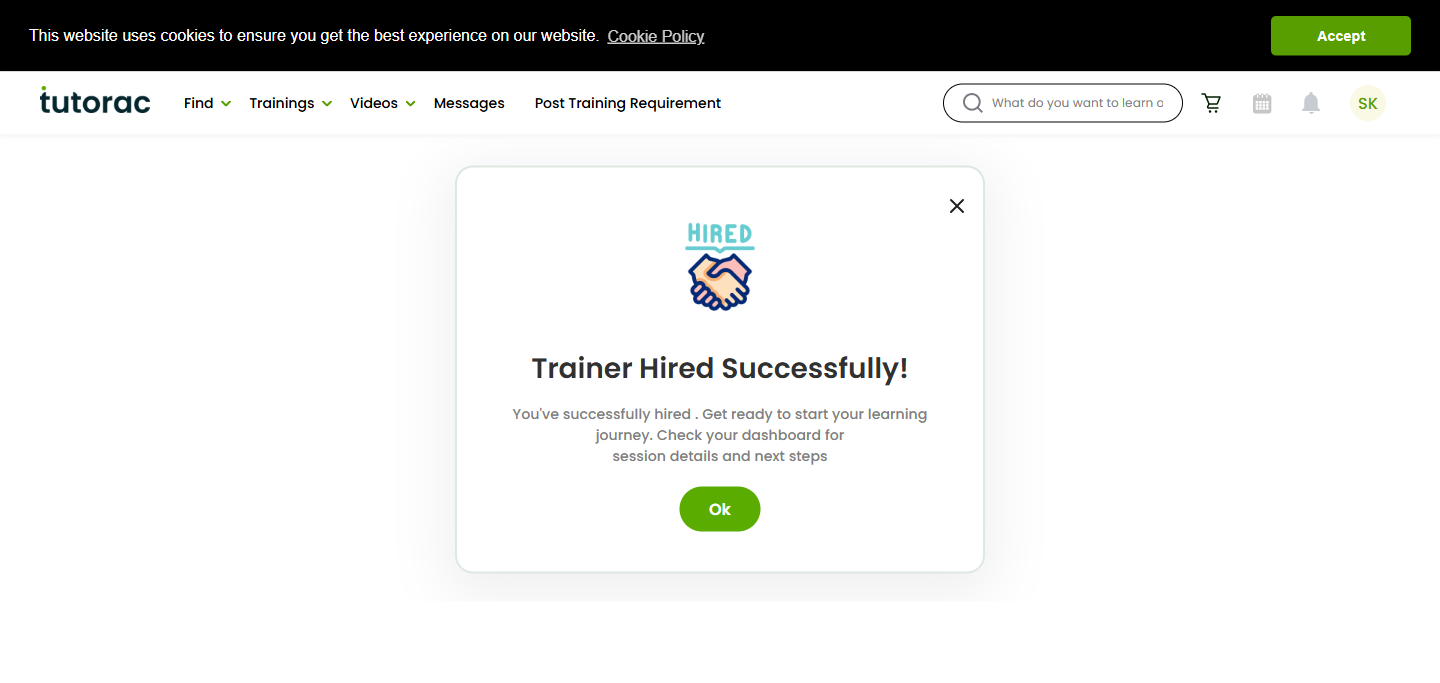
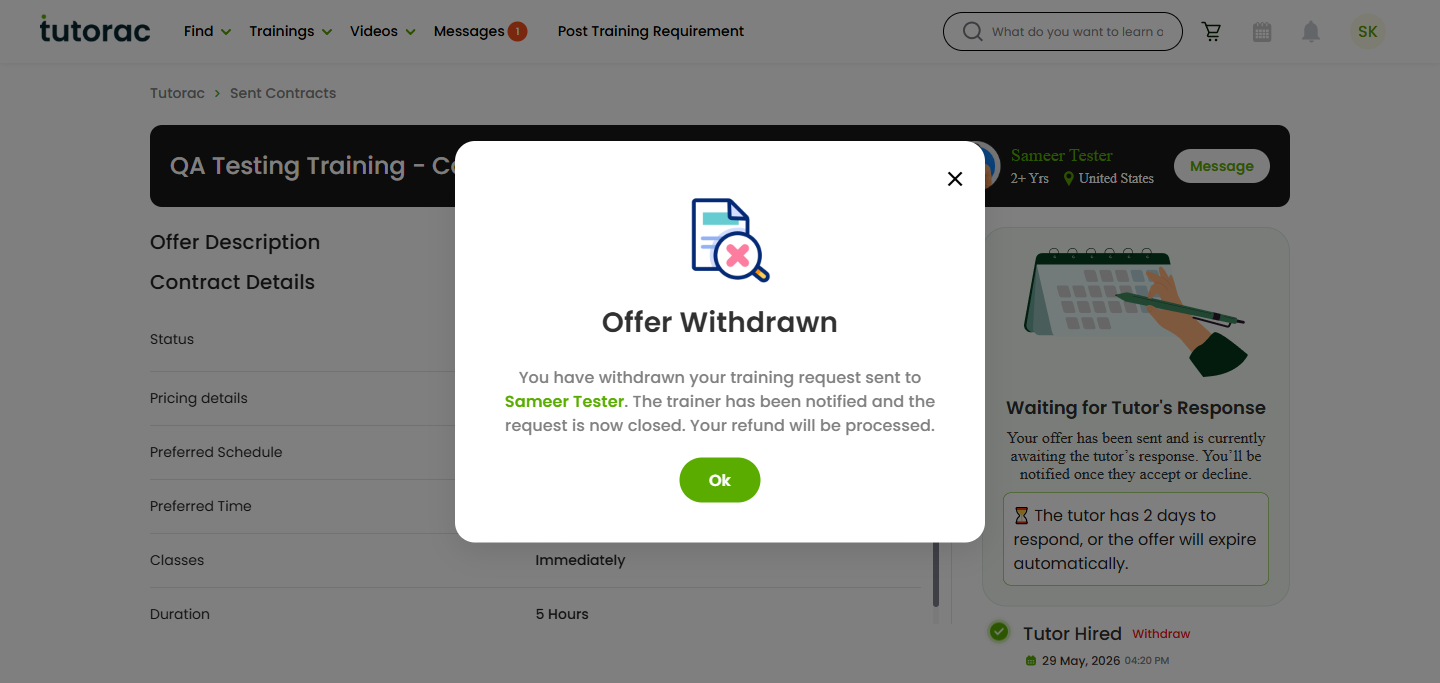
Tutorac shows an Offer Withdrawn confirmation: “You have withdrawn your training request sent to [Tutor Name]. The trainer has been notified and the request is now closed. Your refund will be processed.” Click Ok to close it.
Because nothing on the contract has started, the full amount returns to your original payment method — nothing is deducted.
Case 2: Cancel class on an active batch
Once the tutor accepts your hire, Tutorac creates a Training Batch with one or more milestones. The Withdraw option is gone — you now use Cancel class from the batch’s Payment tab. How much you get back depends on the active milestone’s completion percentage at the time you cancel.
Step 1: Open the batch’s Payment tab
Go to Trainings > My Training Batches.
Find the batch you want to cancel (status: Upcoming or Ongoing) and click View Details.
Inside the batch, click the Payment tab in the secondary nav.
Step 2: Locate the active milestone
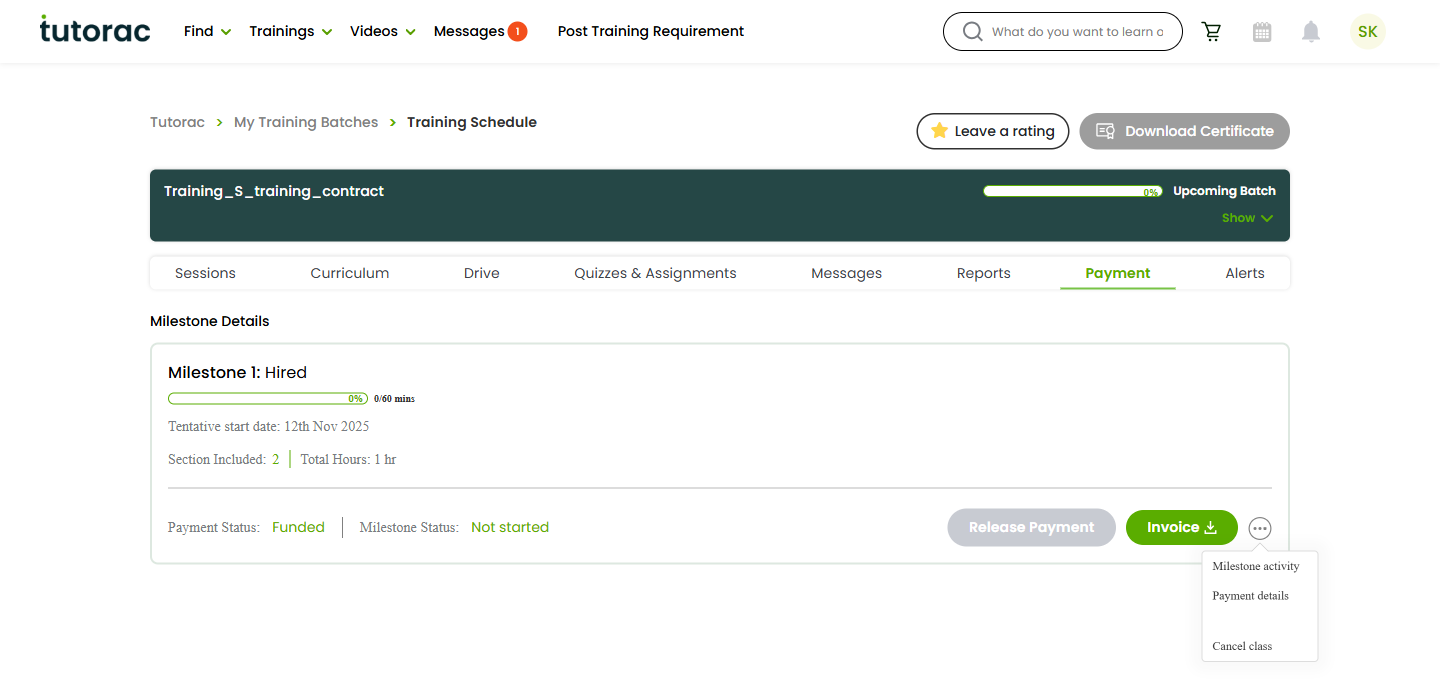
You’ll see Milestone Details with each milestone listed in a card. The active one shows:
A completion percentage with a progress bar (e.g., 0%, 15%, 60%).
Payment Status: Funded (the money is in escrow with Tutorac).
Milestone Status (e.g., Not started, In progress).
A Release Payment button (used when you’re satisfied — don’t click this if you’re about to cancel).
Below the milestone card, a small action row containing Milestone activity, Payment details, and Cancel class.
Note the current milestone-completion percentage — that’s what determines your refund split.
Step 3: Cancel and confirm
Click Cancel class.
The cancellation dialog shows the milestone breakdown, the refund preview based on the policy bracket you fall into, and a cancellation reason dropdown.
Review the refund amount, pick a reason, and confirm.
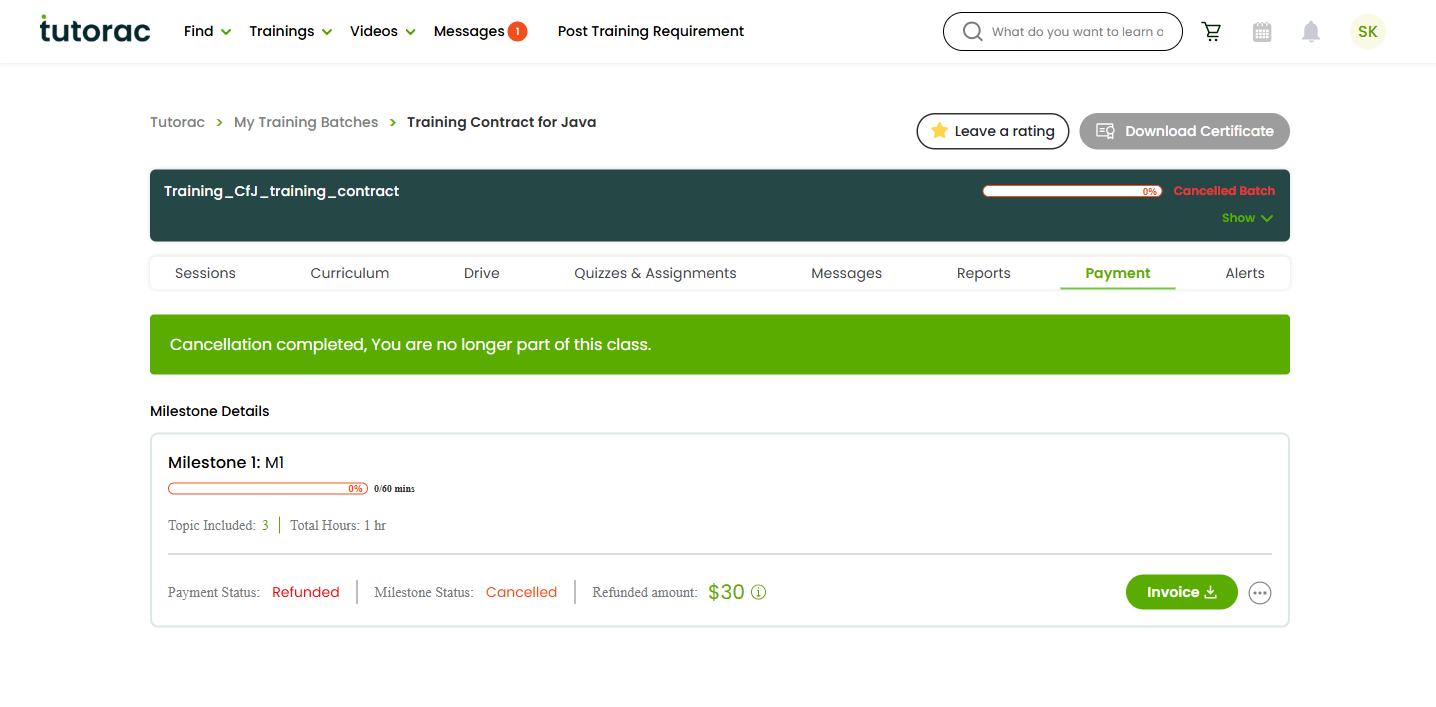
Once processed, the batch shows the badge Cancelled Batch and a message at the top: “Cancellation completed, You are no longer part of this class.” The affected milestone now displays Payment Status: Refunded, Milestone Status: Cancelled, and a Refunded amount line showing exactly what came back to your original payment method.
How much you’ll get back (refund brackets)
The split is based on the active milestone’s completion percentage when you cancel:
Above 30% completed — 0% refund (tutor keeps the milestone in full).
Only the current milestone’s funds are subject to this split. Future milestones in the batch that you funded but hadn’t started yet are refunded in full. Already-released milestones aren’t refundable — the money has left escrow. See Cancellation policy: when you (the learner) cancel for the complete table and edge cases.
Refund timing & payment method
Refunds are processed automatically once you confirm — no separate request is needed.
The money returns to the same payment method you originally used (card-network rule, not a Tutorac choice).
Currency stays as on your account: ₹ INR for India accounts, $ USD for accounts elsewhere.
Bank/card-issuer turnaround is usually 5–10 business days after Tutorac initiates — the exact gap is on your bank’s side, not Tutorac’s.
If 10 business days pass with no credit, get the reference from your batch’s invoice and contact your card issuer first — they can trace it.
Before you cancel — quick checklist
Talk to the tutor first if you can. Sometimes a schedule mismatch or scope concern is fixable on Messages — you don’t need to lose milestone time.
Check the current milestone’s completion %. If you’re close to a bracket boundary (e.g., at 9% vs 11%), the refund difference can be significant.
Don’t click Release Payment on a milestone you intend to cancel — once released, the money leaves escrow and can’t be pulled back.
What if the tutor accepts the offer right as I’m about to withdraw?
Once they accept, the status flips to Scheduled/Upcoming and the Withdraw option disappears. From that moment you’d need to use Cancel class on the Payment tab instead — and the milestone-completion-percentage policy applies. If the milestone hasn’t started yet (0% completion), the refund is still 100%.
Can I cancel just one milestone and keep the rest of the batch?
No — Cancel class cancels the whole batch. If you want to drop just the remaining scope and keep what’s been done, talk to the tutor on Messages and adjust the next milestone’s scope rather than cancelling.
Is there a Support email I should write to instead?
For routine cancellations, no — the in-product Withdraw and Cancel class flows are the official routes. Tutorac Support gets involved only if you and the tutor disagree on the completion percentage, or in edge cases like dormancy or misconduct disputes.
Where do I see the refund amount before I confirm Cancel class?
The cancellation dialog shows a refund preview based on the current milestone-completion percentage and the policy bracket. Review it before confirming — once you submit, the refund initiates immediately.
What happens to a withdrawn offer if I want to re-hire later?
Withdrawing closes the contract — the tutor sees that you withdrew. You can send a fresh Hire Now request to the same tutor any time afterwards; it’s a brand-new offer and a brand-new escrow.
Sometimes a tutor stops showing up. Sometimes life happens to the learner. Tutorac’s dormancy policy says what happens when either side disappears — how long Tutorac waits, when cancellation kicks in, and how refunds are calculated.
If a tutor is inactive for three consecutive classes, you have the right to cancel the batch.
The standard Tutor Cancellation Policy applies (the more learner-favourable table).
If milestone completion is zero — no sessions delivered — you’re entitled to a 100% refund of the fees paid for that milestone.
If some completion has happened before the tutor disappeared, the standard Tutor Cancellation table applies based on the percentage at the moment of cancellation.
To invoke this, contact Tutorac Support with the batch ID, the dates of the 3 missed classes, and any chat history. Don’t just click cancel on your side — explain that the tutor has gone dormant so Tutorac records the cancellation as tutor-initiated.
When the learner goes dormant
If you (the learner) miss three consecutive classes, particularly in one-on-one sessions, Tutorac may advise the tutor to cancel the batch. The tutor is required to notify you of each missed class through both email and website notifications — so you’ll have heard from them before any cancellation happens.
Critically, in dormancy cases triggered by a learner’s absence:
Tutors are entitled to full payment for any class where they were available for at least 30 minutes, regardless of your participation.
For payment purposes, such sessions are treated as fully completed — a 30-minute availability for a 90-minute session counts as a complete 90-minute session.
Milestone progress is adjusted upward accordingly.
Once that adjusted percentage is determined, the Tutor Cancellation Policy applies (tutor cancels because of learner dormancy). The refund table is still the more learner-favourable one, but the higher completion percentage means a smaller refund — sometimes zero.
The 30-minutes-counts-as-full rule only kicks in if you’ve been dormant for three consecutive classes — missing one or two classes doesn’t trigger it.
When both go dormant
If both the tutor and the learner stop engaging, Tutorac doesn’t close the batch immediately. The process is:
Tutorac keeps the batch open for 60 days from the start of inactivity.
After three consecutive missed classes with no engagement from either side, a notice is issued to both tutor and learner.
Both parties have 7 days from that notice to take some form of action (resume sessions, message, mutually cancel).
If no one acts in those 7 days, the Tutor Cancellation Policy takes effect.
If no progress at all has been made on the milestone, the learner receives a 100% refund.
This protects you in the worst-case scenario where things just go quiet on all sides — you don’t lose your money to a milestone neither party engaged with.
How to avoid being marked dormant
If you need to miss a class, message the tutor on Tutorac Messages in advance. A rescheduled session isn’t a missed session.
For longer breaks, propose a pause in writing — Tutorac honours mutual pauses agreed on Messages.
Don’t rely on WhatsApp or external chats to reschedule — those don’t count toward the dormancy assessment.
Open and read the email + website notifications Tutorac sends after a missed class — they’re the formal record that the clock has started.
FAQs
What counts as a “missed class” for dormancy purposes?
A scheduled session that the party in question didn’t join. If you informed the tutor in advance through Tutorac Messages and you both agreed to reschedule, it’s not a missed class — it’s a postponement.
If the tutor showed up but I didn’t, is that a missed class on me?
Yes — from the platform’s perspective, you missed it. After three consecutive misses on your side, the dormancy rule activates and the tutor is entitled to count those sessions as delivered (if they were available 30+ minutes).
The tutor didn’t notify me of the missed classes via email. Does dormancy still apply?
Notification is required — if the tutor didn’t send the email + website notifications, raise it with Tutorac Support. Dormancy decisions are based on documented evidence; missing notifications weaken the tutor’s case.
Does the 60-day clock pause if I respond?
Yes — meaningful engagement (a message, attending the next session, agreeing on a reschedule) restarts the clock. Dormancy is about prolonged inaction, not a one-off missed class.
I went dormant because of a genuine emergency. Can I get the favourable refund anyway?
Tutorac Support handles genuine emergencies (medical, family bereavement, accidents) case-by-case. Provide evidence and reach out as soon as you can — the earlier, the better. The standard dormancy rule is a default, not the only outcome.
If the tutor is the one calling it off, Tutorac uses a separate bracket that tilts strongly in the learner’s favour — especially when the tutor pulls out after work has been delivered. Tutors don’t have a Withdraw equivalent: once they accepted, every tutor-initiated cancellation goes through the same Cancel-class path you’d use, but with the percentages flipped to compensate you for the disruption.
Before they accept: a tutor can decline your hire offer. You get a 100% refund just as you would if you withdrew, and the contract closes with no penalty to either side.
After they accept: tutors cancel via the same in-batch flow you would — from the batch’s Payment tab, with a reason recorded. There is no tutor-side “withdraw” once they’ve agreed.
The cancellation is final once they confirm; the batch flips to Cancelled and you’re notified.
The refund split below applies when the tutor cancels after accepting. If they decline before accepting, you simply get 100% back — no bracket needed.
The refund bracket when the tutor cancels
Just like learner-cancellations, the split depends on the active milestone’s completion percentage at the moment of cancellation. The numbers favour you, the learner:
Milestone completion at cancellation
Tutor keeps
Your refund
1–10%
0%
100%
11–30%
10%
90%
31–50%
30%
70%
51–75%
50%
50%
76–99%
75%
25%
Compare this with the learner-cancellation bracket — at every level, the tutor cancelling costs them more than a learner cancelling at the same completion. That’s by design: the side that walks away absorbs the cost of the disruption.
Worked examples
India learner / ₹5,000 milestone, tutor cancels at 8% completion → You receive ₹5,000 (100% — tutor keeps nothing because they bailed early).
US learner / $200 milestone, tutor cancels at 25% completion → You receive $180 (90% — tutor keeps $20).
India learner / ₹10,000 milestone, tutor cancels at 60% completion → You receive ₹5,000 (50% — tutor keeps half).
US learner / $400 milestone, tutor cancels at 85% completion → You receive $100 (25% — tutor keeps $300; the work was nearly delivered).
What happens to your batch
The active milestone is split per the bracket above; the refund initiates automatically.
Future milestones you funded but the tutor hadn’t started: 100% refund.
Already-released milestones: not refundable — you signed off on them.
The batch shows the Cancelled Batch badge with the cancellation reason the tutor selected.
You’re free to hire a different tutor for the remaining scope — that’s a brand-new hire, not a continuation.
Dormancy — when the tutor just goes silent
If the tutor isn’t cancelling formally but has stopped responding — missing classes, going dark on Messages — the bracket above doesn’t fit, because there’s no tutor-initiated cancellation event. That’s the dormancy path:
After 3 missed classes from the tutor’s side, you can cancel the batch yourself with no penalty.
If zero work has been delivered on the active milestone (0% completion), you receive a 100% refund regardless of the bracket above.
Tutorac may withhold tutor payment for missed sessions automatically.
No — once they’ve accepted, the only path is the formal Cancel-class flow on the Payment tab, with the bracket above applied. There’s no equivalent of the learner-side Withdraw for tutors after acceptance.
My tutor cancelled and is now asking me to hire them again separately. Should I?
It’s your call, but be cautious. Cancellations are tracked on the tutor’s profile, and a pattern of cancel-and-rehire outside Tutorac to dodge the bracket is a Trust & Safety violation on their side. If anything is off, contact Support.
What if the tutor cancels because of an emergency?
The bracket still applies by default. If genuine extenuating circumstances are involved (medical, family), Tutorac Support may waive the tutor’s share on case-by-case review — that’s between the tutor and Support, not your concern. Your refund per the bracket is paid out immediately either way.
Does Tutorac penalise tutors for cancelling?
Cancellations are recorded on a tutor’s profile and factor into their ranking and reliability score. Repeated cancellations can result in profile suspension — but the financial penalty in the table above is the immediate consequence.
Can I leave a review after a tutor-cancellation?
Yes. The batch shows as Cancelled (by tutor), and you can still leave honest feedback about your experience so future learners are informed.