Your Basic Information is what tutors, agencies, and Tutorac itself use to recognise and contact you. This article shows you where to update your name, photo, email, phone, date of birth, location, and timezone — and what the profile completion percentage means.
In this article
- Open Basic Information
- My Details (name, email, phone, DOB, gender)
- Profile photo
- Location and timezone
- Profile completion percentage
- Save your changes
- FAQs
Open Basic Information
- Sign in to Tutorac.
- Click your avatar in the top-right.
- Choose My Profile.
- In the left sidebar, BASIC INFORMATION is the first option (URL:
/student/profile/personal-info).
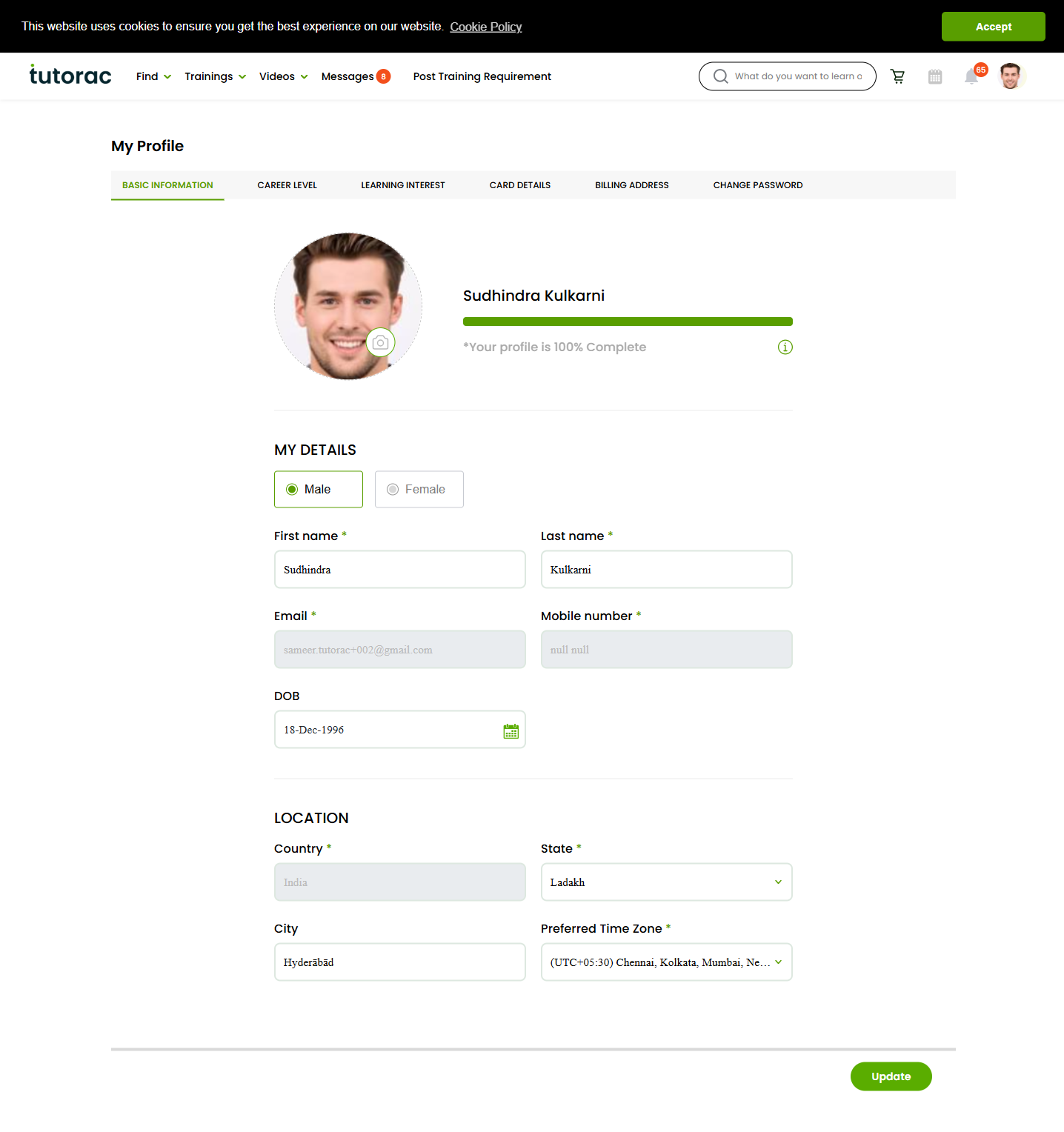
My Details (name, email, phone, DOB, gender)
Under MY DETAILS, you can edit:
- Gender — Male / Female radio toggle.
- First name * — appears on your profile and on invoices.
- Last name * — same.
- Email * — receipts, password resets, and notifications go here.
- Mobile number * — for SMS notifications and account verification.
- DOB — date of birth (optional).
Fields marked * are required.
Profile photo
Click your existing photo (or the placeholder avatar) at the top of the form to upload a new one. Use a clear headshot — tutors are more responsive to learners with real photos, and the avatar appears next to every message you send on Tutorac.
- Supported formats: JPG, PNG.
- Square crop works best.
- The photo is also used as your default avatar in chats and on contracts.
Location and timezone
Under LOCATION:
- Country * — sets your account region. This also determines whether you are billed in ₹ INR (India) or $ USD (everywhere else) and cannot be changed later from the profile page.
- State * — choose from the dropdown for your country.
- City — free-text.
- Preferred Time Zone * — e.g. (UTC+05:30) Chennai, Kolkata, Mumbai, New Delhi or (UTC-08:00) Pacific Time. Tutorac uses this to display session times, schedule demos, and calculate deadlines.
Set your timezone carefully — if it’s wrong, your tutor sees session start times shifted by hours.
Profile completion percentage
A bar at the top of the page shows “Your profile is X% complete”. It rises as you fill more fields and reaches 100% only when:
- All required fields under My Details and Location are filled.
- A profile photo is uploaded.
- Career Level is set.
- Learning Interest has at least one skill selected.
A 100% profile gets matched faster when tutors and agencies search for learners, and gives the platform more context for AI-assisted tutor recommendations on Post Training Requirement.
Save your changes
Scroll to the bottom of the page and click Update. Tutorac confirms the save with a small toast at the bottom-right. Use Previous to discard unsaved edits.
FAQs
Can I change my email address?
Yes — edit the Email field and click Update. Tutorac may send a verification link to the new address before fully switching over. Until then, you may still receive transactional emails on the old address.
Can I change my country after signup?
Country determines whether your account is billed in ₹ (India) or $ (everywhere else), so it’s locked at signup. If you’ve relocated and genuinely need to switch billing currencies, contact Tutorac Support — they’ll advise on next steps, which usually means creating a fresh account for the new region.
Why does the form still show 100% complete after I edit a field?
The completion bar tracks which fields are filled, not what value they hold. As long as required fields aren’t emptied, the bar stays at 100% even when you change a name, phone, or city.
Will changing my name update old invoices?
No. Invoices are point-in-time and lock in your name when each payment was made. Updates only apply to invoices generated after the change.
Why do tutors see my photo?
To recognise you across messages, contracts, and live sessions. If you’d rather not show your face, use a neutral avatar — but profiles with real photos book more demos.
My phone number isn’t accepting OTP. What do I do?
Check the country code and full number are correct, then click Update again. If OTP still doesn’t arrive, contact Tutorac Support — they can manually verify and update the number.
Related articles
Last updated: 29 May 2026