Releasing payment is how you tell Tutorac your tutor has completed a milestone and the escrowed amount can move to them. This article walks through exactly how to do it, when to do it, and what to do if something doesn’t look right.
In this article
- When to release payment
- Release a milestone payment step by step
- Auto-release after grace period
- When to hold off on releasing
- What happens after you release
- FAQs
When to release payment
Release a milestone’s payment when all of these are true:
- All planned sessions in the milestone are complete.
- You’re satisfied with the teaching quality and content delivered.
- Any milestone-linked quizzes / assignments are graded and returned.
- You don’t intend to dispute anything from this milestone.
If any of the above are not yet true, wait. Releasing is irreversible — once funds go to the tutor, the milestone cannot be refunded via the standard cancellation flow.
Release a milestone payment step by step
- Sign in to Tutorac.
- Go to Trainings → My Training Batches in the top navigation.
- Click the batch you want to manage.
- Click the payment tab at the top of the batch workspace.
- Find the milestone you want to release (e.g., “Milestone 1: DevOps”).
- Click the Release Payment button on that milestone’s card.
- Confirm in the dialog that appears.
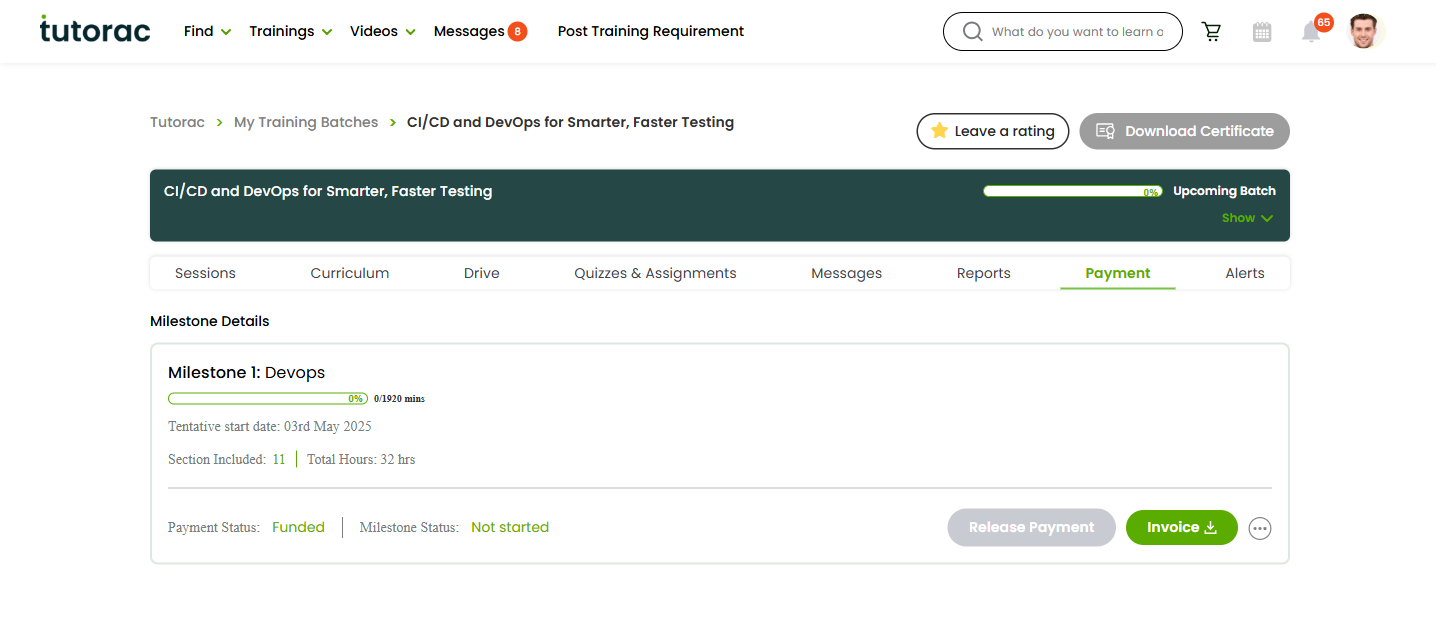
The milestone card will then update to show the payment as released, with a timestamp.
Auto-release after grace period
If you finish a milestone and forget to release manually, Tutorac may auto-release the funds after a grace period following the milestone’s scheduled completion. This ensures tutors are paid in a timely manner for work delivered.
You’ll receive notifications (both in-app and via email) before auto-release, so you have time to raise any issues before funds move.
When to hold off on releasing
- Missed sessions — check the Sessions tab for “Trainer Missed” entries. Get them rescheduled before releasing.
- Unclear scope — if you’re unsure whether a topic was actually covered, ask the tutor before releasing.
- Pending assignments — wait until graded work has been returned.
- Quality concerns — raise these with the tutor or Tutorac Support before paying out.
What happens after you release
- Funds move from Tutorac escrow to the tutor’s payout account (a few business days for them to receive into their bank).
- The milestone is marked paid in your batch’s payment tab.
- A receipt / invoice is generated and available in your account (see Where to find invoices and receipts).
- The next milestone’s payment becomes due before its scheduled start date.
FAQs
Can I undo a release?
No. Once funds move to the tutor, the release is final via the standard flow. If there’s a serious issue, contact Tutorac Support — they may be able to mediate, but it’s no longer an automatic refund.
Will the tutor see exactly when I released?
Yes — they get a notification and the milestone in their dashboard shows the release timestamp.
Do I have to release each milestone separately?
Yes — each milestone has its own Release Payment button, so you keep granular control.
What if I cancel a milestone after partial completion instead of releasing?
Tutorac applies the cancellation policy — you’ll be refunded a portion of the escrowed amount based on how much of the milestone was completed before cancellation. See the Tutorac User Agreement for the exact percentages.
Can a tutor force me to release?
No. Only you can click Release Payment. The platform’s auto-release rules are based on milestone completion and grace period, not tutor demand.
Related articles
- How payments work on Tutorac: milestones, escrow, and releasing funds
- Where to find invoices, receipts, and payment history
- Troubleshooting failed payments and refunds
Last updated: 28 May 2026