Your Basic Information is what tutors, training matches, and the platform itself use to identify you. Keep your name, contact details, location, and time zone current so course recommendations, session schedules, and notifications land correctly.
In this article
Where to find Basic Information
- Sign in to Tutorac.
- Click your avatar in the top right.
- Choose My Profile.
- The page opens on BASIC INFORMATION by default (URL:
/student/profile/personal-info).
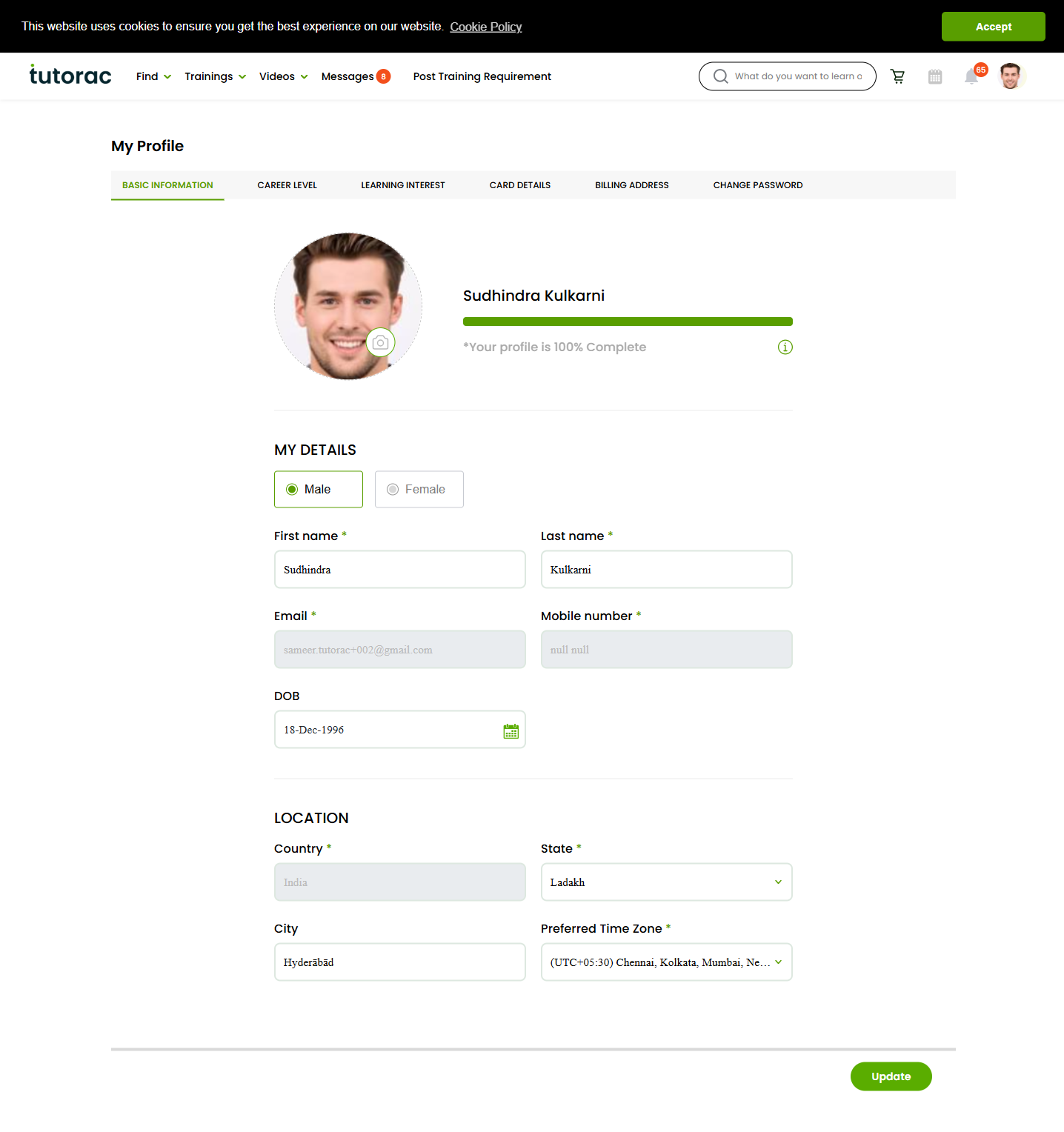
Fields you can edit
The page has two sections:
MY DETAILS
- Gender — Male / Female toggle.
- First name — required.
- Last name — required.
- Email — required. Used for sign-in, password reset, and all platform notifications.
- Mobile number — required. Used for OTP, session reminders, and tutor communication.
- DOB — date of birth.
LOCATION
- Country — required. Sets your account region and billing currency (India → ₹ INR, all other countries → $ USD).
- State — required when applicable to your country.
- City — optional, free text.
- Preferred Time Zone — required. Sessions on the calendar, batch start times, and notifications all use this. Pick the one closest to where you live or where you’ll attend most sessions.
Update your details
- Edit any field you want to change.
- Scroll to the bottom of the page.
- Click Update.
A confirmation appears once changes are saved. Refresh the page to verify everything stuck.
Profile completion %
Above MY DETAILS you’ll see a profile completion percentage (e.g., “Your profile is 100% Complete”). Tutorac calculates this from filled fields across all profile sections — Basic Information, Career Level, Learning Interest, Card Details, and Billing Address. A fully complete profile:
- Gets better tutor matches and training recommendations.
- Lets tutors reach out to you with relevant offers via the “Send Invite” flow.
- Speeds up the checkout process (billing address & card already on file).
FAQs
Can I change my email address?
Yes, edit it in MY DETAILS and click Update. You’ll typically need to verify the new address via a link sent to it before sign-in switches over. If you don’t see the verification email, check spam.
Can I change my mobile number?
Yes — update it in MY DETAILS. Tutorac may send an OTP to the new number to verify it works. Make sure the new number is correct before saving, since session reminders and tutor messages route to it.
Why does my country matter?
The country on your account sets your billing currency for life of the account — India accounts are billed in ₹ INR, all other countries in $ USD. It also affects which time-zone defaults Tutorac suggests and which state list shows. You can’t switch currencies later by changing only the country field; see How payments work on Tutorac for details.
Will my tutor see all this information?
Tutors see your name, profile picture, and the high-level summary needed to teach you (time zone, learning interests). They do not see your DOB, full mobile number, or billing details — those stay private to Tutorac.
What happens if I leave required fields blank?
The Update button will warn you, and the missing fields will be highlighted. You can’t save the page until required fields (marked with *) are filled.
Can I upload a profile photo here?
Profile photo is set from the avatar area at the top of the profile pages. Click your current avatar to upload or replace it. Aim for a clear, square headshot — tutors trust profiles with real photos more than empty placeholders.
Related articles
- How to set your Career Level on Tutorac (coming soon)
- How to set your Learning Interests on Tutorac (coming soon)
- How to update your billing address on Tutorac
Last updated: 29 May 2026