If something feels off about your Tutorac account — an action you don’t recognise, a sign-in alert you didn’t trigger, a contract you didn’t accept — treat it as a possible compromise and act fast. This guide walks through the warning signs, the immediate steps to lock the account down, and how to recover.
In this article
- Warning signs of a compromised account
- Step 1 — Change your Tutorac password immediately
- Step 2 — Secure the email on the account
- Step 3 — Review activity
- Step 4 — Contact Tutorac Support
- Preventing it from happening again
- FAQs
Warning signs of a compromised account
- You receive an email about a password change you didn’t make.
- You receive an OTP or sign-in code you didn’t request.
- Notifications mention actions (sent a proposal, accepted a contract, paid a milestone) you don’t recognise.
- A new payment card or billing address you didn’t add appears in your profile.
- Your profile details (name, email, phone, DOB) have been changed without you doing it.
- Sessions appear on devices or locations you don’t recognise.
- You can no longer sign in with your usual password.
- Your Tutorac email starts bouncing or your recovery email has changed.
Any one of these is enough to act on — you don’t need to be certain.
Step 1 — Change your Tutorac password immediately
If you can still sign in, go to Profile → CHANGE PASSWORD and set a brand-new password — one you haven’t used anywhere else. This will sign the intruder out of any active session.
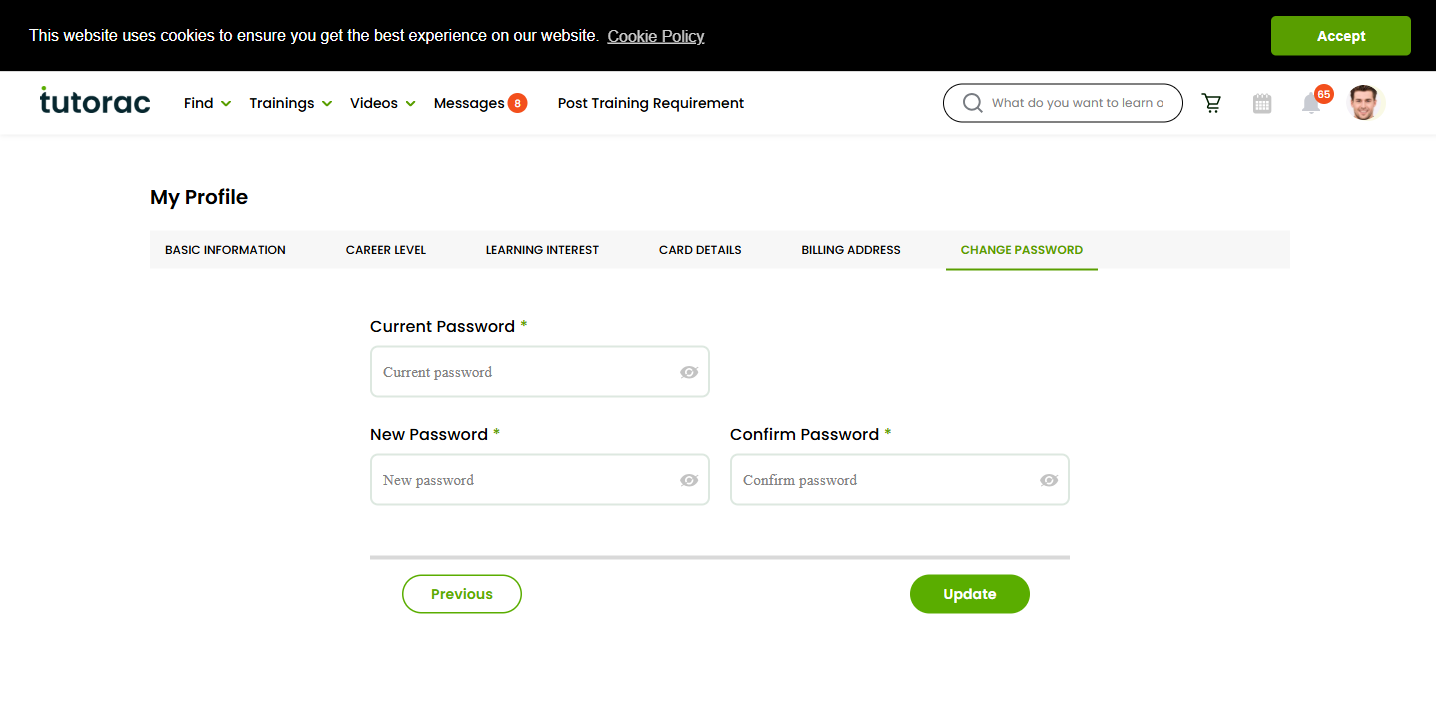
If you can’t sign in (the attacker already changed the password), go to tutorac.com/forgot-password and reset via your email. If the attacker has also changed the email on file, jump straight to Step 4 and contact Tutorac Support — they can verify your identity through other means.
Full instructions: How to change your password on Tutorac.
Step 2 — Secure the email on the account
If your Tutorac password was guessed because of a leak elsewhere, the email account that received the leak (or the one you signed up to Tutorac with) is likely at risk too.
- Change the password on the email account itself.
- Turn on 2FA on the email provider.
- Check that no forwarding rules / auto-replies have been added without your knowledge — attackers use those to silently siphon your future mail.
- Check the email’s “recent activity” / “last sign-in” page for unfamiliar devices.
Step 3 — Review activity
Once you’re back in control of the account, do a quick audit:
- Notifications — scroll back; anything you didn’t do?
- Training Batches — are there any active batches you don’t recognise?
- Sent / Received Contracts — any contract you didn’t initiate or accept?
- Payment cards on file (Profile → Card Details) — remove any you don’t recognise.
- Billing address — make sure it’s yours.
- Profile info — name, email, phone, DOB — reset anything that’s been changed.
- Recent payments — flag anything you didn’t authorise.
Document what you find (screenshots, timestamps) before changing anything — this is useful evidence for both Tutorac Support and your bank if money was involved.
Step 4 — Contact Tutorac Support
Reach out via the Contact Us page or the Tutorac Support email. Give them:
- Your account email and (if you remember) the rough sign-up date.
- What made you suspect a compromise (the signal from the warning-signs list).
- What unauthorised actions / contracts / payments you found.
- What you’ve already done (password change, email security, etc.).
- Whether you still have access to the account or are locked out.
Tutorac Support can:
- Lock the account from further sign-ins while investigation continues.
- Pause unauthorised contracts or in-flight milestone payments.
- Help recover access if the attacker has changed the email.
- Investigate the tutor side if a contract was forged in your name.
If unauthorised money has already left your card, contact your bank in parallel — chargeback windows are time-limited and your bank’s side moves independently of Tutorac’s side.
Preventing it from happening again
- Set a strong, unique Tutorac password (no reuse from any other site).
- Strengthen the email account — long unique password + 2FA.
- Use a password manager so future passwords are unique by default.
- Never share OTPs, even with someone claiming to be Tutorac.
- Sign out from shared devices, and review the account once a week or so.
- If a leak ever exposes your email + password combo (you may be alerted by Have I Been Pwned or similar), change your Tutorac password right away.
The full habit list is in Account security best practices for Tutorac learners.
FAQs
An attacker accepted a contract using my account — am I liable for that payment?
Report it to Tutorac Support and your bank as soon as possible. Tutorac can often pause the milestone payment if it’s still in escrow. For already-released payments, recovery depends on circumstances, evidence, and timing — act fast.
I changed my password but the attacker came back the next day. What now?
This usually means they still control your email (since they can reset the Tutorac password from there) or a device of yours is infected. Lock down the email first (Step 2), then run a malware scan on your phone / computer, then change the Tutorac password again.
The attacker changed my email on the account — I can’t use forgot-password. Help?
Contact Tutorac Support directly via the Contact Us page or by emailing Support from any email address you can prove is yours (e.g., the one previously associated with the account). Provide identifying details — account creation date, recent training batches, tutor names you worked with, last successful payment — so Tutorac can verify it’s really you and restore access.
Is my data still safe on Tutorac after a compromise?
Tutorac doesn’t store full card numbers (only tokens), and passwords are hashed, not stored in plain text. The risk is mainly from what an attacker could do while signed in — act on your behalf, change contact details, see payment history. Closing their access (password change + email lockdown) ends that risk.
Should I delete my Tutorac account after a compromise?
Usually no — once you’ve regained control and reviewed activity, the account is safe to continue using. Deleting is only necessary in extreme cases and you may lose access to training records, payment history, and ongoing batches. Talk to Tutorac Support before doing anything irreversible.
Related articles
- Account security best practices for Tutorac learners
- How to change your password on Tutorac
- How to report a tutor or content issue on Tutorac
- Tutorac Payment Protection: how Tutorac keeps you safe
Last updated: 29 May 2026