Tutorac uses a milestone-based escrow system so you only pay for training in chunks, and your tutor only gets paid for work you’ve approved. This article explains how money flows on the platform — from booking a tutor to releasing payment after each milestone.
In this article
- The big picture: contract → milestone → escrow → release
- What is a milestone?
- What is escrow?
- Releasing payment to your tutor
- Refunds and cancellations
- Currencies and pricing (USD & INR)
- FAQs
The big picture: contract → milestone → escrow → release
- You agree a Training Contract with a tutor — topic, scope, schedule, total price.
- The contract is split into milestones (chunks of work mapped to chunks of price).
- You pay for each milestone before sessions start on it. The money goes into escrow, not directly to the tutor.
- Sessions and assignments for that milestone happen.
- When the milestone is done, you click Release Payment. The escrow funds move to the tutor.
- You then pay the next milestone, and the cycle repeats until the contract is complete.
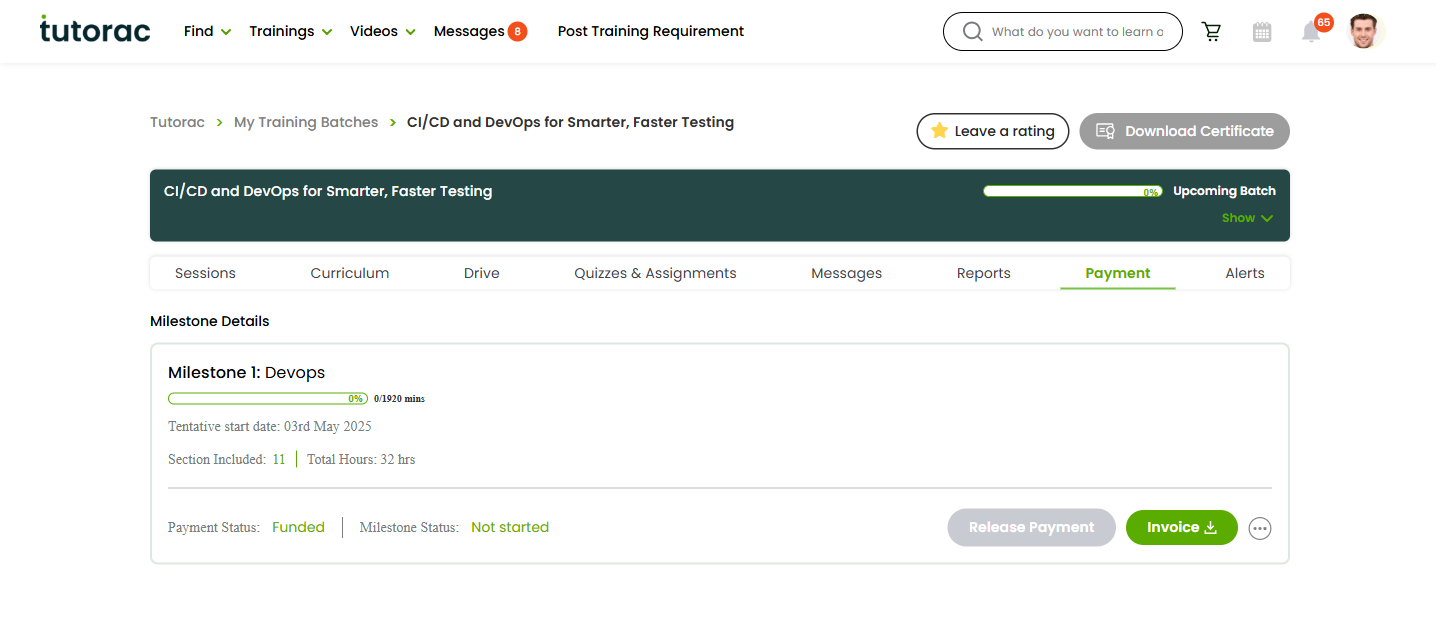
Above: an India learner’s view, showing milestone amounts in ₹ (INR). Learners outside India see the same layout with amounts in $ (USD) instead — see Currencies and pricing below.
What is a milestone?
A milestone is one logical phase of your training, with its own price and tentative start date. For a 12-week DevOps course you might see:
- Milestone 1: DevOps fundamentals — weeks 1–4 — e.g., ₹X (INR) or $X (USD)
- Milestone 2: CI/CD & Containers — weeks 5–8 — e.g., ₹Y (INR) or $Y (USD)
- Milestone 3: Kubernetes & Project — weeks 9–12 — e.g., ₹Z (INR) or $Z (USD)
You see the breakdown on the payment tab of your Training Batch. Each milestone has a heading like “Milestone 1: [topic]”, a tentative start date, and the amount due in your account’s currency.
What is escrow?
Escrow means Tutorac holds your payment in a neutral account until you confirm the milestone is done. The tutor sees that you’ve paid (so they know it’s safe to teach), but they don’t receive the money yet. This protects both sides:
- You — never pay for work that hasn’t happened. If something goes wrong, you can cancel and get a refund per the cancellation policy.
- Tutor — never teach without payment guaranteed. They know the funds are already secured.
This is why all payments must stay on Tutorac — off-platform payments lose escrow protection entirely.
Releasing payment to your tutor
Once a milestone’s sessions are done and you’re satisfied, click the Release Payment button on the milestone card (payment tab of the batch). The escrowed amount moves from Tutorac to the tutor.
If you don’t click Release Payment manually, the platform may auto-release after a defined grace period following the milestone’s scheduled completion to keep tutors paid for work delivered. Watch for notifications around that point.
Refunds and cancellations
If you cancel mid-milestone, Tutorac splits the escrowed amount between you and the tutor based on the percentage of the milestone that was already completed. The split is defined in the Tutorac User Agreement under “Cancellation by Learner” / “Cancellation by Tutor” and ranges from a full refund (very early cancel) to no refund (after most of the milestone is done).
Refunds are processed back to your original payment method in the same currency you paid in.
Currencies and pricing (USD & INR)
Tutorac is a global platform and supports two billing currencies, decided by the country on your account at signup:
- India learners and tutors — all prices, invoices, and payouts in ₹ (INR).
- Learners and tutors in all other countries (US, UK, Canada, UAE, Singapore, Australia, etc.) — all prices, invoices, and payouts in $ (USD).
What this means in practice:
- A learner with an India account sees tutor rates and milestone amounts in ₹ on Find Tutors, the contract, the cart, and the payment tab.
- A learner with any non-India account sees the same screens in $.
- If a tutor wants to teach learners across both regions, Tutorac shows the tutor’s rate in the learner’s currency — you don’t need to do any FX math.
- Your card issuer (bank) handles any conversion if your card is in a third currency — e.g., a UK-based card paying a $ milestone will see a GBP charge on the statement at the bank’s FX rate.
You cannot switch currencies on an existing account. The currency is fixed when the account is created.
FAQs
Do I have to pay the entire course up front?
No. You only pay for one milestone at a time, before that milestone starts. This makes long courses far less risky.
Can a tutor see that I’ve paid?
Yes — once your payment lands in escrow, the tutor sees the milestone as funded. They don’t receive the money, just confirmation that it’s secured.
What if the tutor doesn’t deliver?
Don’t release payment. Cancel the contract instead — Tutorac will refund you per the “Cancellation by Tutor” rules in the User Agreement.
Can I pay outside Tutorac to save fees?
Don’t. Off-platform payments are not protected by escrow, cancellation policy, or dispute resolution. Tutorac cannot help you recover money paid outside the platform.
Is there a platform fee on top of the tutor’s rate?
Tutorac advertises “zero platform fee” for learners on the safety panel. The number you see on the contract is what you pay — in ₹ or $ depending on your account — and the tutor’s side handles their own fee with Tutorac.
Can I switch my account from INR to USD or vice versa?
No. The currency is fixed by the country on the account at signup. If you genuinely need the other currency (e.g., you’ve relocated), contact Tutorac Support — they’ll advise on the best path, which may include creating a fresh account for the new region.
Related articles
- How to release a milestone payment to your tutor
- How to add or remove a payment card on Tutorac
- How to hire a tutor and start a Training Contract
Last updated: 28 May 2026