Your Tutorac account holds your contracts, payment history, training schedule, and personal information. Treating it like any other important account — banking, email, work — goes a long way. Here are the practical security habits worth keeping.
In this article
- Use a strong, unique password
- Secure the email you signed up with
- Never share OTPs or codes
- Recognise phishing
- What never to share with a tutor
- Devices and public Wi-Fi
- Review your account regularly
- FAQs
Use a strong, unique password
- Length over complexity: 12+ characters beats 8 characters with weird symbols.
- Unique to Tutorac. Don’t reuse the password from your email, your bank, or any other site. If any of those leak, your Tutorac account is exposed too.
- Avoid obvious patterns: your name, birthdate, “Tutorac@123”, sequential numbers.
- Use a password manager (1Password, Bitwarden, your browser’s built-in one). It generates a strong unique password and fills it for you — you only have to remember one master password.
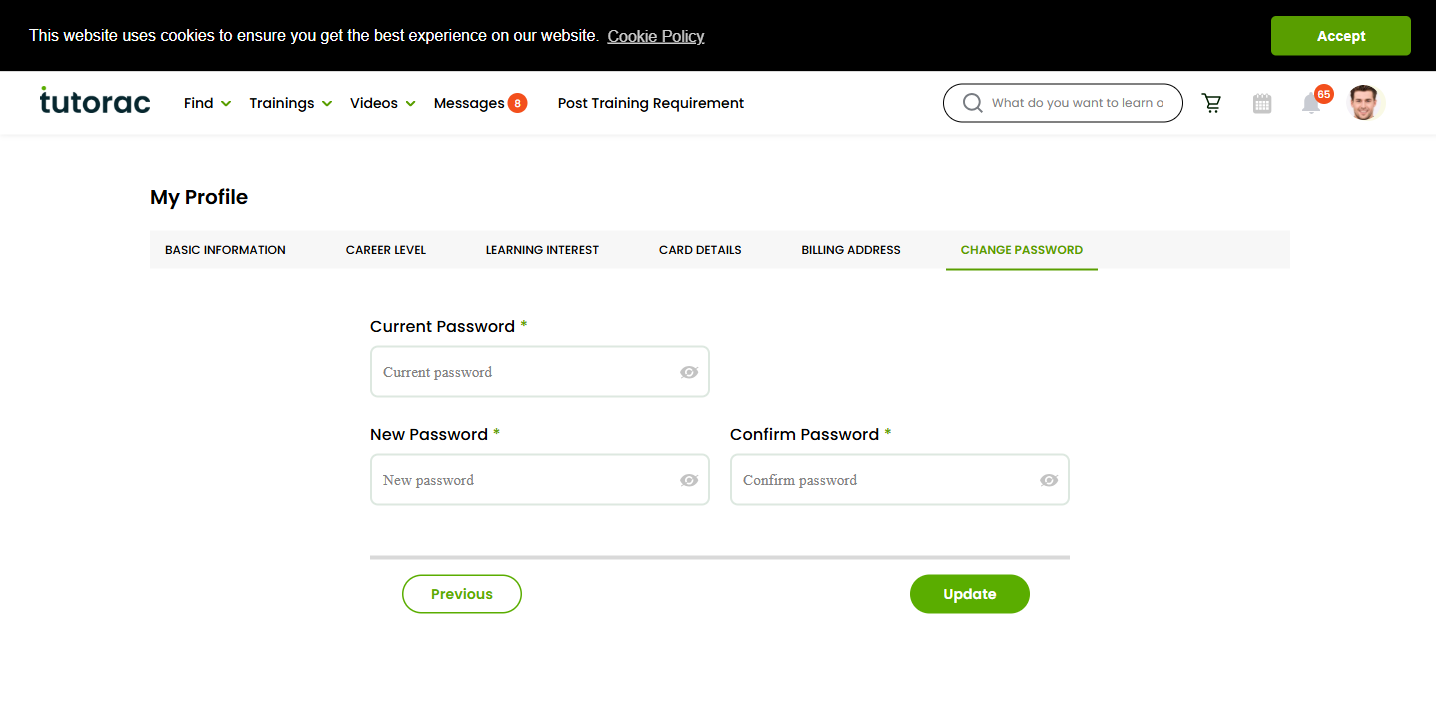
You can change your Tutorac password anytime under Profile → CHANGE PASSWORD. Full steps: How to change your password on Tutorac.
Secure the email you signed up with
Your email is the recovery key to your Tutorac account — password resets, billing receipts, and security alerts all go there. If that mailbox is compromised, your Tutorac account effectively is too.
- Use a strong unique password on your email account itself.
- Turn on two-factor authentication (2FA) on the email provider (Gmail, Outlook, etc.) if available.
- Be wary of forwarding rules you didn’t set up — attackers sometimes silently forward your email elsewhere.
Never share OTPs or codes
Any one-time password (OTP) or verification code — sent by SMS, email, or an authenticator app — is for you only. Tutorac will never call, message, or email asking you to read an OTP back to them. Nor will any legitimate company.
If you receive an OTP you didn’t request, it may mean someone is trying to access your account or password-reset flow. Don’t share it, don’t click any links in the same message, and consider changing your Tutorac password as a precaution.
Recognise phishing
Phishing is the most common way accounts get hijacked. Watch for:
- Sender domain mismatch. A real Tutorac email comes from a tutorac.com address.
tutorac-support.io,tutorac.help-mail.com, or any free-mail address claiming to be Tutorac is phishing. - Suspicious links. Hover over a link before clicking; if it points to
tutoracc.com,tutorac.payments-now.net, or any URL that isn’ttutorac.com/tutorac.org, don’t click. - Urgent or threatening tone. “Your account will be deleted in 1 hour”, “Verify now or lose access”. Real account actions don’t happen on countdowns.
- Requests to confirm password or card. Tutorac never emails asking you to type or send these details.
- Attachments you didn’t expect. Don’t open them.
When in doubt, ignore the email and sign in directly via your browser at tutorac.com (or tutorac.org for non-India accounts). Anything important will be visible inside your account — you don’t need the email’s link.
What never to share with a tutor
- Your Tutorac password (or password to any account).
- OTPs or 2FA codes.
- Full card number, CVV, expiry date.
- Net-banking username / password / transaction PINs.
- Government IDs (PAN / Aadhaar / SSN / passport) unless a verified, official Tutorac process requires it.
- Remote-access invitations (TeamViewer, AnyDesk, etc.) — no legitimate tutor needs control of your computer to teach.
Tutors don’t need any of these to teach you. If they ask, decline, end the conversation, and report them.
Devices and public Wi-Fi
- Sign out from shared devices (a friend’s laptop, a cyber-cafe, a hotel business centre).
- Don’t save your password in someone else’s browser.
- On public Wi-Fi (airports, cafes), prefer using mobile data or a trusted VPN for anything involving sign-in or payments.
- Keep your OS and browser updated — security patches close known attack paths.
Review your account regularly
- Glance at your dashboard once a week — do you recognise every active batch and every recent payment?
- Check the email associated with your account — is it still correct?
- Open the Notifications page now and then — anything you didn’t expect?
Catching anything off early makes recovery far easier than discovering it months later.
FAQs
Does Tutorac have two-factor authentication?
Tutorac may use email-based or OTP-based verification on certain flows (sign-up, password reset). Strengthen the security around your email account too, since email is your recovery channel.
I use Google / LinkedIn sign-in. Is that more secure than a password?
Generally yes — especially if your Google or LinkedIn account has 2FA enabled. You inherit those providers’ security and don’t introduce a new password to guard. The trade-off is that if that provider account is lost, your Tutorac access is too.
My phone was lost / sold. Should I do anything?
Yes — from another device, sign in to Tutorac and change your password (this forces a sign-out on the lost phone). Also reset the password on the email account associated with Tutorac, and on any password manager.
I got an SMS from “Tutorac” with a payment link. Should I pay?
Almost certainly phishing. Tutorac payments only happen inside your Training Batch’s payment tab when you’re signed in via your browser. Ignore SMS links; sign in directly and check there.
How do I know if my account has been accessed by someone else?
Common signals: notifications you didn’t generate, contracts or batches you didn’t accept, password changes you didn’t make, profile fields you didn’t update. If you see any of these, go to the next article: What to do if you suspect your account is compromised.
Related articles
- How to change your password on Tutorac
- Avoid scams: always communicate and pay through Tutorac
- How to report a tutor or content issue on Tutorac
Last updated: 29 May 2026