Author: tutorac

  • Tracking your progress: reports and alerts

    Two tabs in your training batch help you stay on top of your live course: Reports shows how you’re progressing, and Alerts keeps you informed of updates. This article explains how to use both.

    In this article

    The Reports tab

    Open your batch from My Training Batches and go to the Reports tab. It gives you a summary of how you’re progressing through the course — a useful check-in between sessions and a record you can look back on once the course is complete. Your tutor sees this too, so it helps you both stay aligned on pace and progress.

    The Alerts tab

    The Alerts tab collects important updates for the batch — things like schedule changes, new quizzes or assignments, and other notifications from your tutor. Checking it regularly means you won’t miss anything that affects your next session or a task that’s due.

    Staying on track

    • Glance at Alerts when you open your batch, so you catch updates early.
    • Use Reports to see how you’re tracking and where to focus next.
    • Cross-check the Curriculum and Sessions tabs to plan ahead.
    • If something looks off or you’re falling behind, message your tutor early through the Messages tab.

    FAQs

    My Reports tab looks empty — why?

    Reports build up as your course progresses. Early on, or before your first sessions and tasks, there may be little to show. Check back as you move through the curriculum.

    Are alerts the same as my account notifications?

    The Alerts tab is specific to that training batch. You may also receive broader notifications at the account level, but batch alerts keep course-specific updates in one place.

    Will I be told about schedule changes?

    Schedule changes typically appear in the Alerts tab, and your tutor may also message you. It’s good practice to check both before each session.


    Related articles

    Last updated: 3 June 2026

  • Following your curriculum and milestones in a live batch

    Your live course follows a curriculum — the plan of topics you’ll work through — and is paid for in milestones tied to your progress. This article explains how to follow your curriculum and how it connects to milestones.

    In this article

    Following your curriculum

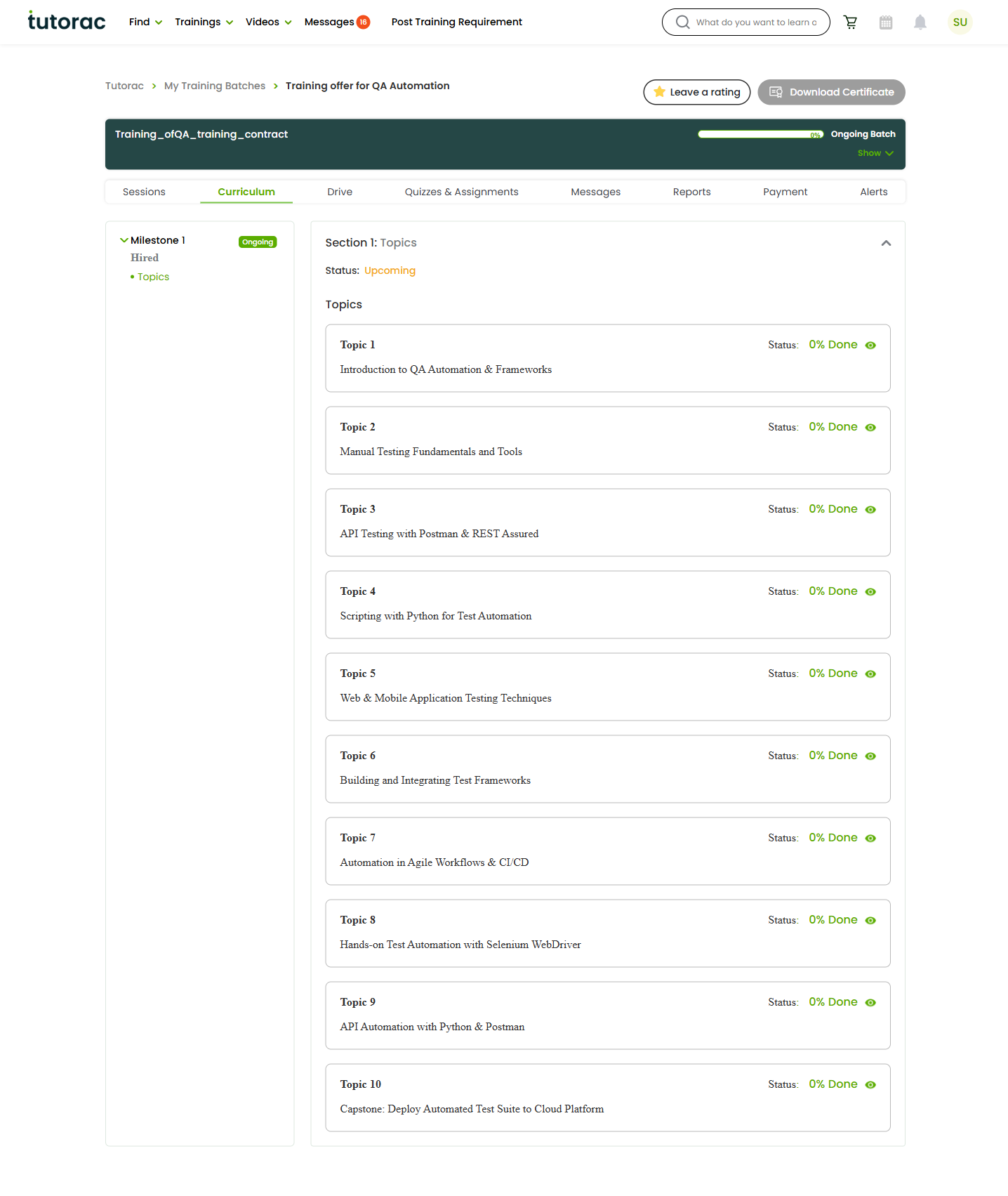
    Open your batch and go to the Curriculum tab. It lays out the topics and structure your tutor has planned for the course, so you can see what’s been covered and what’s coming up. Use it to prepare for sessions and to revise between classes.

    The Curriculum tab of a Tutorac training batch showing the planned course topics

    If the Curriculum tab is empty, your tutor may not have added it yet — it often appears after your first session or planning discussion.

    How milestones fit in

    Live courses are paid in milestones — agreed portions of the training that are funded up front and released as each portion is completed. The curriculum is what you learn; milestones are how that learning is paid for, step by step. You manage milestones and invoices on the Payment tab of your batch.

    For the full detail on how milestones work and how to release a payment, see the dedicated guides below.

    Keeping track of progress

    Between the Curriculum tab (what you’re covering), the Reports tab (how you’re tracking), and the Payment tab (milestone status), you always have a clear picture of where you are in the course.

    FAQs

    Can I change the curriculum?

    The curriculum is set by your tutor, but it’s meant to serve your goals. If you’d like to adjust the focus or pace, raise it with your tutor through the Messages tab.

    Do I have to release a milestone before the next topic?

    Milestones are released as agreed portions of work are completed. The exact arrangement depends on the milestones you set up when enrolling. See the milestone guides above for details.

    What if the course is going faster or slower than planned?

    Talk to your tutor. Pace is flexible in one-to-one training, and your tutor can adjust the plan. The Reports tab helps you both see how things are tracking.


    Related articles

    Last updated: 3 June 2026

  • Joining and attending your live sessions on Tutorac

    Your live sessions are the heart of a live course. This article shows where to find your scheduled classes and how to join and get the most out of each session.

    In this article

    Finding your sessions

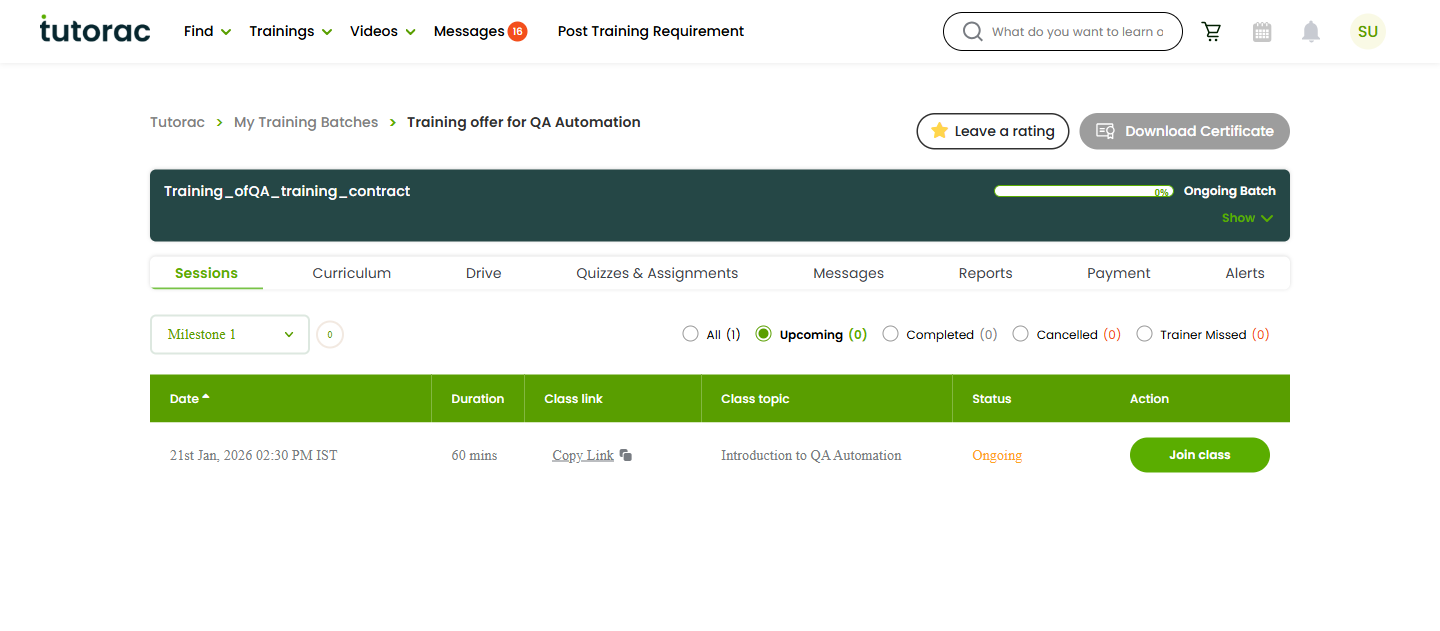
    Open your batch from My Training Batches and go to the Sessions tab. Here you’ll see your scheduled classes — both upcoming and past — along with their date and time.

    The Sessions tab of a Tutorac training batch listing scheduled live classes

    Joining a live session

    When a session is due, open the Sessions tab and join the class from there at the scheduled time. Join a couple of minutes early so you’re settled before the tutor begins. If you can’t find the option to join, refresh the page close to the start time — some sessions only become joinable shortly before they begin.

    Getting ready for class

    • Use a stable internet connection and a quiet space.
    • Check your microphone, speakers, and camera beforehand.
    • Have any materials from the Drive tab or your notes ready.
    • Review the Curriculum tab so you know what the session will cover.

    After a session

    Past sessions stay listed on the Sessions tab for reference. Your tutor may follow up with quizzes or assignments, share files in the Drive, or update the curriculum — check those tabs and your Alerts after class.

    FAQs

    What if I miss a session?

    Message your tutor through the batch’s Messages tab as soon as possible. Tutors can often reschedule or help you catch up. Don’t leave it until the next class.

    Can I join from my phone?

    You can access your batch from a mobile browser, but for live sessions a device with a reliable connection, microphone, and screen space generally gives the best experience.

    The join option isn’t showing — what should I do?

    Refresh the Sessions tab close to the start time. If it still doesn’t appear, message your tutor so they can check the session, or contact support@tutorac.com.

    Are sessions recorded?

    That depends on your tutor. If a recording is available, it will typically be shared through the batch. Don’t record sessions yourself without the consent of everyone involved.


    Related articles

    Last updated: 3 June 2026

  • Your Tutorac training batch dashboard explained

    When you enrol in a live course, Tutorac creates a training batch — your all-in-one workspace for that course. This article tours the batch dashboard and explains what each tab is for, so you always know where to find things.

    In this article

    Opening your training batch

    Go to My Training Batches from your student account. You’ll see every course you’ve enrolled in, with its status (such as Ongoing, Completed, or Cancelled). Select a batch to open its dashboard, where the tools are organised into tabs along the top.

    The batch tabs explained

    Sessions

    Your scheduled live classes. This is where you see upcoming and past sessions and join a class when it’s time.

    The Sessions tab of a Tutorac training batch showing scheduled live classes

    Curriculum

    The structured plan of topics your course covers. You can follow along to see what’s been covered and what’s coming next.

    The Curriculum tab of a Tutorac training batch listing the course topics

    Drive

    Shared files and resources for the course — materials your tutor uploads, and anything shared within the batch.

    Quizzes & Assignments

    Tasks set by your tutor to test and reinforce your learning. You complete and submit them here.

    Messages

    Your conversation with the tutor for this batch, kept on-platform so everything stays in one place.

    Reports

    Your progress in the course — a summary of how you’re tracking against the curriculum and tasks.

    Payment

    The milestones for your course, their payment status, and your invoices. This is where you release milestone payments as work is completed.

    Alerts

    Notifications and important updates for the batch, so you don’t miss schedule changes or new tasks.

    FAQs

    Why can’t I see a particular tab or item?

    Some tabs only show content once your tutor adds it — for example, the Curriculum or Quizzes & Assignments tab may be empty until the tutor sets things up. Check back after your first session.

    Where do I find my invoices?

    Open the batch and go to the Payment tab. Each completed milestone shows its payment status and a corresponding invoice.

    Does a completed or cancelled batch still appear?

    Yes. Past batches remain under My Training Batches with their status shown, so you can revisit sessions, files, and reports later.


    Related articles

    Last updated: 3 June 2026

  • Live Courses on Tutorac: an overview

    Live Courses on Tutorac are real-time, tutor-led training sessions — you learn directly with a tutor on a schedule, rather than watching pre-recorded videos. This overview explains how live courses work, how they differ from video courses, and what your learning journey looks like from start to finish.

    In this article

    What live courses are

    A live course is structured, scheduled training delivered by a tutor in real time. You and your tutor agree on what you’ll cover, when sessions happen, and how the training is paid for in milestones. Once you’ve enrolled, everything for that course lives in a training batch — your dedicated workspace for that engagement.

    One-to-one vs group training

    Live courses come in two formats:

    • One-to-one — private sessions with the tutor focused entirely on you, with pacing and topics tailored to your goals.
    • Group — you learn alongside other students in the same batch, usually at a set schedule and shared curriculum.

    Both formats use the same training batch tools — sessions, curriculum, quizzes, and progress tracking.

    Live courses vs video courses

    The key difference is real-time interaction:

    • Live courses — scheduled sessions with a tutor, two-way interaction, a curriculum tailored to the batch, and milestone-based payment. Best when you want guidance, feedback, and accountability.
    • Video courses — pre-recorded lessons you watch at your own pace, any time, with no scheduling. Best for self-paced, independent learning.

    Your live learning journey

    A typical live course follows these stages:

    1. Find and enrol — you find a tutor or training and enrol, agreeing the scope, schedule, and milestones.
    2. Your batch is created — a training batch appears under My Training Batches with all your tools in one place.
    3. Attend sessions — you join live sessions with your tutor on the agreed schedule.
    4. Follow the curriculum and milestones — you work through topics, complete quizzes and assignments, and release milestone payments as work is completed.
    5. Complete the course — once all milestones are done, the batch is marked completed and you can review your reports.

    Where you manage everything

    All your live courses live under My Training Batches in your student account. Open any batch to find its sessions, curriculum, shared files, quizzes and assignments, messages, progress reports, payments, and alerts — each on its own tab. The next articles in this section walk through each of those areas.

    FAQs

    How do I enrol in a live course?

    See How to enrol in a Live Course on Tutorac for the step-by-step process.

    Can I switch between one-to-one and group?

    The format is set when you enrol, based on the training you choose. If you want a different format, you can look for another training or discuss options with the tutor before enrolling.

    Do I need any special software to attend?

    Live sessions are joined from your training batch. Make sure you have a stable internet connection and a device with a working microphone and (where needed) camera. Specific joining details are shown on the Sessions tab of your batch.

    How do payments work for live courses?

    Live courses are paid in milestones — you release payment as agreed portions of the training are completed. See Understanding milestones on Tutorac.


    Related articles

    Last updated: 3 June 2026

  • Acceptable Use Policy for Tutorac learners

    The Acceptable Use Policy explains how you may — and may not — use the Tutorac website, services, and course content. Following it keeps the platform secure and fair for every learner and tutor.

    In this article

    How you may use Tutorac

    Tutorac is for your own learning. You may browse courses, book and attend live training, buy or subscribe to video courses, message tutors about your learning, and access the materials provided as part of what you’ve purchased — all for personal, non-commercial educational use.

    What’s prohibited

    To protect the platform and its users, you must not:

    • Share your account or let someone else use your login.
    • Copy, download, re-sell, or redistribute course videos or materials.
    • Record or share live sessions without the consent of everyone involved.
    • Scrape, crawl, or use bots to extract data from the platform.
    • Attempt to hack, disrupt, overload, or bypass the security of the site.
    • Upload malware or harmful code, or attempt to gain unauthorised access.
    • Use Tutorac for anything unlawful or to infringe someone else’s rights.
    • Circumvent payments or platform fees by arranging deals off-platform.

    Course content and intellectual property

    Course videos, materials, and resources belong to the tutors who created them or to Tutorac. When you buy or subscribe, you get a personal licence to access and learn from that content — not ownership of it. You may not reproduce, publish, or distribute it. This protects the tutors whose work you’re learning from.

    Consequences of misuse

    Misusing the platform can lead to removal of access to content, suspension, or permanent closure of your account. Activities such as piracy, hacking, or unlawful use may also be reported to the relevant authorities. Where misuse causes loss, you may be held responsible.

    FAQs

    Can I share my account with a friend or family member?

    No. Accounts are for individual use. Sharing your login breaches the Acceptable Use Policy and can put your account and payment details at risk. Each learner should have their own account.

    Can I download course videos to watch offline?

    Course content is provided for streaming within the platform for your personal learning. Copying, downloading, or redistributing it isn’t permitted unless a specific feature explicitly offers it.

    Is it okay to reuse what I learned in my own work?

    Yes — applying the skills and knowledge you gain is the whole point. What’s restricted is copying or redistributing the actual course materials, videos, or content themselves.

    What should I do if I spot a security issue?

    Please report it to support@tutorac.com rather than testing or exploiting it. Responsible reporting helps keep everyone safe.


    Related articles

    Last updated: 3 June 2026

  • Community Guidelines for Tutorac learners

    Tutorac brings learners and tutors together, and our Community Guidelines keep that space respectful, safe, and productive for everyone. This article explains what’s expected of you as a learner and what isn’t allowed.

    In this article

    Why we have guidelines

    The Community Guidelines set the standard for how people treat each other on Tutorac. They protect learners and tutors alike, so everyone can focus on learning without harassment, fraud, or disruption.

    What’s expected of you

    • Be respectful — treat tutors and other users professionally and courteously.
    • Communicate clearly — be honest about your goals and responsive about scheduling.
    • Honour your commitments — attend the sessions you book and pay for completed milestones as agreed.
    • Keep activity on-platform — book, message, and pay through Tutorac so you stay protected.
    • Respect privacy — don’t share other people’s personal information or session content without permission.

    What’s not allowed

    • Harassment, bullying, hate speech, or discrimination of any kind.
    • Threats, abusive language, or intimidating behaviour.
    • Fraud, scams, or misrepresenting who you are.
    • Spam, advertising, or soliciting users for unrelated purposes.
    • Sharing or recording sessions without the consent of those involved.
    • Attempting to take payments or arrangements off-platform to avoid fees or protections.

    Reporting a problem

    If someone behaves inappropriately, you can report it. Use the reporting or block options available in Messages, or email support@tutorac.com with details and any evidence (such as message screenshots). Reports are handled confidentially.

    Consequences of violations

    Depending on the severity, breaking the guidelines can lead to a warning, removal of content, restriction of features, or suspension and closure of your account. Serious violations — such as harassment, fraud, or threats — can result in immediate removal from the platform.

    FAQs

    What should I do if a tutor behaves inappropriately?

    Stop the interaction, and report it through Messages or to support@tutorac.com. Include details so the team can investigate. Your safety comes first.

    Why can’t I move communication or payments off Tutorac?

    Keeping everything on-platform protects you — your payments, milestone protections, and dispute support all rely on the activity happening through Tutorac. Off-platform arrangements remove those protections.

    Will the other person know I reported them?

    Reports are handled confidentially. The team reviews the situation without disclosing who raised the report.

    Can I record my live sessions?

    Only with the consent of everyone involved. Recording or sharing a session without permission breaks the guidelines and may breach privacy laws.


    Related articles

    Last updated: 3 June 2026

  • Tutorac Privacy Policy: how your data is handled

    Tutorac’s Privacy Policy explains what personal information we collect, how it’s used, and the choices you have. This article is a plain-language summary for learners; the full Privacy Policy is the authoritative document.

    In this article

    What information is collected

    To provide the service, Tutorac collects information such as:

    • Account details — your name, email, phone number, and profile information.
    • Payment information — processed securely to complete your purchases (card details are handled by payment processors, not stored by Tutorac in full).
    • Usage data — how you interact with the platform, such as courses viewed and sessions attended.
    • Communications — messages you send through the platform and to support.

    How your information is used

    Your information is used to:

    • Provide and operate the service — creating your account, processing payments, and delivering courses and live training.
    • Connect you with tutors and training relevant to your goals.
    • Communicate with you about bookings, payments, and support requests.
    • Keep the platform safe and prevent fraud or abuse.
    • Improve the product and your experience.

    When information is shared

    Tutorac does not sell your personal information. It is shared only as needed to run the service, for example:

    • With the tutors you engage, so they can deliver your training (such as your name and relevant booking details).
    • With payment processors to complete transactions.
    • With service providers that help operate the platform, under appropriate safeguards.
    • Where required by law or to protect the rights and safety of users.

    Your choices and rights

    Depending on your location, you may have rights over your personal data. In general you can:

    • Access and update your account information from My Profile.
    • Manage communication preferences for marketing messages.
    • Request deletion of your account and associated data, subject to records Tutorac must keep for legal reasons.
    • Control cookies through the cookie banner and your browser settings.

    To make a privacy request, email support@tutorac.com.

    Reading the full Privacy Policy

    This is a summary for convenience. The complete Privacy Policy — including the full detail on data retention, international transfers, and your legal rights — is published on Tutorac and linked in the footer of every page. The full policy always takes precedence over this summary.

    FAQs

    Does Tutorac store my full card details?

    Payments are handled by secure payment processors. Tutorac doesn’t store your complete card number; processors handle the sensitive parts of the transaction.

    Can tutors see my personal information?

    Tutors you engage can see the information needed to deliver your training, such as your name and booking details. They don’t get access to your payment details.

    How do I delete my account and data?

    Email support@tutorac.com to request account deletion. Some information may be retained where Tutorac is legally required to keep it (for example, transaction records).

    How do I manage cookies?

    Use the cookie banner shown on the site and your browser’s privacy settings. The full cookie details are described in the Privacy/Cookie Policy linked in the footer.


    Related articles

    Last updated: 3 June 2026

  • Tutorac Terms of Service: what learners should know

    When you create a Tutorac account, you agree to our Terms of Service — the agreement that governs how you use the platform. This article explains, in plain language, what the Terms cover and what they mean for you as a learner. It’s a summary for convenience; the full Terms of Service is the binding document.

    In this article

    What the Terms of Service are

    The Terms of Service (also called the Terms of Use or User Agreement) is the contract between you and Tutorac. It sets out the rules for using the website and services, the responsibilities of both you and Tutorac, and what happens if something goes wrong. It applies whenever you browse, book training, buy a course, or otherwise use the platform.

    When you accept them

    You accept the Terms of Service when you create an account and continue to accept them each time you use Tutorac. If you don’t agree with the Terms, you shouldn’t use the platform. Tutorac may update the Terms from time to time, and continued use after an update means you accept the revised version.

    What the Terms cover for learners

    For learners, the Terms typically address areas such as:

    • Your account — keeping your login secure and your details accurate, and being responsible for activity on your account.
    • Payments — how you pay for live training, video courses, and subscriptions, and that prices are tax-inclusive.
    • Using the platform — acceptable behaviour and the things you must not do.
    • Content and intellectual property — that course materials belong to their owners and are provided for your personal learning.
    • Cancellations and refunds — the rules that apply when a booking or purchase is cancelled.
    • Disputes — how disagreements are handled.
    • Account suspension — when access may be limited or removed for policy violations.

    Several of these topics have their own dedicated help articles (for example, payments, cancellations, and safety), which explain the day-to-day details.

    Reading the full Terms

    This article is a plain-language summary only. The complete, binding Terms of Service is published on Tutorac and linked in the footer of every page. If anything in this summary appears to differ from the full Terms, the full Terms always take precedence. If you have a question about a specific clause, email support@tutorac.com.

    FAQs

    Do I have to read the whole Terms of Service?

    We recommend it. This summary highlights the key points, but the full document is what legally applies. It’s worth reading before you make your first booking or purchase.

    Will I be told if the Terms change?

    Tutorac updates the Terms from time to time and the current version is always available in the page footer. Continuing to use the platform after a change means you accept the updated Terms.

    What happens if I break the Terms?

    Depending on the issue, Tutorac may warn you, restrict certain features, or suspend or close your account. Serious violations — such as fraud or abuse — can lead to immediate removal.

    Where can I get help understanding a clause?

    Email support@tutorac.com and describe the part you’d like clarified. Note that support can explain how something works but can’t provide legal advice.


    Related articles

    Last updated: 3 June 2026

  • How taxes work on Tutorac

    On Tutorac, any applicable taxes are already included in the price you see. Whether you’re paying for a live training batch, a video course, or a subscription, the amount displayed is the amount you pay — there’s no extra tax added at checkout. This article explains how that works.

    In this article

    Prices include tax

    Every price shown on Tutorac is tax-inclusive. Any applicable tax (such as GST) is already built into the figure you see for:

    • Live training batches and their milestone payments.
    • Single video course purchases.
    • Video course subscription plans and renewals.

    This means the price on the course, the subscription plan, or the contract is the complete, final amount — nothing further is added on top.

    No extra charges at checkout

    Because tax is already included in the displayed price, you won’t see a separate tax row added during checkout. The total at checkout matches the price you saw on the course, plan, or contract. There are no surprise charges and nothing extra to calculate.

    Where to find your invoices

    Every payment generates an invoice you can keep for your records. Where you find it depends on what you paid for:

    • Video course subscriptions — open My Subscription from the profile menu. Your subscription invoices are listed there.
    • Live training batches — open My Training Batches, select the batch, and go to the Payment section. Invoices for your milestone payments are available there.

    FAQs

    Will I be charged tax on top of the price shown?

    No. The price you see already includes any applicable tax. The amount you pay at checkout is the same as the price displayed — there’s no additional tax line.

    Do I need to enter a tax number to pay?

    No. As a learner you don’t need to provide any tax identification number to pay for training, courses, or subscriptions. Just complete the payment as normal.

    Why don’t I see a separate tax amount?

    Tutorac uses tax-inclusive pricing for learners, so the tax is already part of the figure shown. This keeps pricing simple — the number you see is the number you pay.

    Where can I get a record of my payment?

    For a subscription, open My Subscription from the profile menu. For a live training batch, open the batch under My Training Batches and check the Payment section. Both keep invoices for the payments you’ve made.

    Who do I contact about a billing or payment question?

    Email support@tutorac.com with your invoice number and a short description of your question, and the team will help.


    Related articles

    Last updated: 2 June 2026