All Contracts & Offers is the one place where every training agreement you’ve sent and every offer you’ve received comes together. This article shows where to find it and what each part does.
In this article
Where to find it
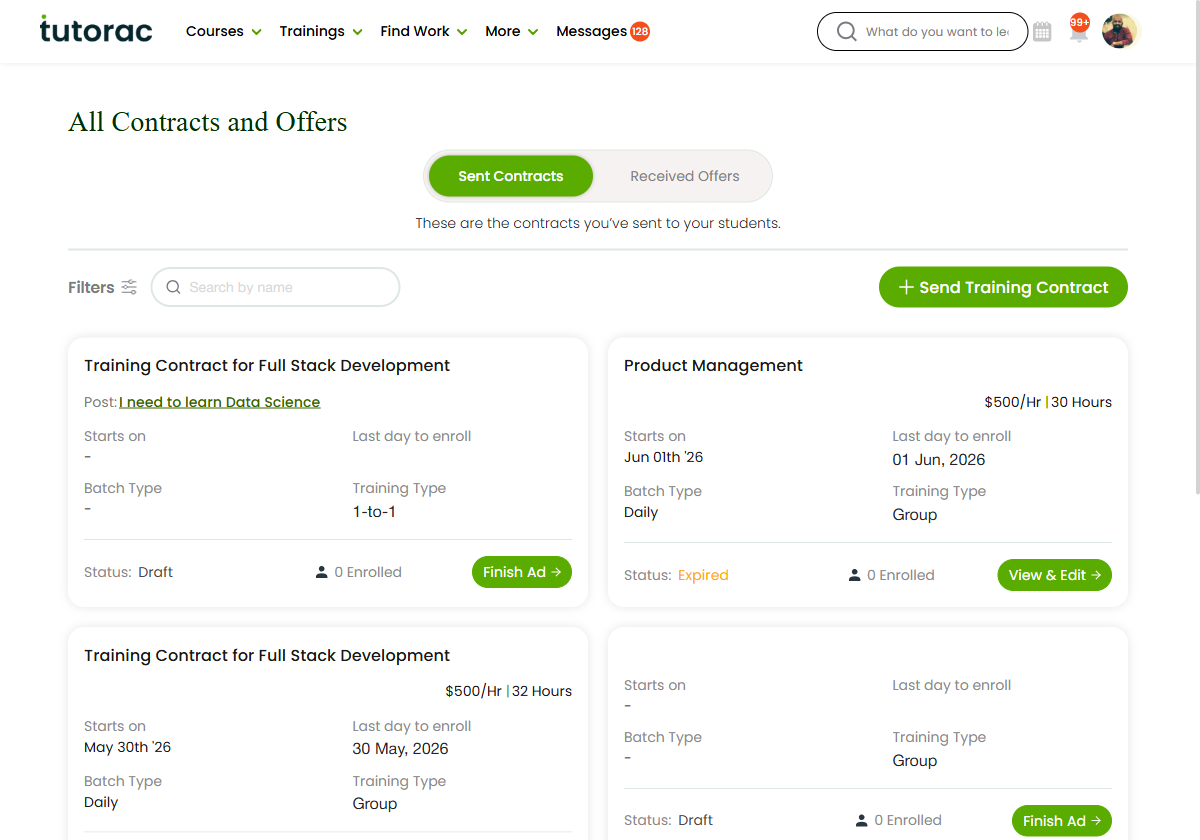
Open the Trainings menu in the top navigation and choose All Contracts. The page opens on the Sent Contracts view, and you can switch between the two tabs at the top whenever you like.
The two tabs
- Sent Contracts — the Training Contracts you’ve created and sent to learners.
- Received Offers — the offers learners have sent to you.
Every agreement appears as its own card, so you can scan everything in progress at a glance. Each tab is covered in detail in “Sent Contracts: contracts you’ve sent” and “Received Offers: offers learners send you.”
Filtering and statuses
Use Filters at the top of either tab to narrow the list by Status when you have a lot of records — for example Active, Draft, Expired, Completed or Cancelled. Every card also carries its own status label, so you can see where it stands without opening it.
How it relates to My Proposals
My Proposals tracks the proposals you submit on training jobs. All Contracts & Offers is the dedicated view of what those conversations become — the contracts you send and the offers you receive. For the concepts behind them, see the Offers & Contracts section.
FAQs
Where do I open All Contracts & Offers?
From the top navigation: Trainings → All Contracts. It opens on the Sent Contracts tab.
What’s the difference between the two tabs?
Sent Contracts are agreements you sent to learners. Received Offers are offers learners sent to you.
Can I filter the lists?
Yes — use Filters → Status on either tab.
Related articles
- Sent Contracts: contracts you’ve sent
- Received Offers: offers learners send you
- How the contract workflow works
- Understanding offers and Training Contracts
Last updated: 17 June 2026