A tutor’s first proposal is rarely their final one. Price, scope, schedule, and milestones are all negotiable on Tutorac, and a short, respectful back-and-forth in chat often produces a much better fit. This guide covers what to negotiate, how to ask for changes, and when to move forward.
In this article
- Why negotiate a proposal?
- What you can negotiate
- Open the chat from a proposal
- How to ask for changes
- Message templates you can copy
- When the tutor sends a revised proposal
- Use a Free Demo or Meet Now to close the gap
- When to walk away
- After you agree
- FAQs
Why negotiate a proposal?
Most proposals are written from a snapshot of your Training Requirement — the tutor hasn’t spoken to you yet. A short conversation usually clarifies your level, your real outcome, and your constraints, and the tutor responds with a sharper offer. Negotiating isn’t about haggling on price; it’s about getting to a clear, mutually agreed scope before you hire.
What you can negotiate
- Scope and outcomes — what exactly you’ll cover, what you’ll know or be able to do at the end.
- Hours and duration — total estimated hours, weeks of training, weekly pace.
- Price and price type — hourly rate, fixed price, switching between hourly and fixed where it fits the scope better.
- Milestones and deliverables — weekly checkpoints, a capstone project, recorded sessions, written notes.
- Schedule — days of the week, time slot, timezone, start date.
- Teaching approach — lectures, hands-on labs, projects, doubt-clearing sessions, mock interviews.
- Tools and platform — specific software, datasets, sandbox environments.
Things that are not typically negotiable: Tutorac platform terms, Payment Protection (escrow), and the tutor’s safety policies.
Open the chat from a proposal
From My Training Posts → Proposals, find the tutor whose proposal you want to discuss. On their proposal card, click the Message button (the one with the chat-bubble icon, often showing an unread badge if the tutor has already messaged you).
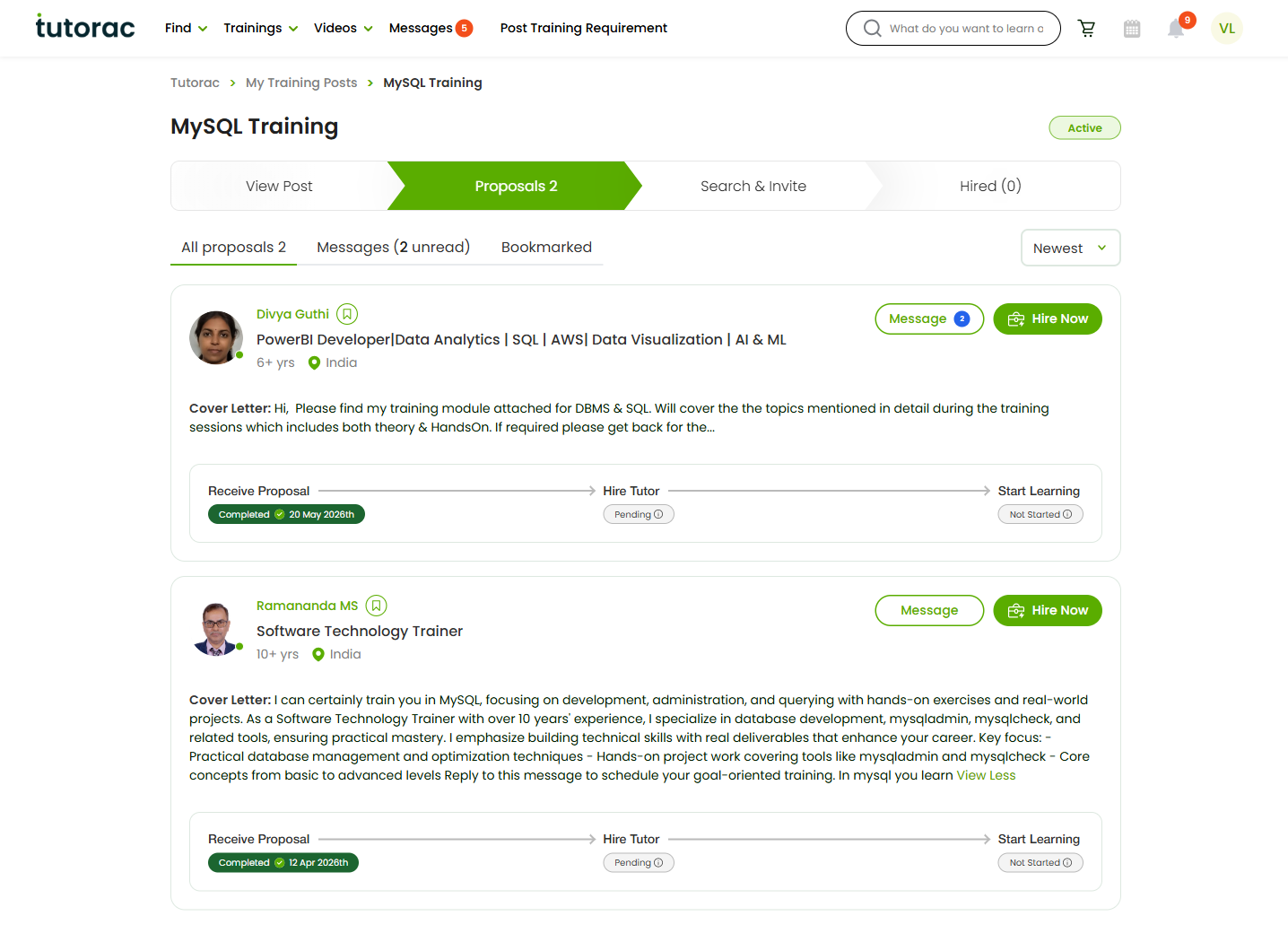
Tutorac opens the conversation in the Messages hub, with the original proposal pinned in the right-hand panel. From the chat thread you can: send text messages, share files, click View Proposal to re-read the full offer, Schedule a Free Session, click Meet Now for an instant video call, or click Hire Now once you’re aligned. (See How to message a tutor before hiring on Tutorac for a tour of the Messages hub.)
How to ask for changes
A useful negotiation message has four parts:
- What you like about the proposal — sets a constructive tone.
- The change you want — specific, not vague (“30 hours total”, not “a bit shorter”).
- Why — one line of context (budget cap, deadline, real-world project).
- A clear ask — for example, “Could you send a revised proposal?”
Keep messages short. Two or three crisp paragraphs is plenty.
Message templates you can copy
Lower the price within scope
“Hi [name], thanks for the detailed proposal — the syllabus looks great. My ceiling for this is ₹X total. Could we make this work by trimming [topic Y] or moving to a fixed price? Happy to keep the core scope and capstone project the same. Could you send a revised proposal?”
Tighten scope and reduce hours
“Hi [name], great proposal. I’d like to focus this engagement on [specific outcome] only — we can skip [topic Z] for now. I’m guessing that takes us to around 20 hours instead of 40. Could you send a revised proposal at that scope?”
Switch to fixed price for a defined outcome
“Hi [name], I’d prefer a fixed price for this since the outcome is clear — clearing the AZ-900 certification. Could you send a fixed-price proposal with weekly milestones and a final mock test?”
Adjust schedule and start date
“Hi [name], the rate works for me. I can only do weekday evenings (IST 7–9 pm) and I’d like to start in two weeks. Does that fit your calendar? If yes, please send a revised proposal with that schedule.”
Ask for stronger milestones
“Hi [name], I like the syllabus. Could the proposal include weekly milestones — for example, end of week 2: build a working CRUD app; end of week 4: deploy to AWS — so we both have clear checkpoints? Please send a revised proposal with those.”
When the tutor sends a revised proposal
If the tutor agrees to revise, a new proposal arrives in your chat thread as a system notification (you’ll also see it on the Proposals page for that Training Requirement). Two ways to confirm:
- Click View Proposal from the chat to compare the new version to the previous one side by side.
- Read carefully — check that all the changes you discussed are reflected (price, hours, scope, schedule, milestones).
If anything is still off, message back with the remaining gap. If everything matches, you’re ready to hire (see How to hire a tutor and start a Training Contract).
Use a Free Demo or Meet Now to close the gap
Text negotiation works for most things, but sometimes a 10-minute call clears up more than ten messages. Two options:
- Schedule a Free Demo — a 30-minute slot the tutor offers at no cost so you can see them teach a sample concept and align on approach. (See How to book a Free Demo Session.)
- Meet Now — the instant video call button in the chat thread, useful for a quick scope or scheduling chat without booking a slot.
After the call, message back a short summary of what you both agreed — that becomes the brief for the revised proposal.
When to walk away
Negotiation works only when both sides are willing to move. If a tutor:
- Doesn’t respond after a polite nudge,
- Holds firm on a price well outside your range without offering a scope change,
- Doesn’t address the specific change you asked for, or
- Pushes you to communicate or pay outside Tutorac,
… politely pass and look at other proposals. You can also Search & Invite additional tutors for the same Training Requirement (see How to send an Invite to a tutor). There is no obligation to hire from your current shortlist.
After you agree
- Click Hire Now on the revised proposal. Tutorac opens the Send Training Offer page with the agreed terms.
- Confirm Title, Price type, Schedule, Description, and Terms.
- Click Proceed to Payment — funds move into Tutorac Payment Protection (escrow).
- The tutor accepts and a training batch is created so you can start sessions.
Keep the chat thread open during training — it’s also where you’ll discuss any scope or schedule adjustments later.
FAQs
Is haggling on price acceptable?
Yes — respectful price negotiation is normal on Tutorac. The cleanest framing is to tie price to scope: ask for a lower price and propose what comes out of scope to match it. That feels fair to the tutor and usually gets a yes.
How many times can a tutor revise their proposal?
As many times as it takes to agree. Each new proposal lands in the chat thread and on the Proposals page, so you can always compare versions before hiring.
Can I negotiate with multiple tutors at once?
Absolutely. Many learners run two or three negotiations in parallel and hire whoever lands the best fit. It’s also polite, once you hire one, to send a short note to the others letting them know you’ve gone with someone else.
What if the tutor only agrees on a call?
That’s fine for the conversation, but make sure the agreement ends up in writing — either as a revised proposal or summarised in chat — before you hire. Written terms protect both sides.
Can I switch from Hourly to Fixed price (or vice versa)?
Yes. Ask in chat and have the tutor send a revised proposal in the new format. Hourly suits open-ended training; fixed suits a clearly bounded outcome like a certification or a defined project.
Do negotiations show up to anyone else?
No. The chat thread is private between you and that one tutor. Other tutors who proposed for the same Training Requirement can’t see your messages or the revised proposals.
Should I share my budget upfront?
Your budget range is already on the Training Requirement, so tutors see it. In chat, stating a firm ceiling (when you have one) speeds things up — tutors can quickly decide whether they can fit and what to trim if needed.
Related articles
- How to view and compare proposals from tutors on Tutorac
- How to message a tutor before hiring on Tutorac
- How to hire a tutor and start a Training Contract on Tutorac
- More Training Requirements & Proposals articles
Last updated: 21 May 2026