Before you hire, get on a free 30-minute call with the tutor. This guide walks you through booking a Free Demo Session on Tutorac — finding the tutor, picking a date and time, confirming, and what happens next.
In this article
- Why book a Free Demo?
- Step 1: Find a tutor on Tutorac
- Step 2: Click Book a Free Session
- Step 3: Pick your time zone, date, and time
- Step 4: Confirm the booking
- What happens after you book
- FAQs
Why book a Free Demo?
A Free Demo is a no-cost 30-minute one-on-one session with a tutor. It lets you experience their teaching style, discuss your learning goals, and confirm fit before you spend money. Tutorac recommends doing a Demo before hiring a tutor for any meaningful course or training contract.
Step 1: Find a tutor on Tutorac
Sign in to Tutorac and open the Find Tutors page (tutorac.com/find-tutors). Use the Category, Location, and Language filters to narrow the list. Read the tutor cards to shortlist someone whose skills, experience, and hourly rate fit your needs. (See How to find a tutor on Tutorac for the full walkthrough.)
Step 2: Click Book a Free Session
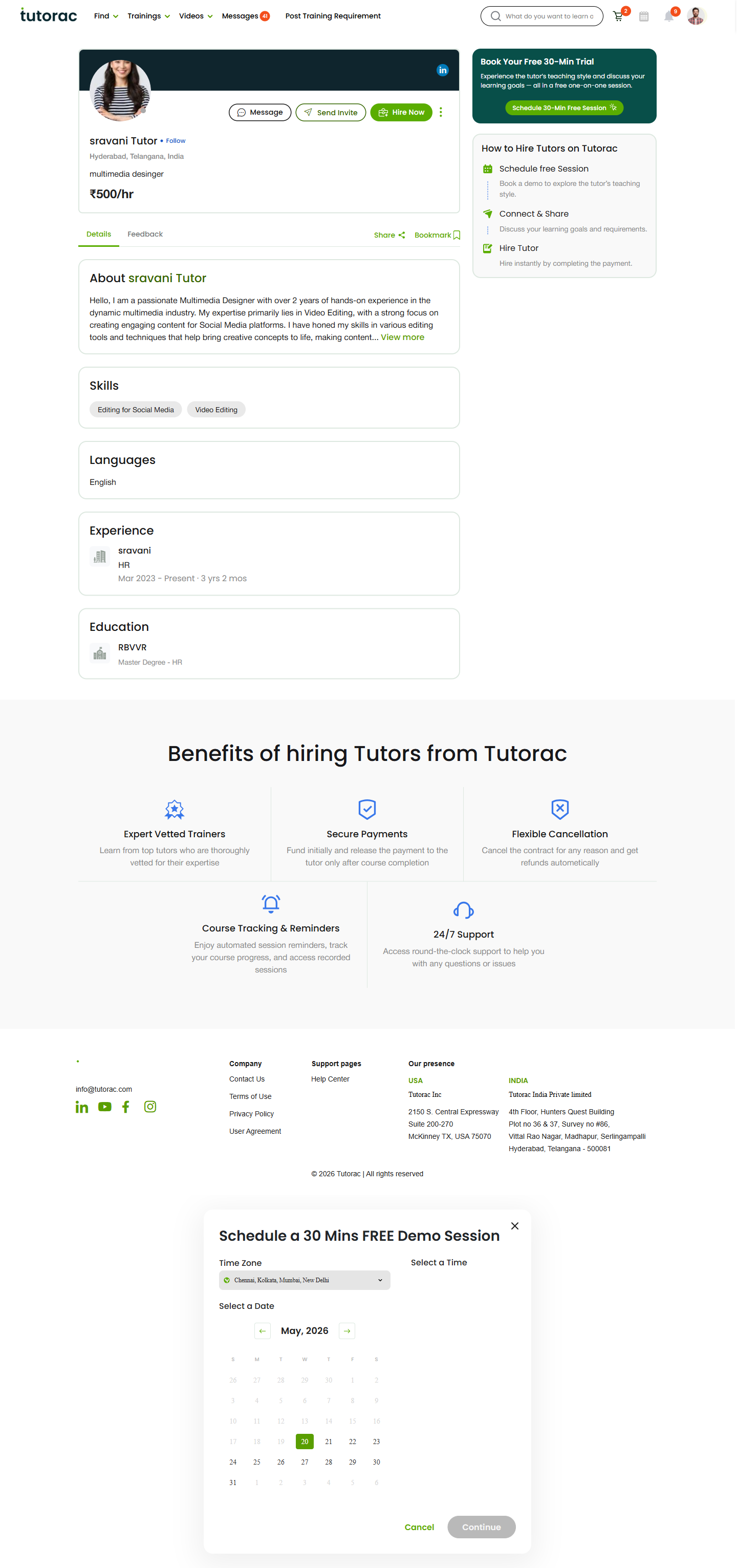
On the tutor card you want, click the green Book a Free Session button. Tutorac opens the tutor’s full profile page in a new tab with the Schedule a 30 Mins FREE Demo Session modal already open.
You can also reach the same modal directly from any tutor’s profile page by clicking the Schedule 30-Min Free Session button in the Book Your Free 30-Min Trial panel.
Step 3: Pick your time zone, date, and time
Inside the booking modal, fill in three things in order:
- Time Zone — Pre-filled from your learner profile (for example, Chennai, Kolkata, Mumbai, New Delhi for India). Change it here if you’ll attend from another zone for this session.
- Select a Date — Pick a date from the calendar. Dates the tutor is unavailable on are greyed out. Use the arrows to move between months.
- Select a Time — After you pick a date, the available 30-minute time slots appear. Click the one that works for you.
All times shown reflect your selected time zone, so what you see is the actual time you need to be online.
Step 4: Confirm the booking
Click the green Continue button. Tutorac shows a confirmation screen with the tutor’s name, date, time, and time zone. You may be asked to add a short note about what you want to discuss — this helps the tutor prepare. Confirm to lock in the slot. If you change your mind, click Cancel to close the modal.
What happens after you book
- You receive an email confirmation at your registered address with the session date, time, and a join link.
- The session appears in your Dashboard under upcoming sessions, with a Join button that becomes active a few minutes before start time.
- The tutor is notified at the same time and can decline or propose a different slot if there is a clash.
- Tutorac sends an automatic reminder before the session.
- After the Demo, you can move forward by clicking Hire Now on the tutor’s profile, sending a Send Invite for a custom proposal, or simply messaging the tutor to discuss next steps.
FAQs
Is the Demo Session really free?
Yes. The Demo is a no-cost 30-minute call. You will only pay if you later choose to hire the tutor or buy a course from them.
How many Free Demos can I book?
You can book one Free Demo per tutor. If you want to compare three tutors, book a Demo with each of them.
Can I reschedule or cancel a Demo?
Yes. Go to your Dashboard, open the upcoming session, and use the Reschedule or Cancel option. Please give the tutor as much notice as possible; cancelling at the last minute is poor practice and may affect future booking availability.
What if the time slots I want aren’t available?
The calendar only shows the tutor’s actual availability. If nothing works, click Cancel and send the tutor a Message instead — they can often open up a special slot or recommend a different time.
Do I need any software for the Demo?
No special install. Tutorac uses an in-browser video call. Sign in to Tutorac, open your Dashboard, and click Join on the session card a few minutes before start time.
What should I cover in the Demo?
Treat it like an interview both ways. Share your background, your goal, and your preferred pace. Ask about the tutor’s syllabus, project work, recordings, doubt-clearing, and pricing for the full course. By the end of 30 minutes you should know if the tutor is the right fit.
Does the tutor have to accept my booking?
Time slots in the calendar reflect availability the tutor has already opened. Booking those slots is normally confirmed instantly, but the tutor may still need to acknowledge or propose an alternative if something has changed on their side. You’ll be notified either way.
Related articles
- How to find a tutor on Tutorac
- More Finding & Hiring Tutors articles
- How to set up your learner profile on Tutorac
- Pricing, Milestones & Discounts
Last updated: 20 May 2026