Knowing how to sign in and out and staying on top of your notifications keeps your account secure and ensures you never miss an opportunity. Here’s how.
In this article
Signing in
Go to the Tutorac sign-in page and enter your email and password to access your tutor dashboard. If you’ve forgotten your password, use the reset option on the sign-in page.
Logging out
To sign out, open the profile menu in the top-right and choose Log Out. Always log out on shared or public devices to keep your account secure.
Your notifications
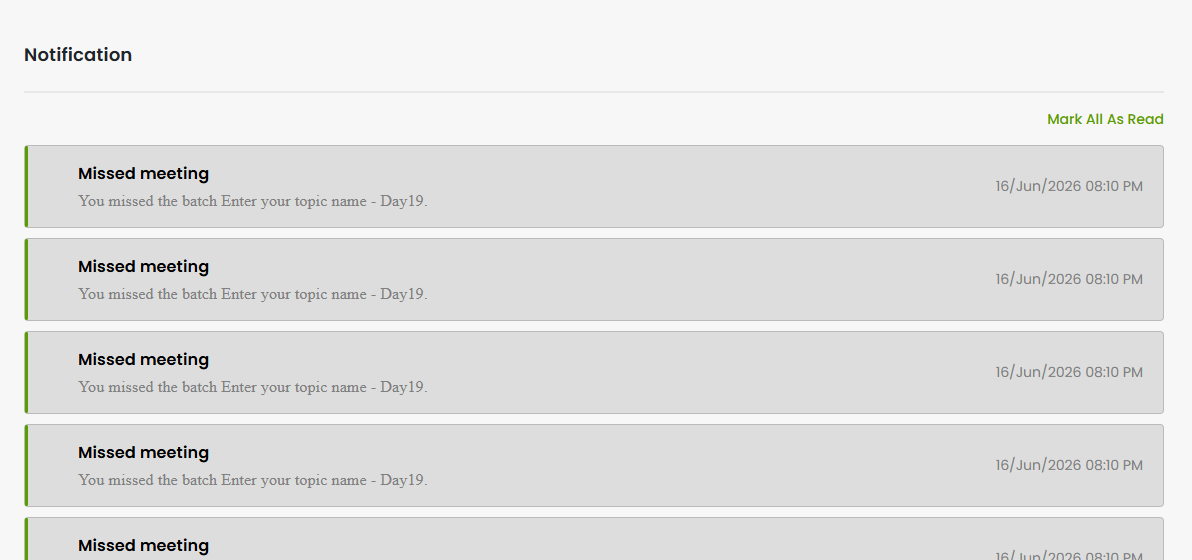
The notifications area (the bell icon in the top bar) alerts you to activity that needs attention — new training requirements, proposal updates, invitations, messages, and more. Open it to review recent alerts and act on anything time-sensitive.
Staying responsive
Responding quickly to invitations and messages helps you win more work and build a strong reputation. Check your notifications and Messages regularly, especially when you have active proposals or batches.
FAQs
Where is the log out option?
In the profile menu in the top-right, as Log Out.
Where do I see notifications?
Via the notifications (bell) icon in the top bar of your dashboard.
I forgot my password — how do I get back in?
Use the password-reset option on the sign-in page. If you’re still locked out, contact support@tutorac.com.
Related articles
- Managing your tutor account: settings overview
- Changing your password and keeping your account secure
- Closing your tutor account
Last updated: 8 June 2026