Tutorac protects both learners and tutors by holding payment in escrow and giving each side a clear, in-product way to back out. There are two cancellation flows depending on the state of your hire: Withdraw (before the tutor accepts) for a full refund, and Cancel class (after acceptance) where the refund follows a milestone-completion-percentage policy. This article gives you the big picture; the linked guides cover each flow step by step.
In this article
- The two cancellation flows at a glance
- Flow 1: Withdraw (pre-acceptance)
- Flow 2: Cancel class (post-acceptance)
- When the tutor is the one cancelling
- How the money flows
- FAQs
The two cancellation flows at a glance
- Withdraw — you used Hire Now on a tutor’s profile and the tutor hasn’t accepted yet (status: Awaiting Approval). You can pull the offer back at any time before they accept. Refund is always 100% because no work has started.
- Cancel class — the tutor has accepted, the batch exists (status: Upcoming or Ongoing), and a milestone is now in play. You cancel from the batch’s Payment tab. The refund follows the milestone-completion-percentage policy — how much you get back depends on how far the active milestone has progressed.
Whichever flow applies, you handle it yourself in the dashboard — there’s no Support ticket to file for routine cancellations. The step-by-step walkthrough for both flows is in How to cancel a hire or batch and get your refund on Tutorac.
Flow 1: Withdraw (pre-acceptance)
When you submit a hire, the offer goes into Awaiting Approval and the tutor has 2 days to respond. While in that state:
- You can withdraw the offer from Trainings > All Contracts > Sent Offers, then View Details > Withdraw.
- The Withdraw dialog asks for one of 8 reasons (sent by mistake, found another tutor, etc.).
- On confirmation, Tutorac shows “Offer Withdrawn… Your refund will be processed” and starts the full refund to your original payment method.
- If the tutor doesn’t respond within 2 days, the offer expires and refunds automatically.
Because nothing has started, no milestone-completion bracket applies — you get all of it back.
Flow 2: Cancel class (post-acceptance)
Once the tutor accepts, the contract becomes a Training Batch with one or more milestones. Tutorac releases payment to the tutor milestone by milestone — not all at once. When you cancel here:
- You open Trainings > My Training Batches > View Details > Payment and click Cancel class next to the active milestone.
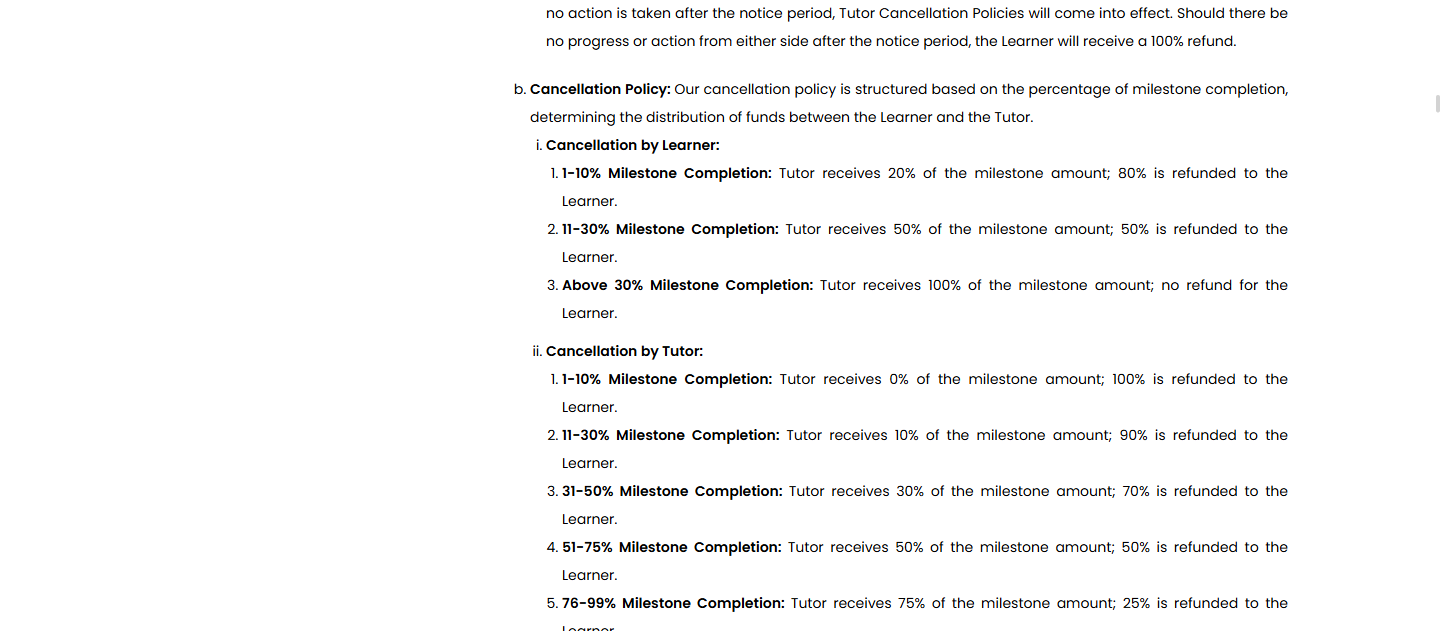
- The refund preview is calculated from the active milestone’s completion percentage at the moment you cancel:
- 0% → 100% refund of that milestone
- 1–10% → 80% refund
- 11–30% → 50% refund
- Above 30% → 0% refund
- Future milestones in the same batch that you funded but hadn’t started yet are refunded in full.
- Already-released milestones aren’t refundable — that money has left escrow.
Full table and edge cases: Cancellation policy: when you (the learner) cancel.
When the tutor is the one cancelling
Tutors only have the post-acceptance flow (there’s no “withdraw” for them once they’ve agreed). If they cancel, the bracket is tilted in the learner’s favour — the further the milestone has progressed, the larger the tutor’s share they have to forfeit. See Cancellation policy: when your tutor cancels for the full table.
Tutors also can’t cancel a batch they’ve simply gone quiet on — if a tutor stops showing up, the Tutorac dormancy policy kicks in and protects you.
How the money flows
- Escrow — every milestone you fund is held by Tutorac, not paid to the tutor up-front.
- Release — you click Release Payment on a milestone when you’re satisfied; only then does the tutor receive it.
- Refund — whatever Tutorac is still holding for that hire (per the policy) returns to your original payment method automatically.
- Currency — ₹ INR for India accounts; $ USD for accounts elsewhere. The refund comes back in the same currency you paid in.
- Timing — Tutorac initiates immediately; your bank/card issuer usually credits within 5–10 business days.
FAQs
Why is there no “Cancel” button next to my hire?
You’re probably looking in the wrong place. If the tutor hasn’t accepted yet, the button is labelled Withdraw on the contract details page (Sent Offers). If the tutor has accepted, it’s Cancel class inside the batch’s Payment tab.
Will the tutor know I cancelled?
Yes, in both flows. Withdrawing closes the offer and notifies the tutor. Cancelling a class marks the batch as Cancelled and notifies them with the reason you provided.
Can I cancel only a single class within a batch?
No — cancellation always operates at the batch level. If you just want to skip a session, talk to your tutor on Messages and reschedule.
What if the tutor and I disagree about the milestone percentage?
Raise it through Tutorac Support before cancelling. They can review the milestone activity log and adjust the percentage if there’s clear evidence in either direction.
Related articles
- How to cancel a hire or batch and get your refund on Tutorac
- Cancellation policy: when you (the learner) cancel
- Cancellation policy: when your tutor cancels
- Tutorac dormancy policy
Last updated: 29 May 2026