Most learners on Tutorac end up with more than one Training Requirement open at a time — one for SQL, one for AWS, one for a certification prep. This guide covers how to organize, track, and close out multiple Training Requirements without dropping anything.
In this article
- Why you’d run multiple Training Requirements
- The My Training Posts hub
- One Training Requirement per goal
- Use the status tabs to triage
- Name each requirement clearly
- Read the four counters at a glance
- Cross-tutor scheduling across requirements
- Budget management across requirements
- Close requirements when they’re done
- When to consolidate vs. split
- FAQs
Why you’d run multiple Training Requirements
- Different topics — SQL with one tutor, AWS with another, Python with a third.
- Different levels in the same area — a beginner Python requirement plus an advanced Pandas / NumPy requirement.
- Different outcomes — a certification track plus a hands-on project track.
- Different timeframes — one starting immediately, another in 1–3 months.
- Job-search prep — one requirement for interview practice, another for a skills brush-up.
The My Training Posts hub
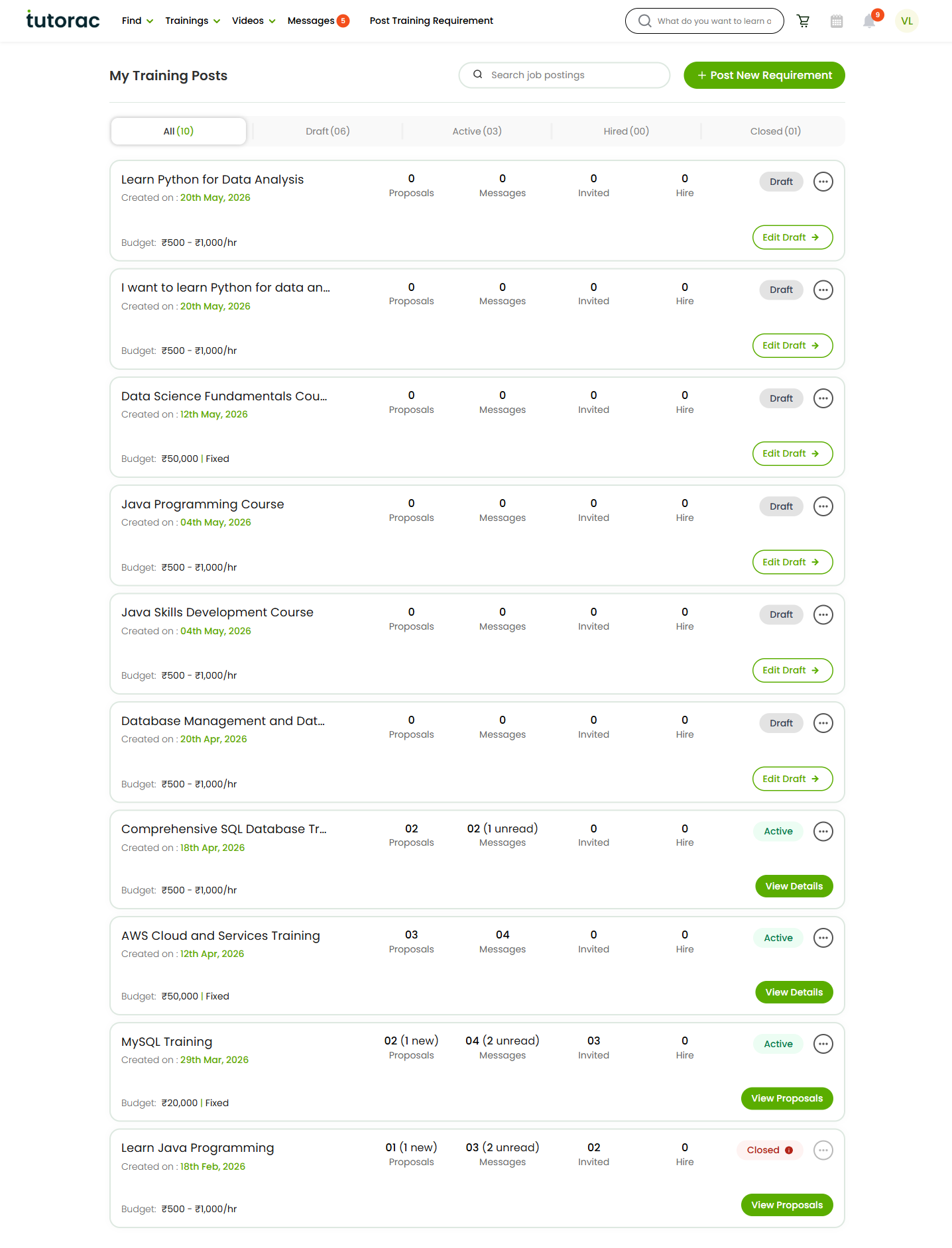
Everything lives at Trainings → My Trainings Posts (tutorac.com/student/job-post). It’s the single page where every requirement you’ve created is listed as a card, with status tabs at the top and a primary action on each card.
One Training Requirement per goal
The cleanest rule of thumb: one Training Requirement per distinct goal. If two needs share the topic, level, schedule, and outcome, they belong in one requirement. If anything material differs, they belong in two.
- Different topic (SQL vs. AWS) → two requirements.
- Different level (beginner Python vs. advanced Pandas) → two requirements.
- Different schedule windows (weekday evenings vs. weekends) and you want separate tutors → two requirements.
- Same topic, same level, same schedule, you just want to test the market → one requirement.
One-goal-per-requirement keeps proposals comparable. When a Training Requirement tries to cover too much, tutors quote vague proposals because the scope itself is vague.
Use the status tabs to triage
The status tabs at the top of My Training Posts are your daily triage view:
- All — overview of everything you’ve created.
- Draft — requirements you haven’t posted yet. Either finish and post, or delete if no longer needed.
- Active — the one to check daily. New proposals, messages, and invites land here.
- Hired — requirements where you’ve hired at least one tutor; training is in progress.
- Closed — archived, read-only. Useful for reference (past briefs, past tutor contacts).
A daily two-minute scan of the Active tab is usually enough to keep things moving.
Name each requirement clearly
When you have three or four requirements live, titles do the work of telling them apart. Good titles include the topic, the level, and any defining constraint:
- “MySQL Training — Beginner, weekday evenings”
- “AWS Certified Cloud Practitioner — Exam prep in 6 weeks”
- “Python for Data Analysis — Intermediate, real-world project”
- “Java Backend — SDE-1 interview prep”
Generic titles like “Python help” become hard to tell apart on the hub and attract less specific proposals.
Read the four counters at a glance
Every card shows Proposals, Messages, Invited, and Hire counters. Use them as a daily checklist:
- Proposals (new) — new tutors who’ve responded; open the proposals page and skim.
- Messages (unread) — tutors waiting on a reply; respond before they go cold.
- Invited — how many tutors you’ve invited; bump it up if Proposals is low.
- Hire — how many tutors you’ve hired against this requirement.
When all four counters on a card are zero and the post is older than a few days, it’s a signal to revise the brief or invite tutors directly.
Cross-tutor scheduling across requirements
Running two or three training contracts in parallel means juggling schedules. A few practical habits:
- Reserve a separate time slot per tutor — for example, Tutor A on Mon/Wed evenings, Tutor B on Tue/Thu. Don’t double-book.
- Keep timezones consistent with your profile timezone so the hour you see in chat matches the hour on your calendar.
- Block buffer time — back-to-back sessions across tutors leave no room for absorbing what you just learned.
- Use Tutorac Messages for any reschedule conversations. The chat thread is also the audit trail.
Budget management across requirements
Each Training Contract funds independently into Tutorac Payment Protection, so your spend across requirements doesn’t auto-pool. Two practical tips:
- Set a per-month learning budget across all your active contracts and use the budget range on each Training Requirement to enforce it.
- Prefer fixed-price contracts for predictable outcomes (certifications, defined projects) — they cap total spend. Use hourly contracts where scope is open-ended.
Close requirements when they’re done
Once you’ve hired the tutor you wanted, close the Training Requirement (with reason “All positions filled”). This stops new proposals and frees up your mental space — current applicants get notified, your existing hires are not affected, and the post moves to the Closed tab for future reference. See How to edit or close a Training Requirement.
Closing on time also keeps your Active tab clean — if your Active tab has ten cards but only two are real, you’ll miss the real ones.
When to consolidate vs. split
Consolidate (merge into one) when…
- Two requirements have the same topic, same level, and you’d be happy with one tutor for both.
- You posted a generic version first (e.g., “Python help”) and then a sharper one (“Python for Data Analysis”) — close the generic one and keep the sharp one.
- The two were posted to test the market and you only have bandwidth for one.
Split (post two) when…
- The scope keeps growing in chat and no single tutor is a great fit for all of it.
- You realise you want two different specialists (e.g., a SQL tutor and a Power BI tutor).
- One outcome is short-term (certification in 4 weeks) and the other is long-term (ongoing skill-building).
FAQs
Is there a limit to how many Training Requirements I can post?
Posting Training Requirements is free, and there is no hard cap. The practical limit is how many you can actually compare and follow up on — most learners find 2 to 4 active at once is the sweet spot.
Can I move a proposal from one Training Requirement to another?
Not directly. If a tutor proposed for the wrong requirement, message them and ask them to send a fresh proposal against the correct one (or send them an Invite to that requirement).
Can I hire the same tutor on two Training Requirements?
Yes. Each Training Requirement creates its own contract, so you can have two parallel contracts with the same tutor on different topics. Tutorac shows each contract separately under Trainings → All Contracts.
How do I keep track of unread messages across requirements?
Two places to watch: the Messages tab in the top nav (with a global unread count) and the Messages counter on each card in My Training Posts. Pick whichever flow you prefer — per-requirement or chronological across all.
My Active tab is getting cluttered. What should I do?
Close anything you’ve actually filled (reason: “All positions filled”) and anything where the goal is no longer relevant (reason: “Requirement was cancelled”). A clean Active tab makes the rest much easier to manage.
Can I reuse a closed requirement as the starting point for a new one?
Open the closed post via the Closed tab, copy its title, description, skills, and budget, then post a new Training Requirement with the same content (and revise where needed). A fresh post attracts new proposals faster than reopening would.
Should I tell each tutor about my other Training Requirements?
You don’t have to, but it can help when scope or scheduling depends on it — for example, “I’m also doing AWS in parallel, so let’s keep SQL sessions on Mon/Wed only.” Tutors appreciate the context.
Related articles
- How to post a Training Requirement on Tutorac
- How to view and compare proposals from tutors on Tutorac
- How to edit or close a Training Requirement on Tutorac
- More Training Requirements & Proposals articles
Last updated: 26 May 2026