A proposal is more than a price quote — it’s a structured offer the tutor sends in response to your Training Requirement. This guide breaks down every part of a Tutorac proposal so you know exactly what to read, what to compare, and what good looks like.
In this article
- What is a proposal on Tutorac?
- 1. Tutor header: name, headline, experience, location
- 2. Cover letter
- 3. Price and price type
- 4. Scope, hours, and duration
- 5. Schedule and start date
- 6. Milestones and deliverables
- 7. Attachments (if any)
- 8. Action buttons
- 9. Progress timeline
- What a strong proposal looks like vs. a weak one
- FAQs
What is a proposal on Tutorac?
A proposal is a tutor’s formal response to your Training Requirement. It bundles the tutor’s pitch, scope, price, schedule, and milestones into a single card on your Proposals page. You can have many proposals against one Training Requirement; comparing them well comes down to reading each section carefully.
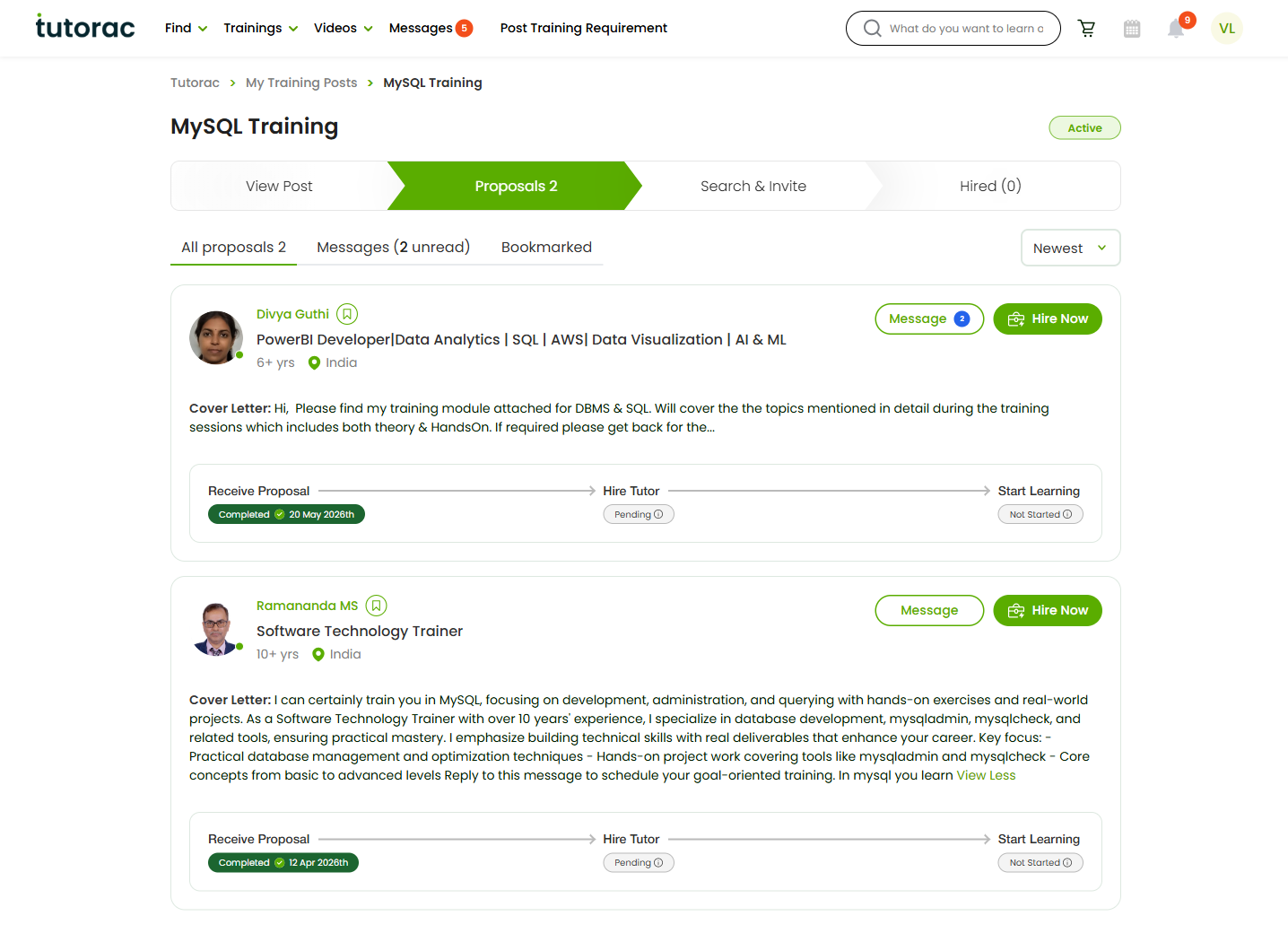
1. Tutor header: name, headline, experience, location
The top strip of each proposal card identifies the tutor:
- Name — clickable; opens the tutor’s full Tutorac profile in a new tab.
- Headline — the one-line specialisation the tutor wrote (e.g., “PowerBI Developer | Data Analytics | SQL | AWS”). Read this first to decide if their specialisation matches your need.
- Years of experience — total years working in the field (e.g., 6+ yrs, 10+ yrs).
- Location — country and sometimes city. Useful for timezone alignment.
Use the header to shortlist — not to decide. The cover letter and scope are where you actually evaluate fit.
2. Cover letter
The Cover Letter is the tutor’s pitch. It typically covers:
- How they understood your Training Requirement.
- What they propose to cover (a syllabus or outline).
- Their teaching approach — lectures, hands-on labs, projects, doubt-clearing, mock interviews.
- Why they’re a fit (relevant experience, similar engagements, specialisations).
- Any prerequisites or expectations.
Use the View More / View Less toggle to expand the full text. A strong cover letter quotes specifics from your requirement (your topic, level, outcome). A weak one is generic and could be sent to anyone.
3. Price and price type
Each proposal has a price expressed in one of two forms:
- Hourly rate (e.g., ₹700/hour) — you pay per hour of teaching. Best when scope is open-ended or evolving.
- Fixed price (e.g., ₹20,000 total) — one agreed amount for the entire engagement. Best when the outcome is clearly bounded (e.g., a certification, a defined syllabus, a finished project).
Tutors sometimes set their rate slightly above what they’ll actually accept — price is negotiable. Compare each tutor’s price against the budget range you posted on the Training Requirement. (See How to negotiate a proposal with a tutor.)
4. Scope, hours, and duration
Most proposals state an estimated number of hours and a duration (in weeks). On hourly proposals these drive the total cost; on fixed proposals they set the expected effort.
Watch for two patterns:
- Under-scoped — the price looks low but the hours are too few to actually deliver the outcome.
- Over-scoped — the hours and duration are inflated relative to what comparable proposals quote.
If hours feel off, raise it in the chat (“could you walk me through the 40 hours?”). A confident tutor can break their estimate down by topic.
5. Schedule and start date
The proposal usually states:
- Frequency — daily, weekly, weekend, or custom.
- Days of the week — for example, Mon – Wed – Fri.
- Time slot — a window (e.g., 7:00 – 9:00 pm IST) with the tutor’s timezone.
- Start date — immediately, within a week, in 1–3 months, or to be agreed.
Even if everything else is perfect, schedule mismatch is the most common reason a great tutor doesn’t work out. Verify your timezone overlap and your weekly availability against theirs before hiring.
6. Milestones and deliverables
The strongest proposals include milestones — concrete checkpoints with deliverables and dates. Typical examples:
- End of Week 1: SQL basics — CRUD on a sample database.
- End of Week 2: JOINs and aggregations — build a sales report.
- End of Week 4: Window functions — finish a real-world analytics project.
- Final: A capstone project the learner can put in a portfolio.
Milestones help both sides:
- You know what to expect each week.
- The tutor knows what to prepare.
- For fixed-price contracts, milestones determine when payments are released from Tutorac Payment Protection (escrow).
If a proposal has no milestones, ask the tutor in chat to add them — the proposal can be revised before you hire.
7. Attachments (if any)
Some tutors attach supporting documents alongside the proposal:
- A detailed syllabus or course outline.
- A sample lesson plan or recording link.
- Their CV or a project portfolio.
- References from previous Tutorac learners.
Click any attachment to preview or download. Attachments are a strong positive signal — they show the tutor invested time in your Training Requirement.
8. Action buttons
Every proposal card carries the same set of actions:
- Message — opens the chat thread with this tutor in the Messages hub. An unread badge appears when the tutor has sent something new.
- Hire Now — opens the Send Training Offer page so you can create a Training Contract. (See How to hire a tutor and start a Training Contract.)
- View More / View Less — expand or collapse the cover letter.
- Bookmark — mark this proposal so you can return to it via the Bookmarked filter at the top of the page.
9. Progress timeline
At the bottom of every card you’ll see a three-step progress tracker:
- Receive Proposal — Completed the moment the tutor sends the proposal.
- Hire Tutor — Pending until you click Hire Now and the tutor accepts the offer.
- Start Learning — Not Started until the first session is held.
The tracker is per-tutor, not per Training Requirement. You can have one tutor at Hire Tutor: Pending while another is at Start Learning: Not Started for the same Training Requirement.
What a strong proposal looks like vs. a weak one
Signs of a strong proposal
- References your topic, level, and outcome by name.
- Breaks scope into a clear week-by-week or topic-by-topic syllabus.
- Lists concrete milestones with deliverables.
- Names the teaching approach (labs, projects, mocks, recorded sessions).
- Quotes a price that maps cleanly to hours and outcomes.
- Suggests a realistic schedule with the right timezone.
- Includes an attachment or two with supporting material.
Signs of a weak proposal
- Generic cover letter that could have been sent to any learner.
- No specifics on scope — just “I can teach this end-to-end.”
- No milestones or deliverables.
- Price feels arbitrary — either far above or far below comparable proposals.
- Schedule is vague (“flexible” with no concrete time slot).
- Asks you to communicate or pay outside Tutorac — a red flag; politely decline and report if pushy.
FAQs
Can a proposal change after the tutor sends it?
Yes. The tutor can send a revised proposal based on chat negotiation. Each new version appears as a system notification in the chat thread and replaces the previous version on the Proposals page.
What if the proposal doesn’t show milestones?
Ask for them in the chat. Most tutors are happy to add weekly checkpoints — it’s in their interest too, especially on fixed-price contracts where milestones drive payments.
Are hours an estimate or a commitment?
On hourly contracts, hours are a planning estimate — you pay for actual hours taught. On fixed contracts, hours are an effort estimate — the total price is locked regardless.
How do I view the tutor’s full profile?
Click the tutor’s name in the proposal header. Tutorac opens their full profile in a new tab, with bio, skills, ratings, past trainings, and free-demo availability.
Is the price what I’ll actually pay?
On a hourly contract, your total depends on hours actually taught. On a fixed contract, the price is exactly what you’ll pay. In both cases, you pay into Tutorac Payment Protection, and funds are released to the tutor as milestones complete.
Can the tutor see I’ve read their proposal?
Tutors see when you reply to their chat or interact with their proposal (bookmark, hire), but they don’t get a read receipt for opening the card itself. You’re free to compare quietly before responding.
What’s the difference between a proposal and a Training Contract?
A proposal is the tutor’s offer — non-binding until you accept. A Training Contract is created when you click Hire Now and fund the offer through Payment Protection; that’s when the engagement officially starts.
Related articles
- How to view and compare proposals from tutors on Tutorac
- How to negotiate a proposal with a tutor on Tutorac
- How to hire a tutor and start a Training Contract on Tutorac
- More Training Requirements & Proposals articles
Last updated: 21 May 2026