Your skills decide which learners find you. This article shows how to set your teaching categories, sub-categories, and skills in the Skills section of your profile.
In this article
- Open the Skills section
- Select your categories
- Choose sub-categories
- Select your skills
- Save your changes
- FAQs
Open the Skills section
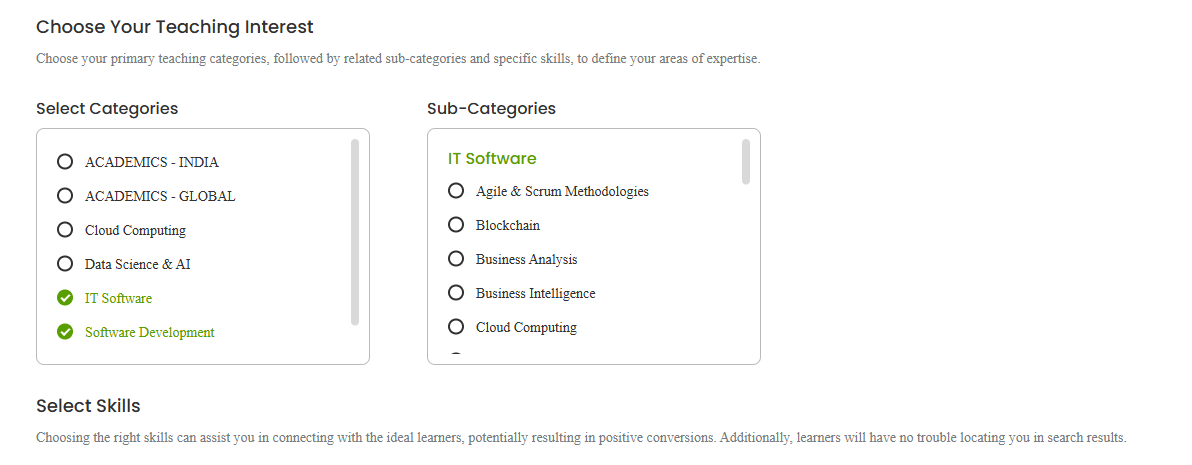
Go to My Profile from the top-right menu and open the Skills section. You’ll see the heading Choose Your Teaching Interest, where you define your areas of expertise.
Select your categories
Under Select Categories, choose your primary teaching categories — for example Cloud Computing, Data Science & AI, IT Software, Multimedia, Software Development, or Web Development. Pick the ones that genuinely match what you teach.
Choose sub-categories
Once you pick a category, its Sub-Categories appear. For example, under Web Development you’ll see options such as Backend Development, CMS, Front End Development, Fullstack Development, Progressive Web Apps, and Web Design. Select the sub-categories that fit your expertise.
Select your skills
Under Select Skills, choose the specific skills you teach (for example HTML, CSS, JavaScript, React, Node.js, SQL, and so on). As Tutorac notes on this page, choosing the right skills helps you connect with the ideal learners and makes you easier to find in search results, so be specific and accurate.
Save your changes
When you’re done, click Update to save. You can come back and refine your categories and skills any time as your offering grows.
FAQs
How many skills should I add?
Add the skills you can genuinely teach well. Enough to cover your expertise so learners can find you, but accurate — don’t list skills you can’t deliver.
Can I teach across more than one category?
Yes. You can select multiple categories and sub-categories if you genuinely teach across them.
Will updating my skills affect how I appear in search?
Yes — your categories and skills are a key part of how learners find you, so keeping them accurate and current helps the right learners reach you.
Related articles
- Setting up your tutor profile: an overview
- Completing your basic and professional information
- Reaching 100% profile completion and getting verified
Last updated: 8 June 2026