A complete, verified profile is what turns a new account into a tutor learners trust and can pay. This article shows how to finish your profile, add your bank details, get verified, and be ready to receive students.
In this article
- Work through your completion checklist
- Add your bank details
- Getting verified
- Check your public view
- Get ready to receive students
- FAQs
Work through your completion checklist
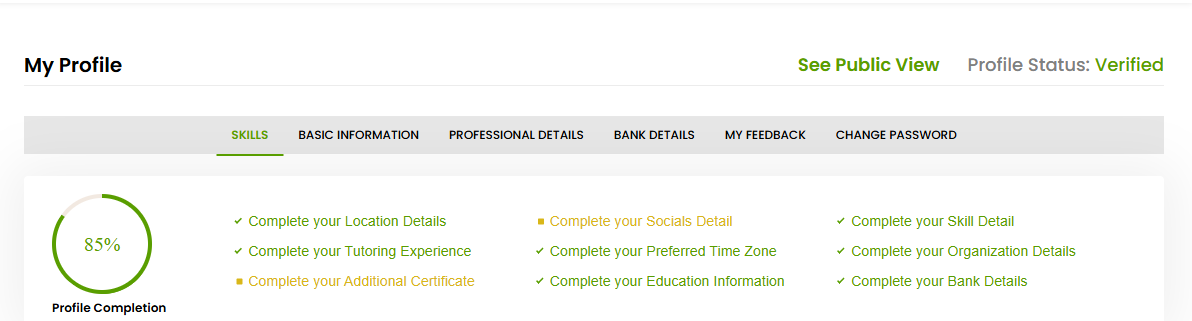
Your profile shows a Profile Completion percentage with a checklist of what’s still missing. Work through each item to reach 100%:
- Location details
- Socials detail
- Skill detail
- Tutoring experience
- Preferred time zone
- Organisation details
- Additional certificate
- Education information
- Bank details
As you complete each one, the percentage rises and the item drops off the list.
Add your bank details
Open the Bank Details section of your profile and add your payout details. This is how Tutorac pays your earnings, so completing it is essential before you start earning. For more on payouts, see the Earnings & Payouts section.
Getting verified
Your profile displays a Profile Status. Once your profile is reviewed and approved, the status shows as Verified. A verified status signals to learners that you’re a genuine, trusted tutor and helps you stand out. Keep your details accurate and complete to support verification.
Check your public view
Use the See Public View link to preview your profile exactly as learners see it. Review it once you’re near 100% so you know your public profile is complete and reads well.
Get ready to receive students
With your profile complete and verified, set your availability so learners can book you — use the View & Edit Your Availability option from your dashboard. From here you’re ready to find work, send proposals, and take on learners. See the Training Jobs & Proposals and Demo & Live Sessions sections for the next steps.
FAQs
Do I need 100% completion to get verified?
A complete, accurate profile gives you the best chance. Fill in every checklist item, especially your skills, professional details, and bank details.
Why do I need to add bank details?
Your bank details are how Tutorac pays your earnings. Without them, you can’t receive payouts.
How do I know when I’m verified?
Your profile’s Profile Status will show as Verified.
Related articles
- Setting up your tutor profile: an overview
- Completing your basic and professional information
- Choosing your teaching categories and skills
Last updated: 8 June 2026