Your profile is the foundation of everything you do as a tutor on Tutorac. This overview shows you where your profile lives, the sections it’s made of, and how to track your progress toward a complete, verified profile.
In this article
- Opening your profile
- The profile sections
- Profile completion
- Preview with See Public View
- Profile status and verification
- FAQs
Opening your profile
Open the profile menu in the top-right of any page and choose My Profile. This takes you to your tutor profile, where all of your details are organised into sections you can edit.
The profile sections
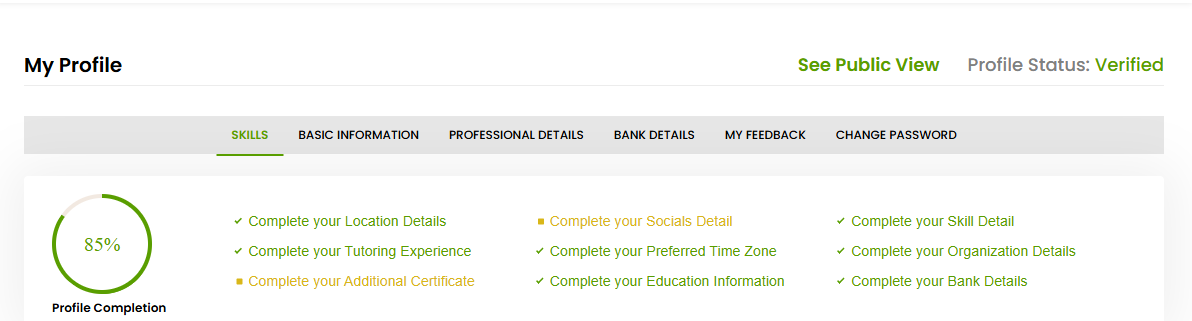
Your profile is split into these sections:
- Skills — the teaching categories, sub-categories, and skills that define your expertise.
- Basic Information — your personal and contact details, location, socials, and preferred time zone.
- Professional Details — your tutoring experience, education, certificates, and organisation details.
- Bank Details — the payout details Tutorac uses to pay your earnings.
- My Feedback — the reviews and feedback learners have left for you.
- Change Password — update your account password.
Profile completion
Your profile shows a Profile Completion percentage along with a checklist of what’s still missing — for example your location details, socials, skills, tutoring experience, preferred time zone, organisation details, certificates, education information, and bank details. Work through the checklist to reach 100%. A more complete profile helps you appear in more learner searches and builds trust.
Preview with See Public View
Use the See Public View link on your profile to see exactly how learners see you. Check it after making changes so you know your public profile reads the way you intend.
Profile status and verification
Your profile shows a Profile Status — once your profile is verified, it displays as Verified. Verification reassures learners that you’re a genuine, trusted tutor. See the Profile & Verification section for more on the verification process.
FAQs
Do I have to complete every section before I can teach?
The more complete your profile, the better. Skills, basic information, professional details, and bank details are the most important to fill in early so you can be found and paid.
Why does profile completion matter?
A complete profile helps you rank in learner searches, gives learners confidence, and unlocks a stronger public profile. The completion checklist tells you exactly what’s left.
Where do I see my reviews?
In the My Feedback section of your profile.
Related articles
- Choosing your teaching categories and skills
- Completing your basic and professional information
- Reaching 100% profile completion and getting verified
Last updated: 8 June 2026