Your live sessions are the heart of a live course. This article shows where to find your scheduled classes and how to join and get the most out of each session.
In this article
Finding your sessions
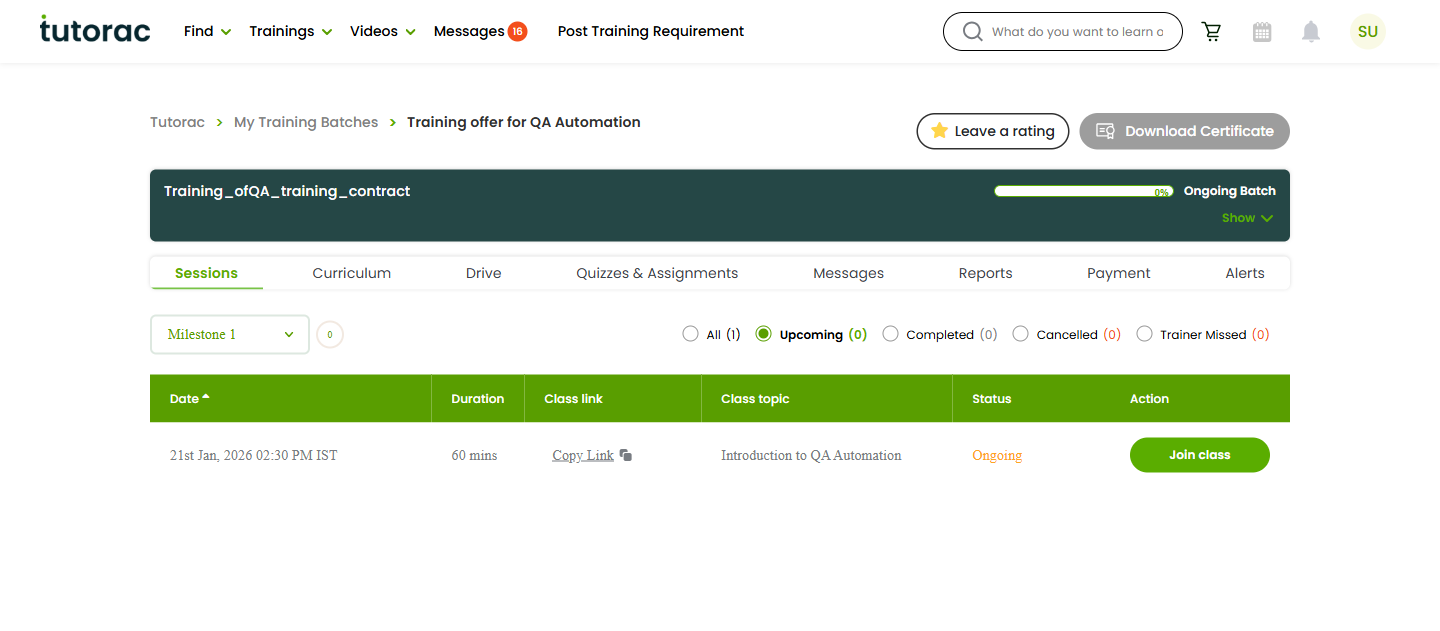
Open your batch from My Training Batches and go to the Sessions tab. Here you’ll see your scheduled classes — both upcoming and past — along with their date and time.
Joining a live session
When a session is due, open the Sessions tab and join the class from there at the scheduled time. Join a couple of minutes early so you’re settled before the tutor begins. If you can’t find the option to join, refresh the page close to the start time — some sessions only become joinable shortly before they begin.
Getting ready for class
- Use a stable internet connection and a quiet space.
- Check your microphone, speakers, and camera beforehand.
- Have any materials from the Drive tab or your notes ready.
- Review the Curriculum tab so you know what the session will cover.
After a session
Past sessions stay listed on the Sessions tab for reference. Your tutor may follow up with quizzes or assignments, share files in the Drive, or update the curriculum — check those tabs and your Alerts after class.
FAQs
What if I miss a session?
Message your tutor through the batch’s Messages tab as soon as possible. Tutors can often reschedule or help you catch up. Don’t leave it until the next class.
Can I join from my phone?
You can access your batch from a mobile browser, but for live sessions a device with a reliable connection, microphone, and screen space generally gives the best experience.
The join option isn’t showing — what should I do?
Refresh the Sessions tab close to the start time. If it still doesn’t appear, message your tutor so they can check the session, or contact support@tutorac.com.
Are sessions recorded?
That depends on your tutor. If a recording is available, it will typically be shared through the batch. Don’t record sessions yourself without the consent of everyone involved.
Related articles
- Your Tutorac training batch dashboard explained
- Following your curriculum and milestones in a live batch
- Live Courses on Tutorac: an overview
Last updated: 3 June 2026