Learning Interests tell Tutorac which technologies and skills you want to learn. The platform uses them to recommend the right tutors, and tutors use them to send you relevant training offers and invites.
In this article
- Where to find Learning Interests
- Pick your interests
- Add or remove an interest later
- Why your interests matter
- FAQs
Where to find Learning Interests
- Sign in to Tutorac.
- Click your avatar in the top right.
- Choose My Profile.
- In the left sidebar, click LEARNING INTEREST (URL:
/student/profile/skills).
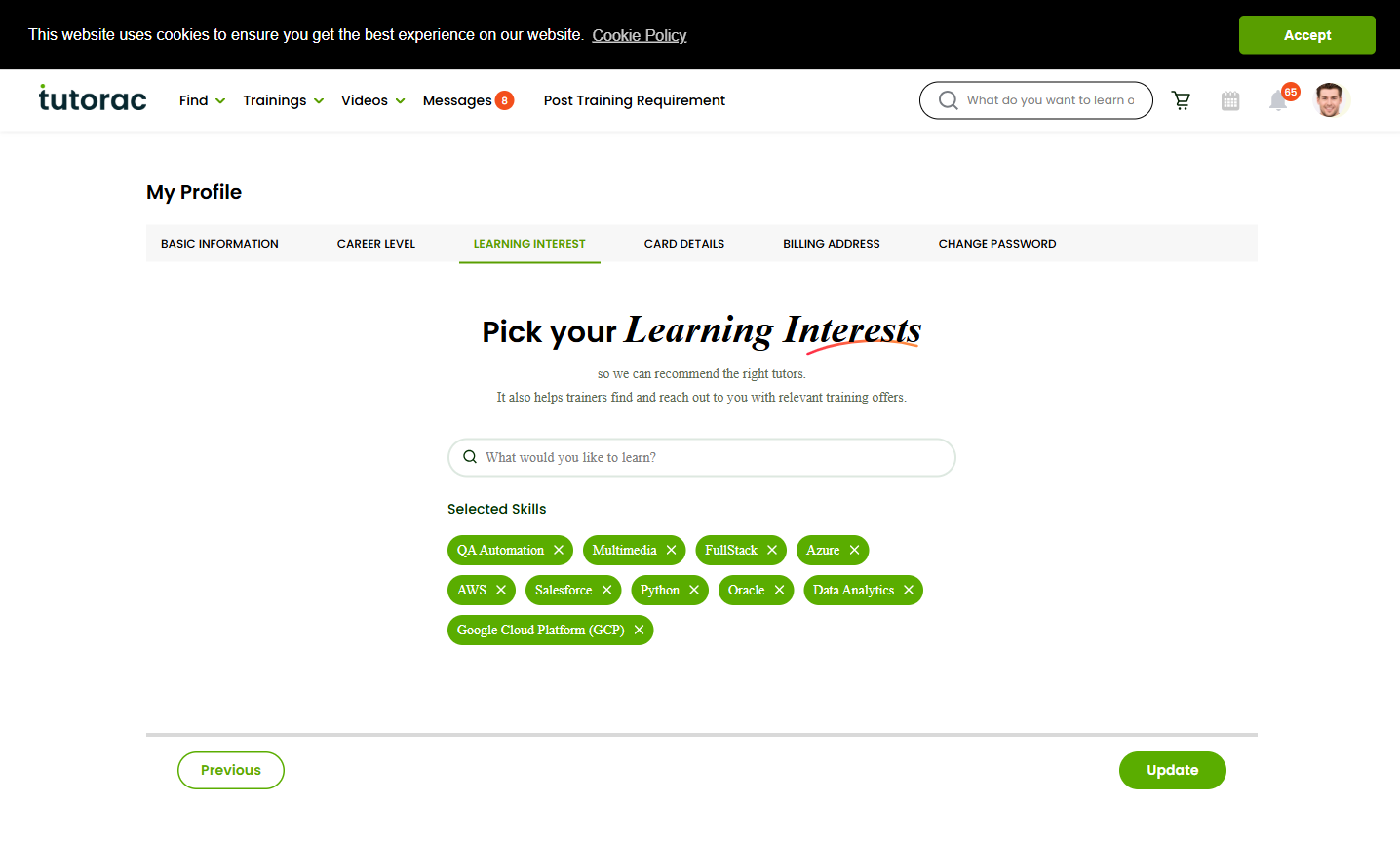
Pick your interests
The page header reads “Pick your Learning Interests so we can recommend the right tutors. It also helps trainers find and reach out to you with relevant training offers.”
- Browse the skill list (examples include QA Automation, Multimedia, FullStack, Azure, AWS, Salesforce, Python, Oracle, Data Analytics, Google Cloud Platform (GCP), and many more).
- Click each skill you want to learn. Selected skills appear under the Selected Skills heading at the top.
- To remove a skill, click it again to deselect.
- Once your list reflects what you actually want to learn, click Update at the bottom.
There’s no minimum, but picking 3–6 specific interests usually gives the best signal — broad enough to surface options, narrow enough to stay relevant.
Add or remove an interest later
You can change Learning Interests anytime — e.g., when you finish a course on one stack and want to move to the next. Click extra skills to add, click selected chips to remove, then Update.
New tutor recommendations reflect the change immediately. Ongoing batches you’ve already paid for continue under their original scope.
Why your interests matter
- Tutor recommendations — Find Tutors and the dashboard surface tutors matched to your interests first.
- Inbound offers — Tutors searching for learners on the platform can find you via skills and send invites or relevant training offers.
- Personalised dashboard — Videos, courses, and training requirements you see are filtered by your interests.
- Profile completeness — Counts toward the “Your profile is X% Complete” bar. A complete profile gets surfaced more often.
FAQs
What if my exact skill isn’t in the list?
Pick the closest broader category (e.g., choose “Python” if “FastAPI” isn’t listed, or “AWS” if a specific AWS service isn’t there). You can mention the specific tech in your Training Requirement when posting one.
Is there a limit on how many interests I can pick?
There’s no strict cap, but picking everything dilutes the signal. Stick to skills you actually plan to learn in the next 6–12 months.
Will tutors see my interests?
Yes — tutors who match your interests can see them and reach out via the Send Invite flow. Your interests are how they discover you.
Does picking an interest sign me up for anything?
No. Selecting a skill is purely a preference signal — it doesn’t enrol you in any course or commit you to any tutor. Nothing happens until you book a demo or accept a contract.
My interests have changed completely — should I clear everything?
Yes — deselect old skills you no longer care about and pick new ones, then Update. The cleaner your list, the better your recommendations.
Related articles
- How to set your Career Level on Tutorac
- How to update your Basic Information on Tutorac
- How to change your password on Tutorac (coming next)
Last updated: 29 May 2026