Your profile shows a status that tells you and learners where your account stands. This article explains what the verification status means and what affects it.
In this article
- Where to find your status
- What “Verified” means
- If you’re not verified yet
- Keeping your verified status
- FAQs
Where to find your status
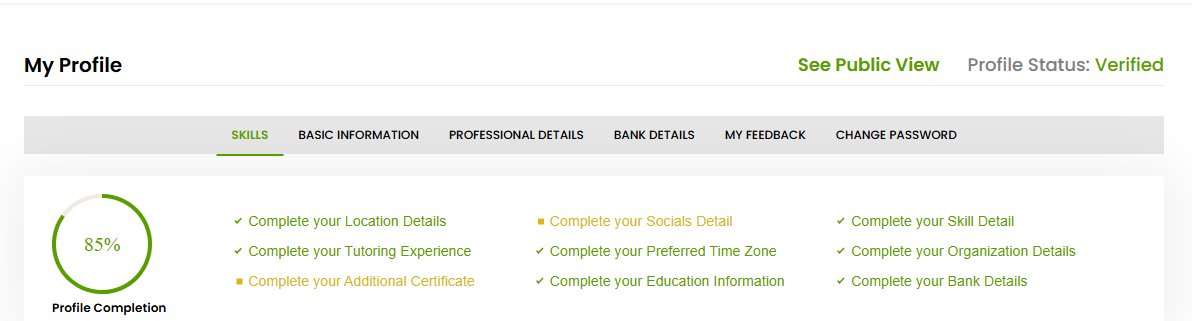
Open My Profile. Your Profile Status is shown on your profile, alongside your Profile Completion percentage. This is the quickest way to see whether your account is verified.
What “Verified” means
When your status reads Verified, Tutorac has reviewed and approved your account. Learners can see that you’re a genuine, trusted tutor, which helps you win their confidence.
If you’re not verified yet
If your status isn’t verified, the most common reason is an incomplete or inconsistent profile. Work through your Profile Completion checklist, make sure your details are accurate, and give the review time to complete. If you’re stuck, reach out to support@tutorac.com.
Keeping your verified status
Keep your profile accurate and follow Tutorac’s policies. Misleading information or policy breaches can affect your standing. See the Safety & Policies section for the standards tutors are expected to meet.
FAQs
Where exactly do I see my status?
On your profile, shown as Profile Status near your profile completion details.
My profile is 100% complete but not verified — why?
Completion and verification are related but separate. Completion measures your checklist; verification is Tutorac’s review. If completion is full and you’re still not verified, contact support.
Can my verified status change?
Yes — inaccurate information or policy breaches can affect it. Keep your profile honest and current.
Related articles
- How tutor verification works on Tutorac
- Account suspension and reactivation for tutors
- Editing and keeping your tutor profile up to date
Last updated: 8 June 2026