When a training post is a good fit, you apply by sending a proposal. This article explains what a proposal is and how to submit a strong one.
In this article
What a proposal is
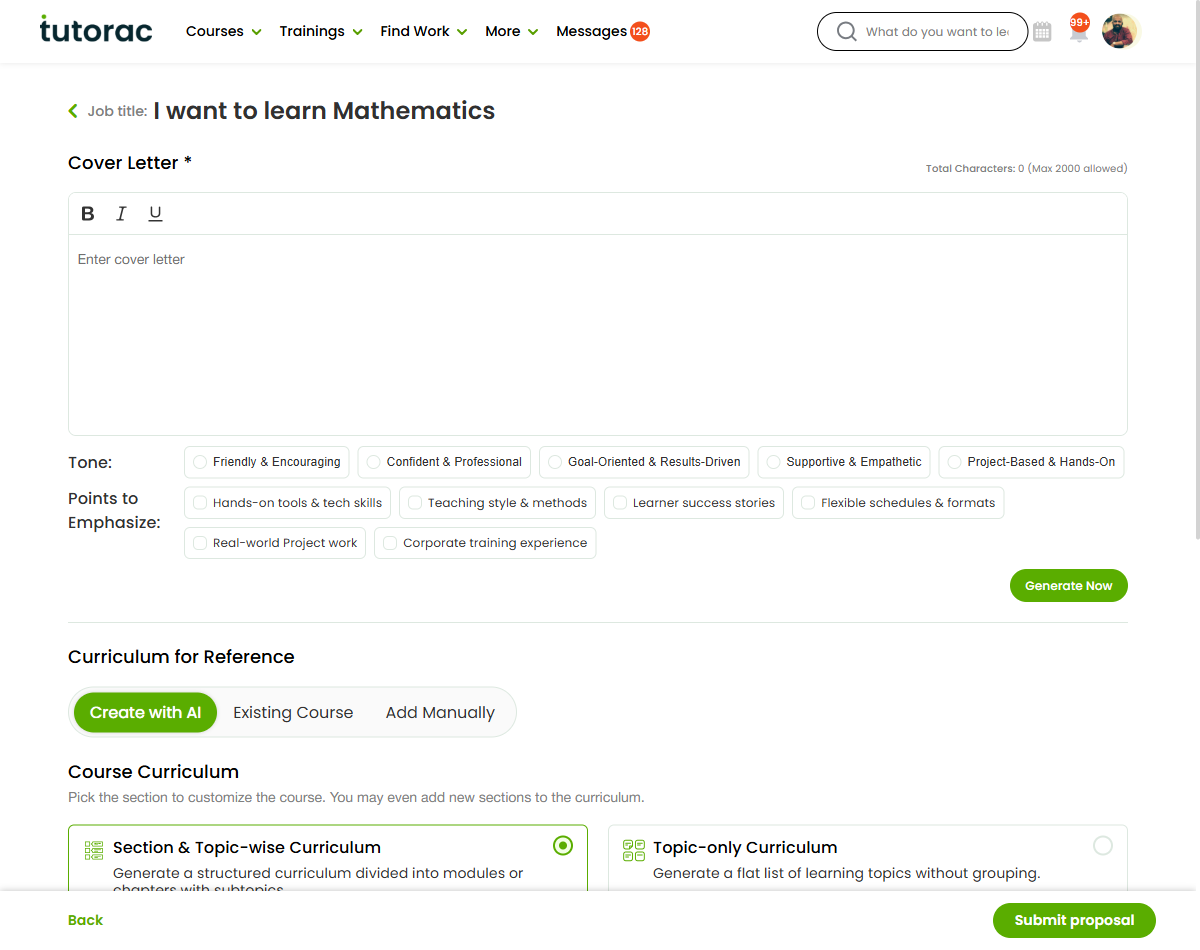
A proposal is your application to a learner’s training post. Its core is a cover letter — a short, personalised message explaining how you can help that learner reach their goal.
Submitting a proposal
- From Find Work, open the training post you want to apply to.
- Review the learner’s goal, level, schedule, and budget.
- Write your cover letter and submit your proposal.
Writing a strong cover letter
- Address the learner’s specific goal, not a generic pitch.
- Mention relevant experience and the skills they listed.
- Outline how you’d approach teaching them, briefly.
- Be clear, friendly, and easy to read.
After you submit
Your proposal is marked Proposal Sent and appears under My Proposals, where you can track its status. See “Tracking your proposals and invitations.”
FAQs
What’s the most important part of a proposal?
The cover letter. A tailored, specific message stands out far more than a generic one.
Where do I see proposals I’ve sent?
Under My Proposals. Each one shows its current status.
Can I apply to posts I was invited to?
Yes. Invitations appear under the Invited tab in Find Work; you submit a proposal the same way.
Related articles
- Finding training jobs (Find Work)
- Tracking your proposals and invitations
- Winning contracts: best practices
Last updated: 8 June 2026