Search results for: “refund”

  • How to release a milestone payment on Tutorac

    When you’re satisfied with what the tutor delivered for a milestone, you click Release Payment to move the money out of escrow to them. It’s a one-click action, but it’s also irreversible — once released, the money is gone from your refund-able balance. Here’s how to do it confidently and what to check first.

    In this article

    When to release

    Release a milestone payment when:

    • The tutor has finished the scope of that milestone (completion percentage is at 100%).
    • You’ve reviewed what was delivered — sessions attended, assignments graded, code working, etc.
    • You’re comfortable that the next milestone’s scope is clear (so releasing this one doesn’t feel like you’ve closed off a discussion).

    You don’t have to release the moment a milestone hits 100% — you can take a day or two to review. There’s no penalty for waiting a reasonable amount of time. But sitting on a completed milestone for weeks isn’t fair to the tutor and can be flagged.

    How to release a payment

    1. Go to Trainings > My Training Batches and open the batch.
    2. Click the Payment tab in the secondary nav.
    3. Find the milestone you want to release. It should show Payment Status: Funded and the completion percentage at 100% (or close to it — it’s your call when to release).
    4. Click the Release Payment button on that milestone’s card.
    5. Confirm in the dialog that asks “Are you sure you want to release this payment?”

    That’s it — the release is instant from your side. The tutor sees the funds reflected in their payout balance within a few minutes.

    What happens after you release

    • The milestone’s Payment Status flips from Funded to Released.
    • The amount (minus Tutorac’s service fee, deducted on the tutor’s side) moves to the tutor’s payout balance.
    • The next milestone in the batch (if any) becomes the active milestone — the tutor can start work, and you may need to fund it if you hadn’t funded all milestones upfront.
    • A receipt is emailed to you with the milestone reference, amount, and date.
    • The action is permanent — you cannot reverse a release on your own. (Tutorac Support can intervene only in cases of fraud or clear misrepresentation by the tutor.)

    Pre-release checklist

    Before clicking Release Payment, take 60 seconds to confirm:

    • All sessions or deliverables for this milestone are actually done.
    • Any homework, code, or materials the tutor was supposed to share are in the batch’s Drive or Messages.
    • Recordings (if your tutor records sessions) are accessible.
    • You don’t have an open dispute about quality or scope for this milestone.
    • You’re fine with the next milestone’s scope and have funded it (or plan to).

    When NOT to release

    • You have open quality concerns. Raise them on Messages first. If unresolved, you can cancel the batch — once you release, you forfeit refund eligibility on that milestone.
    • The tutor is asking you to release before completing the milestone. That defeats the entire escrow protection — politely decline and release once the work is actually done.
    • The completion percentage is below 100% and there’s no agreement to close the milestone short. Wait for completion or formally adjust scope.
    • You’re considering cancelling. Don’t release first — see how to cancel a hire or batch instead.

    FAQs

    Can I release a partial amount of a milestone?

    No — release is all-or-nothing for a given milestone. If you want to pay for only part of the work, ask the tutor to revise the milestone scope/amount and resubmit it (or split it into two milestones).

    What if I forget to release after the tutor finishes?

    The tutor can request release on Messages. If you don’t respond for a long time after the milestone is at 100%, Tutorac may auto-release it after a notice period — that’s the dormant-learner side of the dormancy policy. See dormancy policy.

    Can I get a released payment back if the tutor was actually bad?

    Generally no — that’s the design of the escrow system. The window to challenge quality is before you release. If you released and then discovered something serious (e.g., the tutor lied about credentials, content was plagiarised), contact Support; they may intervene in clear-cut cases.


    Related articles

    Last updated: 29 May 2026

  • Understanding milestones on Tutorac

    A milestone is the basic unit of payment on Tutorac — a chunk of scope with its own amount, schedule, and status. Understanding how milestones flow through their lifecycle is the key to using Tutorac confidently: when to release payment, when to wait, what each status indicator means, and how the numbers tie back to refunds if things go sideways.

    In this article

    What a milestone is

    A milestone is one self-contained block of training with three things attached:

    • Scope — what the tutor will deliver (sessions, modules, deliverables).
    • Amount — how much you pay for that scope, in your account currency.
    • Status — where the milestone is in its lifecycle (more on this below).

    You fund milestones one at a time (or all at once if you prefer). Money you fund goes into escrow with Tutorac — the tutor doesn’t receive it until you release it. That’s what makes refunds work even mid-training.

    The milestone lifecycle

    Every milestone moves through this flow:

    1. Funded — you paid the milestone amount; Tutorac is holding it.
    2. In progress — the tutor has started delivering the scope. Completion percentage starts moving up from 0%.
    3. Completed — the tutor has finished the milestone’s scope (100% completion). The Release Payment button is now active.
    4. Released — you clicked Release Payment. The amount (minus the tutor’s service fee) moves out of escrow to the tutor.

    Two off-ramps can occur instead of Released:

    • Cancelled — you (or the tutor) cancelled the class. The refund is calculated using the active milestone’s completion percentage at the moment of cancellation. See how to cancel a hire or batch.
    • Refunded — the cancellation has been processed and the agreed portion of funds returned to your original payment method.

    The status indicators

    On the batch’s Payment tab, each milestone card shows three pieces of state. Read them together to know what’s going on:

    • Payment Status — Funded (in escrow), Released (paid to tutor), or Refunded (returned to you).
    • Milestone Status — Not started, In progress, Completed, or Cancelled.
    • Completion percentage — the progress bar on the card (0% → 100%).

    Common combinations and what they mean:

    • Funded + Not started + 0% — tutor hasn’t started this milestone yet.
    • Funded + In progress + 40% — tutor is mid-way through; don’t release yet.
    • Funded + Completed + 100% — tutor finished; review and click Release Payment.
    • Released + Completed + 100% — you released; the tutor has been paid; milestone is closed.
    • Refunded + Cancelled + 0% — the class was cancelled at 0% completion and you got a full refund.

    Completion percentage explained

    The completion percentage isn’t something the tutor types in arbitrarily. It’s tied to the actual scope:

    • For session-based milestones (e.g., 10 sessions of 1 hr), each delivered session typically counts as 10%.
    • For deliverable-based milestones (e.g., 3 assignments), each delivered piece counts proportionally.
    • Sessions you missed (not the tutor) aren’t counted — the tutor was available, so they count as delivered for completion purposes.
    • Sessions the tutor missed (no-shows) don’t count toward completion either — see dormancy policy.

    This number drives the cancellation refund bracket. If you’re uncertain, check the milestone activity log on the Payment tab to see what’s being counted.

    Single vs multi-milestone batches

    • A single-milestone batch behaves like a fixed-price training — the whole engagement is one milestone, released at the end.
    • A multi-milestone batch splits the training into 2+ chunks. Only one milestone is active at a time; the next unlocks only after you release the previous (or it’s explicitly opened by the tutor for a parallel scope).

    Multi-milestone is generally safer for longer engagements — you keep more leverage and refund flexibility throughout the training. For short trainings, single-milestone is fine and simpler.

    FAQs

    Can a tutor change a milestone’s scope after I’ve funded it?

    Not unilaterally. Scope can only change with your agreement on Messages. If a tutor is pushing for scope changes without you agreeing, that’s worth raising with Support.

    What if a milestone is taking longer than expected?

    That’s normal — milestones have scope, not a strict deadline. As long as the work is happening, it’s fine. Long stretches with no progress (no sessions, no Messages reply) tip into dormancy — see that policy.

    Can I see how much I’ve paid across all milestones in a batch?

    Yes — the Payment tab shows a summary at the top of the batch with total funded, total released, total refunded, and the in-escrow balance.


    Related articles

    Last updated: 29 May 2026

  • How pricing works on Tutorac

    Tutorac supports a few different ways of paying for learning, and the one that applies to you depends on what you’re hiring — a live tutor, a recorded video course, or a custom training. This guide explains each pricing model, when it applies, and what you can expect to see at checkout.

    In this article

    The three pricing models

    • Milestone-based — the whole training is split into chunks (milestones), and you fund and release each one separately. This is Tutorac’s default for live, custom trainings hired through Hire Now.
    • Fixed price — a single agreed amount for a whole training, paid up-front. Used mostly for short, well-defined courses.
    • Hourly rate — the tutor charges per hour of teaching; you pay weekly or per session depending on the agreement.

    Whatever model is used, your money goes into escrow with Tutorac first — the tutor only receives funds when you (or the policy) release them. That’s what makes the refund system in cancellations and refunds work.

    Milestone-based pricing (default for live tutors)

    • The total training cost is divided into 2 or more milestones, each with its own scope (e.g., “Module 1: Fundamentals” — ₹5,000 / $60) and an amount.
    • You fund the first milestone when the tutor accepts your hire. Tutorac holds it in escrow.
    • You click Release Payment when satisfied with a milestone — that funds the tutor and unlocks the next milestone.
    • If something goes wrong, the cancellation refund is calculated on the active milestone’s completion percentage. Future milestones you funded but haven’t started yet are refunded in full.

    See Understanding milestones on Tutorac for the full lifecycle.

    Fixed-price pricing

    • A single amount for the entire engagement, funded at the start.
    • Used by tutors who offer well-defined, short trainings (e.g., a 4-hour bootcamp).
    • Cancelling is treated as a single milestone — the same percentage-based refund bracket applies based on how much of the training has been delivered.
    • No mid-way release: payment moves to the tutor once you mark the training complete or the schedule ends without disputes.

    Hourly-rate pricing

    • Tutor lists an hourly rate on their profile (e.g., ₹1,500/hr or $25/hr).
    • When you hire, you and the tutor agree on a session schedule and an estimate of total hours.
    • Hours are typically grouped into weekly milestones for funding/release rhythm — you don’t literally pay after every single session.
    • If the actual hours used differ from the estimate, the milestones can be adjusted on Messages and reflected in the batch.

    Video Courses pricing

    • Pre-recorded courses sold at a fixed price on the tutor’s listing.
    • Paid up-front in full — there are no milestones for video courses.
    • Once purchased, you have access for the duration stated on the listing (often lifetime, sometimes time-bound).
    • Different refund rules apply — see the Video Courses section for details.

    Who sets the price

    • Tutors set their own rates — Tutorac doesn’t fix prices.
    • Tutors can quote a different price for your specific hire than the one shown on their profile — that’s a negotiated rate, captured in the hire form.
    • You can negotiate before the tutor accepts — once accepted, the agreed amount and milestones are locked in.
    • India accounts are billed in ₹ INR; all other accounts in $ USD. The tutor sees the amount in their own account currency.

    FAQs

    Does Tutorac add fees on top of the price I see?

    For learners, the amount you fund is the amount agreed in the hire — service fees are deducted on the tutor’s side from their earnings, not added on top of yours. See Tutorac service fees for the exact breakdown.

    Can I negotiate the milestone amounts after hiring?

    The original milestones are locked once the tutor accepts. To adjust scope or amounts mid-batch, discuss on Messages — the tutor can propose a revised milestone, which you fund separately.

    Why do some tutors charge much more or much less than others?

    Tutor rates reflect their experience, certifications, country, niche, and demand. Cheaper isn’t always worse — many highly capable tutors offer competitive intro rates.


    Related articles

    Last updated: 29 May 2026

  • Tutorac dormancy policy: what happens when a tutor or learner goes inactive

    Sometimes a tutor stops showing up. Sometimes life happens to the learner. Tutorac’s dormancy policy says what happens when either side disappears — how long Tutorac waits, when cancellation kicks in, and how refunds are calculated.

    In this article

    When the tutor goes dormant

    If a tutor is inactive for three consecutive classes, you have the right to cancel the batch.

    • The standard Tutor Cancellation Policy applies (the more learner-favourable table).
    • If milestone completion is zero — no sessions delivered — you’re entitled to a 100% refund of the fees paid for that milestone.
    • If some completion has happened before the tutor disappeared, the standard Tutor Cancellation table applies based on the percentage at the moment of cancellation.
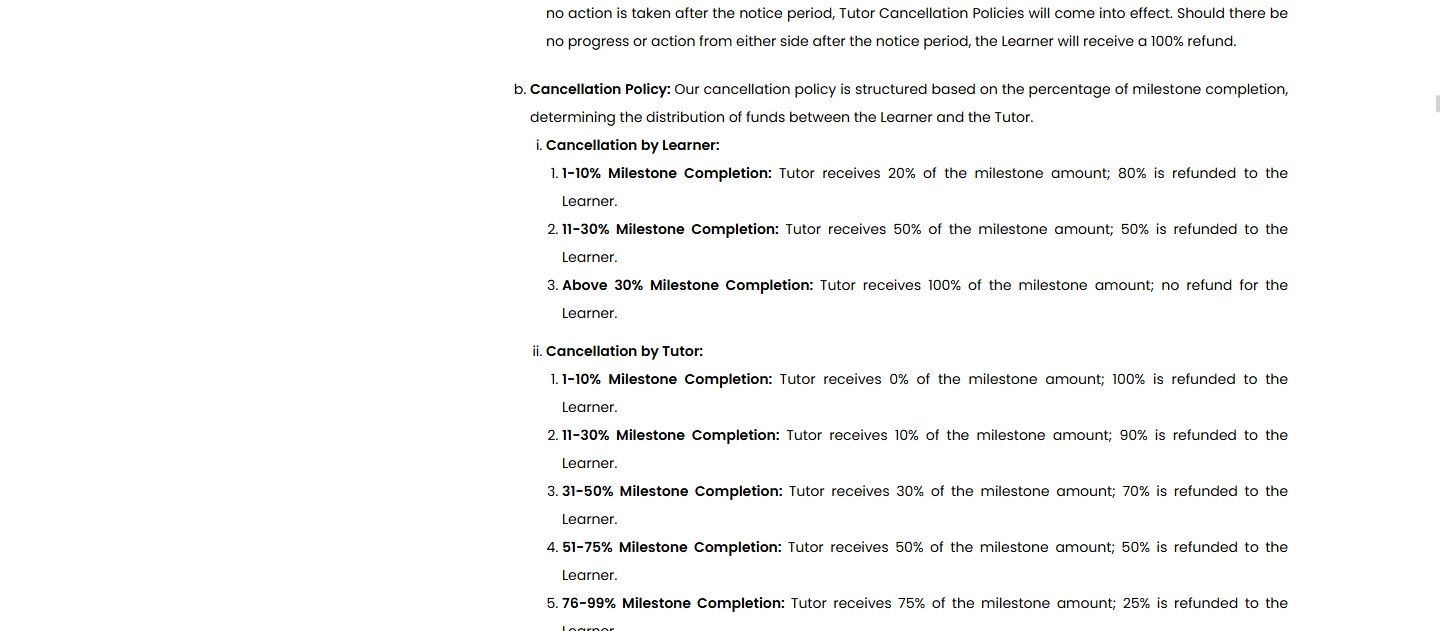
    Tutorac Cancellation Policy section showing the brackets used for dormancy-triggered cancellations.

    To invoke this, contact Tutorac Support with the batch ID, the dates of the 3 missed classes, and any chat history. Don’t just click cancel on your side — explain that the tutor has gone dormant so Tutorac records the cancellation as tutor-initiated.

    When the learner goes dormant

    If you (the learner) miss three consecutive classes, particularly in one-on-one sessions, Tutorac may advise the tutor to cancel the batch. The tutor is required to notify you of each missed class through both email and website notifications — so you’ll have heard from them before any cancellation happens.

    Critically, in dormancy cases triggered by a learner’s absence:

    • Tutors are entitled to full payment for any class where they were available for at least 30 minutes, regardless of your participation.
    • For payment purposes, such sessions are treated as fully completed — a 30-minute availability for a 90-minute session counts as a complete 90-minute session.
    • Milestone progress is adjusted upward accordingly.

    Once that adjusted percentage is determined, the Tutor Cancellation Policy applies (tutor cancels because of learner dormancy). The refund table is still the more learner-favourable one, but the higher completion percentage means a smaller refund — sometimes zero.

    The 30-minutes-counts-as-full rule only kicks in if you’ve been dormant for three consecutive classes — missing one or two classes doesn’t trigger it.

    When both go dormant

    If both the tutor and the learner stop engaging, Tutorac doesn’t close the batch immediately. The process is:

    1. Tutorac keeps the batch open for 60 days from the start of inactivity.
    2. After three consecutive missed classes with no engagement from either side, a notice is issued to both tutor and learner.
    3. Both parties have 7 days from that notice to take some form of action (resume sessions, message, mutually cancel).
    4. If no one acts in those 7 days, the Tutor Cancellation Policy takes effect.
    5. If no progress at all has been made on the milestone, the learner receives a 100% refund.

    This protects you in the worst-case scenario where things just go quiet on all sides — you don’t lose your money to a milestone neither party engaged with.

    How to avoid being marked dormant

    • If you need to miss a class, message the tutor on Tutorac Messages in advance. A rescheduled session isn’t a missed session.
    • For longer breaks, propose a pause in writing — Tutorac honours mutual pauses agreed on Messages.
    • Don’t rely on WhatsApp or external chats to reschedule — those don’t count toward the dormancy assessment.
    • Open and read the email + website notifications Tutorac sends after a missed class — they’re the formal record that the clock has started.

    FAQs

    What counts as a “missed class” for dormancy purposes?

    A scheduled session that the party in question didn’t join. If you informed the tutor in advance through Tutorac Messages and you both agreed to reschedule, it’s not a missed class — it’s a postponement.

    If the tutor showed up but I didn’t, is that a missed class on me?

    Yes — from the platform’s perspective, you missed it. After three consecutive misses on your side, the dormancy rule activates and the tutor is entitled to count those sessions as delivered (if they were available 30+ minutes).

    The tutor didn’t notify me of the missed classes via email. Does dormancy still apply?

    Notification is required — if the tutor didn’t send the email + website notifications, raise it with Tutorac Support. Dormancy decisions are based on documented evidence; missing notifications weaken the tutor’s case.

    Does the 60-day clock pause if I respond?

    Yes — meaningful engagement (a message, attending the next session, agreeing on a reschedule) restarts the clock. Dormancy is about prolonged inaction, not a one-off missed class.

    I went dormant because of a genuine emergency. Can I get the favourable refund anyway?

    Tutorac Support handles genuine emergencies (medical, family bereavement, accidents) case-by-case. Provide evidence and reach out as soon as you can — the earlier, the better. The standard dormancy rule is a default, not the only outcome.


    Related articles

    Last updated: 29 May 2026

  • Cancellation policy: when your tutor cancels on Tutorac

    If the tutor is the one calling it off, Tutorac uses a separate bracket that tilts strongly in the learner’s favour — especially when the tutor pulls out after work has been delivered. Tutors don’t have a Withdraw equivalent: once they accepted, every tutor-initiated cancellation goes through the same Cancel-class path you’d use, but with the percentages flipped to compensate you for the disruption.

    In this article

    How tutor cancellations work

    • Before they accept: a tutor can decline your hire offer. You get a 100% refund just as you would if you withdrew, and the contract closes with no penalty to either side.
    • After they accept: tutors cancel via the same in-batch flow you would — from the batch’s Payment tab, with a reason recorded. There is no tutor-side “withdraw” once they’ve agreed.
    • The cancellation is final once they confirm; the batch flips to Cancelled and you’re notified.

    The refund split below applies when the tutor cancels after accepting. If they decline before accepting, you simply get 100% back — no bracket needed.

    The refund bracket when the tutor cancels

    Just like learner-cancellations, the split depends on the active milestone’s completion percentage at the moment of cancellation. The numbers favour you, the learner:

    Milestone completion at cancellationTutor keepsYour refund
    1–10%0%100%
    11–30%10%90%
    31–50%30%70%
    51–75%50%50%
    76–99%75%25%

    Compare this with the learner-cancellation bracket — at every level, the tutor cancelling costs them more than a learner cancelling at the same completion. That’s by design: the side that walks away absorbs the cost of the disruption.

    Tutorac Cancellation Policy section in the User Agreement, showing both learner-cancellation and tutor-cancellation refund brackets side by side.

    Worked examples

    • India learner / ₹5,000 milestone, tutor cancels at 8% completion → You receive ₹5,000 (100% — tutor keeps nothing because they bailed early).
    • US learner / $200 milestone, tutor cancels at 25% completion → You receive $180 (90% — tutor keeps $20).
    • India learner / ₹10,000 milestone, tutor cancels at 60% completion → You receive ₹5,000 (50% — tutor keeps half).
    • US learner / $400 milestone, tutor cancels at 85% completion → You receive $100 (25% — tutor keeps $300; the work was nearly delivered).

    What happens to your batch

    • The active milestone is split per the bracket above; the refund initiates automatically.
    • Future milestones you funded but the tutor hadn’t started: 100% refund.
    • Already-released milestones: not refundable — you signed off on them.
    • The batch shows the Cancelled Batch badge with the cancellation reason the tutor selected.
    • You’re free to hire a different tutor for the remaining scope — that’s a brand-new hire, not a continuation.

    Dormancy — when the tutor just goes silent

    If the tutor isn’t cancelling formally but has stopped responding — missing classes, going dark on Messages — the bracket above doesn’t fit, because there’s no tutor-initiated cancellation event. That’s the dormancy path:

    • After 3 missed classes from the tutor’s side, you can cancel the batch yourself with no penalty.
    • If zero work has been delivered on the active milestone (0% completion), you receive a 100% refund regardless of the bracket above.
    • Tutorac may withhold tutor payment for missed sessions automatically.

    Full procedure: Tutorac dormancy policy.

    FAQs

    Can a tutor “withdraw” an acceptance?

    No — once they’ve accepted, the only path is the formal Cancel-class flow on the Payment tab, with the bracket above applied. There’s no equivalent of the learner-side Withdraw for tutors after acceptance.

    My tutor cancelled and is now asking me to hire them again separately. Should I?

    It’s your call, but be cautious. Cancellations are tracked on the tutor’s profile, and a pattern of cancel-and-rehire outside Tutorac to dodge the bracket is a Trust & Safety violation on their side. If anything is off, contact Support.

    What if the tutor cancels because of an emergency?

    The bracket still applies by default. If genuine extenuating circumstances are involved (medical, family), Tutorac Support may waive the tutor’s share on case-by-case review — that’s between the tutor and Support, not your concern. Your refund per the bracket is paid out immediately either way.

    Does Tutorac penalise tutors for cancelling?

    Cancellations are recorded on a tutor’s profile and factor into their ranking and reliability score. Repeated cancellations can result in profile suspension — but the financial penalty in the table above is the immediate consequence.

    Can I leave a review after a tutor-cancellation?

    Yes. The batch shows as Cancelled (by tutor), and you can still leave honest feedback about your experience so future learners are informed.


    Related articles

    Last updated: 29 May 2026

  • Cancellation policy: when you (the learner) cancel on Tutorac

    If you’re the one stopping a hire, the size of your refund depends on which flow you’re in. The Withdraw flow (before the tutor accepts) always gives a full refund. The Cancel class flow (after the tutor accepts) uses a milestone-completion-percentage bracket. Here’s the exact policy for both, plus how it applies to multi-milestone batches.

    In this article

    Which flow applies

    • Tutor hasn’t accepted your offer yet? Use the Withdraw flow — 100% refund, no bracket logic.
    • Tutor has accepted and the batch exists? Use the Cancel class flow — the milestone-completion-percentage bracket below applies.

    Step-by-step on both: How to cancel a hire or batch and get your refund on Tutorac.

    Withdraw (pre-acceptance) — always 100%

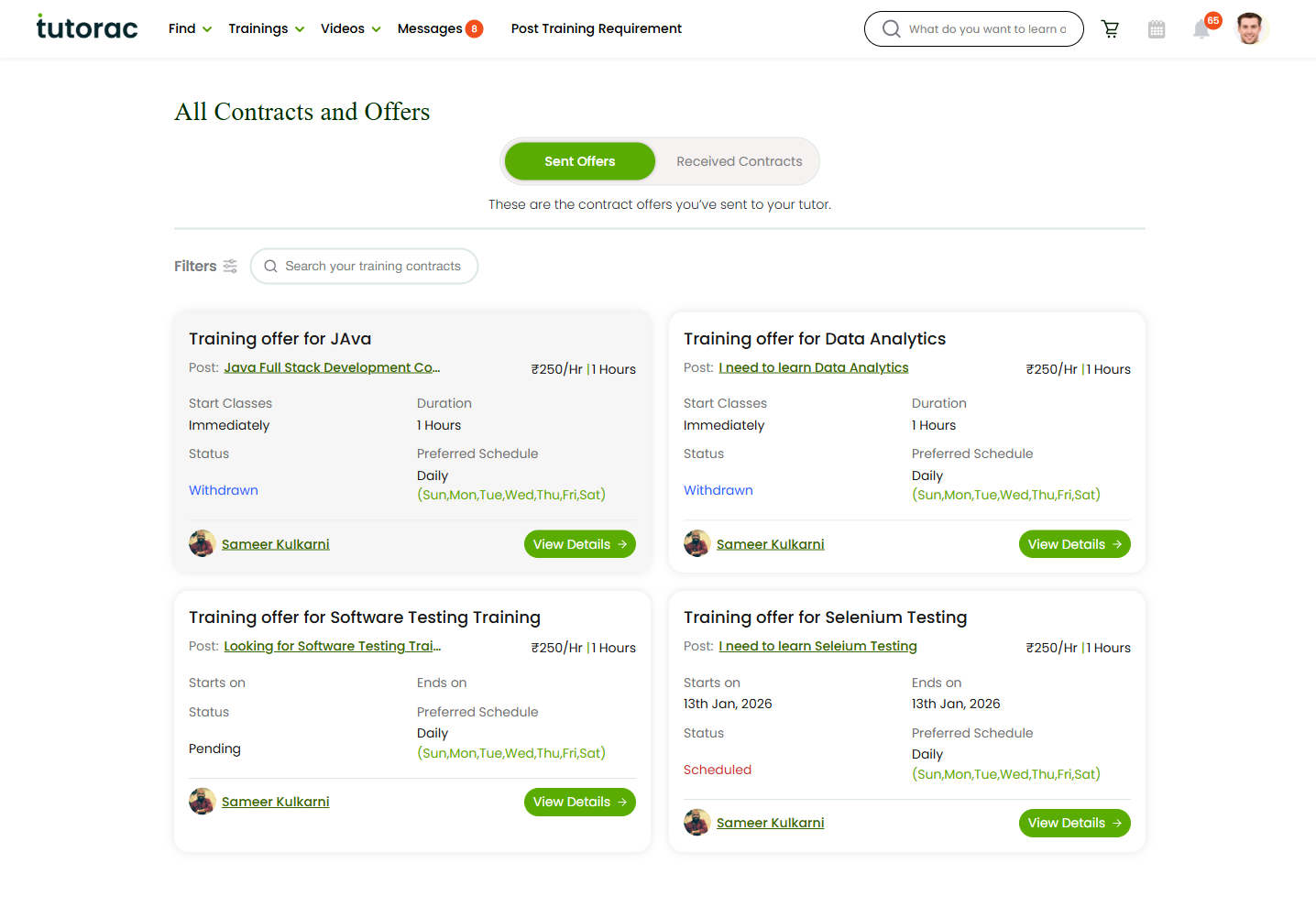
    Before the tutor accepts, you can pull the offer back from Trainings > All Contracts > Sent Offers > View Details > Withdraw. Because no work has started:

    • You receive a 100% refund of the amount you funded.
    • The tutor gets nothing — they never accepted the offer.
    • If the tutor doesn’t accept within 2 days, the offer expires on its own and the refund happens automatically.

    The bracket table below does not apply to withdraw. It only applies once the tutor has accepted and a milestone exists.

    Cancel class (post-acceptance) — the bracket table

    Once the tutor has accepted and you’re inside the batch, your refund is determined by the active milestone’s completion percentage at the moment you click Cancel class:

    Milestone completion at cancellationYour refundTutor keeps
    0% (not started)100%0%
    1–10%80%20%
    11–30%50%50%
    Above 30%0%100%

    The cancellation dialog previews this number before you confirm — if it doesn’t match what you expect, close the dialog and check the milestone activity log first.

    Tutorac Cancellation Policy section in the User Agreement, showing the refund brackets when the learner cancels after the tutor has accepted.

    Multi-milestone batches

    The bracket only applies to the currently active milestone — the one in progress when you cancel. For other milestones in the same batch:

    • Future milestones you funded but haven’t started: 100% refund.
    • Already-released milestones (you clicked Release Payment): not refundable — the money has left escrow.
    • Completed but unreleased milestones: usually released to the tutor when you cancel, since the work is done. If you believe a completed milestone wasn’t actually delivered, raise it with Support before cancelling.

    How the milestone percentage is calculated

    • Each milestone has a defined scope — classes, deliverables, or session count.
    • The completion percentage is the share of that scope that has been delivered when you click Cancel class.
    • You can see it on the Payment tab in the milestone card’s progress bar (e.g., 0%, 15%, 60%).
    • For session-based milestones, missed sessions aren’t counted as delivered — only sessions you actually attended or that the tutor delivered count.

    If you disagree with the percentage

    Don’t click Cancel class yet — once you do, the refund per the displayed bracket is locked in.

    1. Check the milestone activity log on the Payment tab to see what Tutorac is counting as delivered.
    2. Talk to the tutor on Messages first — sometimes a sync resolves it (e.g., a session was logged that didn’t happen).
    3. If you can’t agree, contact Tutorac Support with screenshots before cancelling. Support can adjust the percentage if there’s clear evidence either way.

    If the cancellation is because the tutor is at fault (no-shows, going silent), see Tutorac dormancy policy — you may get a full refund regardless of the milestone percentage.

    FAQs

    Does the bracket apply when I withdraw an offer?

    No. Withdraw is pre-acceptance — it’s always 100%. The bracket only applies once a milestone exists, i.e., after the tutor accepted.

    What counts as “Above 30%”?

    Anything from 31% upward. At 31%, the policy treats the milestone as substantially delivered and you receive no refund for it — future milestones you haven’t started are still refundable in full.

    If I cancel at 10%, do I get 80% or 50%?

    At exactly 10% you’re in the 1–10% bracket, so 80%. The 50% bracket starts at 11%.

    Can I get back milestones I already released?

    No — releasing a milestone means you signed off on it and Tutorac paid the tutor. That’s why we recommend not releasing a milestone you have any concerns about until it’s resolved.

    Does this policy apply to Video Courses too?

    No. Video Courses (pre-recorded) have their own refund window — usually based on the date of purchase, not milestone completion. See the Video Courses section for details.


    Related articles

    Last updated: 29 May 2026

  • How to report a tutor or content issue on Tutorac

    If a tutor pushes you off-platform, behaves inappropriately, sends spam, or anything else feels wrong, Tutorac wants to know. Reports help Tutorac investigate and act against accounts that break the rules — protecting you and other learners.

    In this article

    When to report

    Report a tutor (or any content on Tutorac) when any of the following happens:

    • The tutor asks you to pay outside Tutorac (UPI, bank transfer, wallet, crypto, gift cards, etc.).
    • The tutor pressures you to move chats to WhatsApp / Telegram / personal email.
    • The tutor asks for sensitive information they shouldn’t need (your Tutorac password, full card number, OTP, banking credentials).
    • The profile, description, or training content includes misleading credentials, plagiarised material, hate speech, harassment, sexual content, or anything that violates the Tutorac User Agreement.
    • The tutor doesn’t show up for paid sessions repeatedly, or stops responding entirely after a milestone is paid.
    • You suspect the tutor account is impersonating someone else.
    • You receive an email or SMS claiming to be from Tutorac but the link or sender looks suspicious (phishing).
    Learn Safely with Tutorac safety panel reminding learners to communicate and pay through Tutorac.

    How to report

    The most reliable channel is Tutorac Support. Reach out via:

    • The Contact Us page on tutorac.com.
    • The official Tutorac Support email address listed on the Help Center.
    • From within the platform — many flows surface a Support link from the avatar menu / footer.

    If you’re unsure where to send a report, use the Contact Us form — Support will route it internally.

    What to include in your report

    Make the report easy to act on. Include:

    • Tutor name and profile URL — copy from the address bar when you’re on the tutor’s profile.
    • Training batch name and contract ID, if the issue is in an active engagement.
    • What happened, in 3–5 short paragraphs. Stick to facts and times.
    • Screenshots of the relevant chat messages, emails, payment requests, etc.
    • Dates and times of the incidents.
    • What you’ve already tried — e.g., asked them politely to stay on-platform, refused the off-platform payment.
    • What outcome you want — refund, account review, contract cancellation, just a record on file, etc.

    Don’t share sensitive financial data (full card number, CVV, OTP, banking password) in the report — Tutorac Support never needs these to investigate.

    What happens after you report

    • Tutorac Support acknowledges the report and assigns it to the relevant team.
    • They review the evidence and may follow up with you for clarification.
    • If the report concerns an active contract or paid milestone, Tutorac may pause the related transaction while investigating.
    • Action against the tutor can range from a warning, to suspension, to permanent removal from the platform, depending on severity.
    • You’ll be updated on the resolution where appropriate. Some internal details may not be shared for privacy reasons.

    Confidentiality and retaliation

    • Reports are treated confidentially. Tutorac doesn’t forward your message verbatim to the tutor.
    • Retaliation by a reported tutor (negative reviews, harassment, public posts) is itself a violation and can be reported too.
    • If you ever feel unsafe, contact Tutorac Support immediately and, if appropriate, your local authorities.

    FAQs

    Will the tutor know I reported them?

    Tutorac doesn’t reveal who reported a tutor. If the report leads to action against the tutor (warning, suspension), they may guess based on context, but Tutorac itself won’t name you.

    Can I report and continue training with the same tutor?

    Yes — reporting doesn’t automatically cancel your contract. If you want to continue while the review happens, you can. If you’d rather cancel, follow the cancellation flow — Tutorac applies the standard refund split per the User Agreement.

    How long do investigations take?

    Simple cases (clear off-platform payment requests with screenshots) resolve within a few business days. Complex cases involving disputed facts or active contracts can take longer.

    I reported but nothing visibly happened — was it ignored?

    Not necessarily. Tutorac handles enforcement privately for legal reasons; you may not see the outcome publicly. Follow up with Support if you need confirmation that the report was reviewed.

    What about reviews — can I just leave a negative review instead?

    Reviews and reports serve different purposes. A negative review warns other learners; a report triggers internal investigation and possible action against the account. For policy violations (especially safety / payment issues), file a report — reviews alone don’t lead to enforcement.


    Related articles

    Last updated: 29 May 2026

  • Avoid scams: always communicate and pay through Tutorac

    Tutorac’s safety guarantees — escrow, refunds, dispute resolution — only work for activity that happens on the platform. The moment money or important conversations move off Tutorac, every protection is gone. This guide explains why, the most common scam patterns to watch for, and what to do if a tutor pushes you off-platform.

    In this article

    Why off-platform = no protection

    Tutorac Payment Protection covers payments made through Tutorac and conversations held on Tutorac Messages. If you pay via UPI, bank transfer, wallet, or any other channel directly to a tutor, Tutorac has:

    • No record of the transaction.
    • No way to refund the money.
    • No leverage with the tutor — they’ve already been paid in full.
    • No basis for a dispute or chargeback.

    Same goes for chats: a conversation on WhatsApp, Telegram, personal email, or any external app is invisible to Tutorac. If the tutor later denies promises or refuses to deliver, Tutorac can only see what happened in Tutorac Messages. Without that evidence, there’s no case to make.

    Learn Safely with Tutorac safety panel showing the scam warning at the bottom.

    Common scam patterns

    These are the patterns to recognise — not all are obvious malice; sometimes a well-meaning tutor just wants to skip the platform. The risk to you is the same either way.

    • “Pay directly and I’ll give you a discount” — the “saving” vanishes the moment something goes wrong. There’s already zero platform fee for learners.
    • UPI / bank account / GPay request in the chat — legitimate Tutorac payments never happen this way.
    • Gift cards / crypto / wire transfers — classic scam channels because they’re irreversible. No legitimate tutor will ask for these.
    • “Move our chat to WhatsApp / Telegram” — if they want a back-channel, ask why. Promises made there can’t be enforced by Tutorac.
    • Fake invoices / payment links sent over email claiming to be from Tutorac — only pay via the Tutorac batch payment tab. Tutorac doesn’t email payment links.
    • Urgency tactics — “Pay now, the seat is closing”, “the discount expires in an hour”. Real Tutorac contracts don’t expire in minutes.
    • Tutor asks for personal financial info — card numbers, OTPs, banking passwords, your Tutorac password. Never share any of these, with anyone, ever.
    • Free demo extending into “just a couple more free sessions” — once the contract is set up, all paid work goes through milestones. Endless free extensions are a red flag.

    Red-flag phrases

    If a tutor sends any of these, treat it as a clear signal something’s off:

    • “Tutorac takes too much commission, just pay me directly.”
    • “I’ll give you my UPI / IBAN / wallet for the payment.”
    • “Let’s continue on WhatsApp, it’s easier.”
    • “Send the money first, I’ll create the contract after.”
    • “Send your card details / OTP / Tutorac password so I can set it up for you.”
    • “Pay in cryptocurrency / via gift card to lock the discount.”

    What to do if a tutor asks you off-platform

    1. Decline politely but firmly, in Tutorac Messages: “I’d like to keep everything on Tutorac for safety. Please send a contract through the platform.”
    2. Do not share any payment, banking, or password info, even “just to test”.
    3. Screenshot the chat if anything pressured or suspicious was said — useful evidence later.
    4. Report the tutor to Tutorac Support with the screenshot and a short description.
    5. If you’re uncomfortable continuing, find a different tutor. The Find Tutors page has many options for any skill.

    There’s nothing to save by going off-platform

    A common pitch is “going direct saves you the platform fee”. This is misleading on Tutorac:

    • Learners pay zero platform fee. The amount on the contract is the entire amount you owe.
    • The demo is already free. You don’t need to negotiate around it.
    • Refunds, escrow, dispute resolution — these are valuable and they vanish off-platform. The risk vastly outweighs any “discount”.

    If the price is the issue, negotiate on the contract, not around the platform. Tutors can offer Tutorac-side discounts via lower milestone amounts when sending the offer.

    FAQs

    A tutor I trust says off-platform is fine. Why is Tutorac warning me?

    Tutorac isn’t doubting the tutor — it’s protecting you. Even genuine tutors don’t have escrow, refund flows, or dispute systems on UPI / WhatsApp. If anything goes wrong (illness, schedule change, a misunderstanding), you have no fallback. Keep it on-platform and the tutor gets paid the same.

    I already paid a tutor outside Tutorac. Can Tutorac help me get it back?

    Unfortunately no — Tutorac can’t access or refund money that didn’t go through it. Report the tutor so Tutorac can review their account, but the only path for the lost money is directly with your bank (chargeback) or local consumer-protection authorities. Don’t pay more in the hope of recovering the original payment.

    Is it OK to add a tutor on LinkedIn or follow their YouTube?

    Yes — following public content is fine. The line is around money and training-related promises: those have to be on Tutorac to be protected. Casual professional follow-up isn’t the issue.

    My tutor wants to email me PDFs and resources directly. Is that off-platform?

    Use Tutorac’s in-batch Drive for course materials so they’re archived against the contract. One-off emails are fine if it’s a quick share, but anything you might need to reference in a dispute should go through the platform.

    A site claiming to be Tutorac sent me a payment link. Is it real?

    Almost certainly phishing. The only place to make a Tutorac payment is from inside your batch’s payment tab, while signed in to tutorac.com (or tutorac.org for non-India accounts). Never pay from a link in an email or SMS without first signing in directly via your browser and confirming the payment lives in your batch.


    Related articles

    Last updated: 29 May 2026

  • Tutorac Payment Protection: how Tutorac keeps you safe

    When you hire a tutor on Tutorac you’re trusting a stranger with both your money and your time. Tutorac Payment Protection is a set of platform guarantees designed to make that trust safe — escrow, refunds, demos, and zero platform fees. This article walks through what each piece means and where to see it in the app.

    In this article

    The “Learn Safely with Tutorac” panel

    Open any chat thread in Messages. On the right side of the conversation you’ll see a panel titled Learn Safely with Tutorac. Click the header to expand it — it summarises Tutorac’s payment protection in four bullet points and one important reminder about scams.

    Learn Safely with Tutorac safety panel in chat, expanded showing escrow protection and four features.

    The panel reads:

    Your payments are securely held in escrow until the tutor completes your training — giving you full protection and peace of mind.

    • Flexible Cancellations  • Instant Refunds  • Zero Platform Fees  • Try Before You Hire

    Avoid scams — always communicate and pay through Tutorac.

    Escrow: payments held until training is done

    The core of Tutorac Payment Protection is escrow. When you pay for a milestone, Tutorac holds the money in a neutral account — it doesn’t go to the tutor straight away. The tutor sees that you’ve paid, so they know it’s safe to teach. Funds only reach the tutor after you click Release Payment at the end of the milestone (or after an automatic release window if you forget).

    This protects you from upfront-only scams and protects the tutor from teaching without payment. Read the full mechanics in How payments work on Tutorac.

    Flexible cancellations

    You can cancel a milestone partway through if the tutor isn’t a fit, doesn’t deliver, or your circumstances change. The escrowed amount is then split between you and the tutor based on the percentage of the milestone already completed, per the rules in the Tutorac User Agreement (“Cancellation by Learner” / “Cancellation by Tutor”). The earlier you cancel, the more you get back — a very early cancel typically returns most or all of the milestone amount.

    Instant refunds

    When a refund is owed (failed transaction, approved cancellation, tutor-side cancel), Tutorac initiates it within 1–2 business days. The actual credit on your bank statement depends on your card issuer (typically 5–10 business days). Refunds always go back to the original payment method in the original currency — ₹ INR for India accounts, $ USD for accounts elsewhere.

    Zero platform fees

    Tutorac advertises zero platform fee for learners. The amount shown on the contract is what you pay — nothing extra is added at checkout for using the platform. The tutor’s side handles its own fees with Tutorac, so the price you see is the price you owe.

    Try before you hire (free demo)

    Before you commit any money you can book a free 30-minute demo session with most tutors. Open a tutor’s profile from Find Tutors and click Book Free Session — you can check teaching style, pace, and communication before paying for anything. If they’re not a fit, simply don’t hire them.

    Always pay and communicate through Tutorac

    None of these protections apply if you pay or talk to a tutor outside Tutorac. Off-platform payments are unrecoverable — Tutorac cannot mediate, refund, or dispute money that didn’t go through it. If anyone asks you to pay via UPI directly, bank transfer, gift cards, crypto, or any external wallet — that’s a red flag. Stay on platform.

    Same with conversations: use Tutorac Messages so disputes have a record. WhatsApp / Telegram / personal email chats can’t be referenced in a Tutorac dispute.

    FAQs

    Is Tutorac Payment Protection automatic?

    Yes — it applies to every milestone payment you make on Tutorac. You don’t opt in or buy anything extra; it’s built into how payments work.

    Does Payment Protection cover the demo session?

    The 30-minute demo is free, so there’s nothing to protect. Payment Protection kicks in the moment you pay for your first milestone.

    What if the tutor and I agreed on something special that isn’t in the contract?

    If it’s not on the contract, Tutorac can’t enforce it. Get any custom arrangement (extra sessions, custom assignment review, post-training mentoring) written into the contract milestones before you pay.

    A tutor said off-platform is cheaper because there’s no platform fee. Should I do it?

    No. There’s already zero platform fee for learners on Tutorac — the tutor’s pitch is misleading. Worse, going off-platform means zero escrow, zero refund rights, and zero dispute resolution. The “savings” vanish the moment something goes wrong.

    How do I know my payment is actually in escrow?

    Open your Training Batch → payment tab. A paid milestone that hasn’t been released shows as “in escrow” (or equivalent), and the Release Payment button is active. Once you click Release, the status updates to released / completed.


    Related articles

    Last updated: 29 May 2026

  • Where to find invoices, receipts, and payment history on Tutorac

    Every milestone payment you make on Tutorac generates a receipt — in ₹ if you’re on an India account, in $ if you’re on a US or any other country account. This article shows you where to find them — per-batch, across all contracts, and via email — so you can download invoices for reimbursement, tax filing, or your own records.

    In this article

    Per-batch receipts (payment tab)

    Each Training Batch keeps its own payment history on the payment tab.

    1. Sign in to Tutorac.
    2. Go to Trainings → My Training Batches.
    3. Open the batch you’re interested in.
    4. Click the payment tab.

    You’ll see each milestone with its amount (in your account currency — ₹ or $), payment status (paid, in escrow, pending), and a receipt link once paid.

    All payments view: Contracts page

    For payments across all batches, use the contracts pages:

    • Sent Offers — /student/sent-contracts — contracts you’ve sent.
    • Received Contracts — /student/received-contracts — contracts tutors sent to you that you accepted.
    Tutorac Contracts page showing sent offers and received contracts tabs.

    Click into any contract to see its full milestone payment history with timestamps and amounts.

    Email receipts

    Every milestone payment also triggers a receipt email to the address on your Tutorac account. Subject lines usually read “Payment confirmation — [Batch Name] — Milestone N”.

    If you’re missing receipts:

    • Check your spam / promotions folder.
    • Search your inbox for “Tutorac payment”.
    • Verify your email address under Profile → Basic Information is current.
    • Add no-reply@tutorac.com (and any sender domain Tutorac uses) to your safe senders.

    Download an invoice / receipt

    1. From the batch’s payment tab (or a contract’s detail view), find the milestone you want a receipt for.
    2. Click the Download / Receipt link on that milestone.
    3. The PDF opens or downloads to your device.

    For multi-payment summary (e.g., for an entire course), download each milestone receipt individually and bundle them.

    What an invoice contains

    • Your billing name & address (from your billing address profile setting).
    • Tax ID, if you provided one — GSTIN for India, VAT / EIN / ABN etc. for other regions.
    • Tutorac’s legal entity, address, and (where applicable) tax registration number.
    • Tutor / training name and milestone description.
    • Amount, tax breakup, and total — in your account currency (₹ for India accounts, $ for all other accounts).
    • Payment method (card last 4 digits or wallet) and transaction ID.
    • Invoice number and date.

    FAQs

    Can I get a single consolidated invoice for the full course?

    Tutorac issues one invoice per milestone payment, not one for the whole course. If you need a consolidated record, download each milestone receipt and combine them.

    My employer is reimbursing me — what do I send them?

    The milestone invoice PDF. Make sure your billing address and tax ID (GSTIN, VAT, EIN, ABN — whichever applies to your country) were correct before you paid — invoices lock in those details at the moment of payment.

    Can I get the invoice in a different currency than my account?

    No. Invoices are issued in the account’s billing currency: ₹ for India accounts, $ for all other accounts. If you’re claiming reimbursement in another currency, use your bank’s FX rate from the transaction date.

    Can Tutorac email me a copy of a missing receipt?

    Yes — contact Tutorac Support with your batch name and the milestone in question, and they can re-send.

    How long are receipts stored?

    Indefinitely, while your account is active. Download copies for your own archive anyway, especially if you change email addresses or close the account.

    Where are refund credit notes?

    If you receive a refund (e.g., after cancellation), Tutorac issues a credit note linked to the original payment, in the same currency. It appears on the same payment tab / contract detail view, marked as a refund.


    Related articles

    Last updated: 28 May 2026