A milestone is a defined stage of the work — a portion of the training with its own deliverable. An engagement can be split into one or more milestones, each completed in turn.
Why use milestones
They give the learner confidence by tying progress to clear stages.
They make larger engagements easier to manage.
They keep expectations clear on both sides.
Agreeing milestones
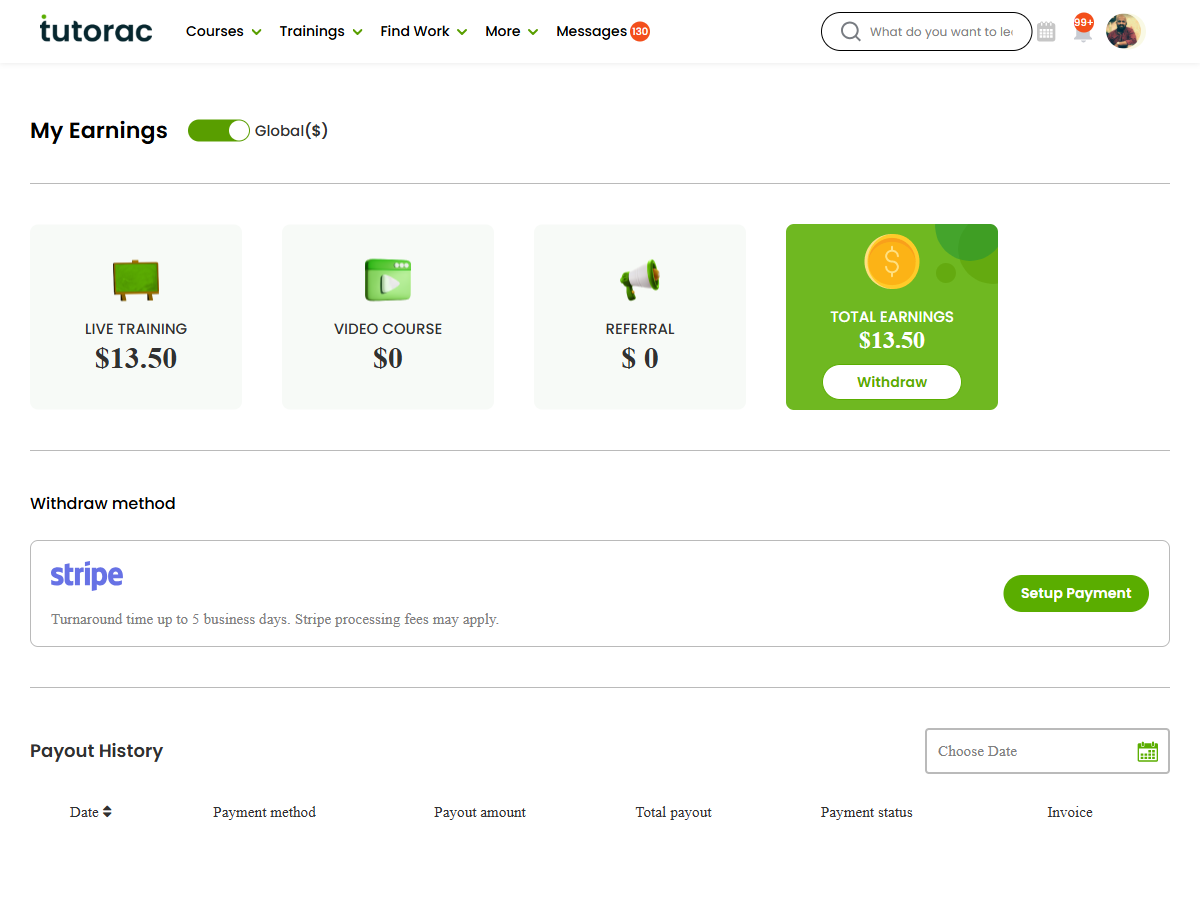
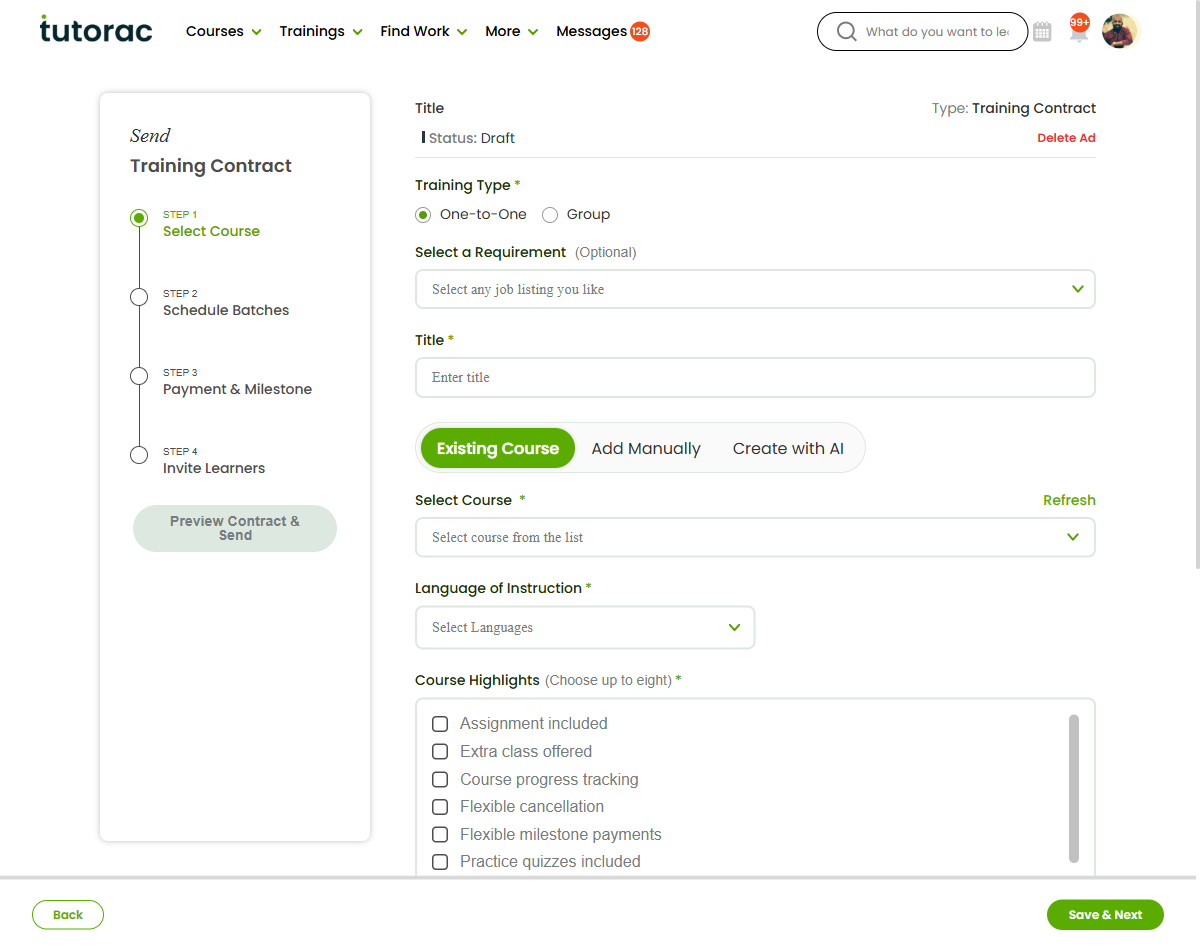
Milestones are set as part of the offer or Training Contract for an engagement. Agree the stages with the learner up front so everyone knows what each milestone covers. See the Offers & Contracts section, and the Earnings & Payouts section for how completed work translates into earnings.
FAQs
Do all engagements use milestones?
Not necessarily — it depends on what you and the learner agree in the contract or offer.
Where are milestones defined?
As part of the offer or Training Contract for the engagement.
How do milestones relate to my earnings?
Completing agreed stages is what moves an engagement forward. See the Earnings & Payouts section for details.
Offers and Training Contracts are how a proposal becomes confirmed work. This article explains the two directions an agreement can come from and what a Training Contract is.
A Training Contract is the agreement that sets out the training you’ll deliver to a learner. Once it’s agreed, the work is confirmed and you move from applying to teaching.
Two ways an agreement starts
You send a Training Contract — after submitting a proposal, you can send the learner a contract to formalise the work.
The learner sends you an offer — a learner can make you an offer, which you then review and accept.
Either path ends the same way: an agreed contract and a confirmed (Hired) engagement.
Where to track them
Everything is visible under My Proposals, using the Sent Contracts, Offers Received, and Hired tabs. See “Tracking your proposals and invitations” in the Training Jobs & Proposals section.
FAQs
Who starts the contract — me or the learner?
Either of you. You can send a Training Contract, or a learner can send you an offer to review and accept.
When is the work confirmed?
Once the contract or offer is accepted, the engagement shows as Hired.
Where do I see my contracts and offers?
Under My Proposals, in the Sent Contracts, Offers Received, and Hired tabs.
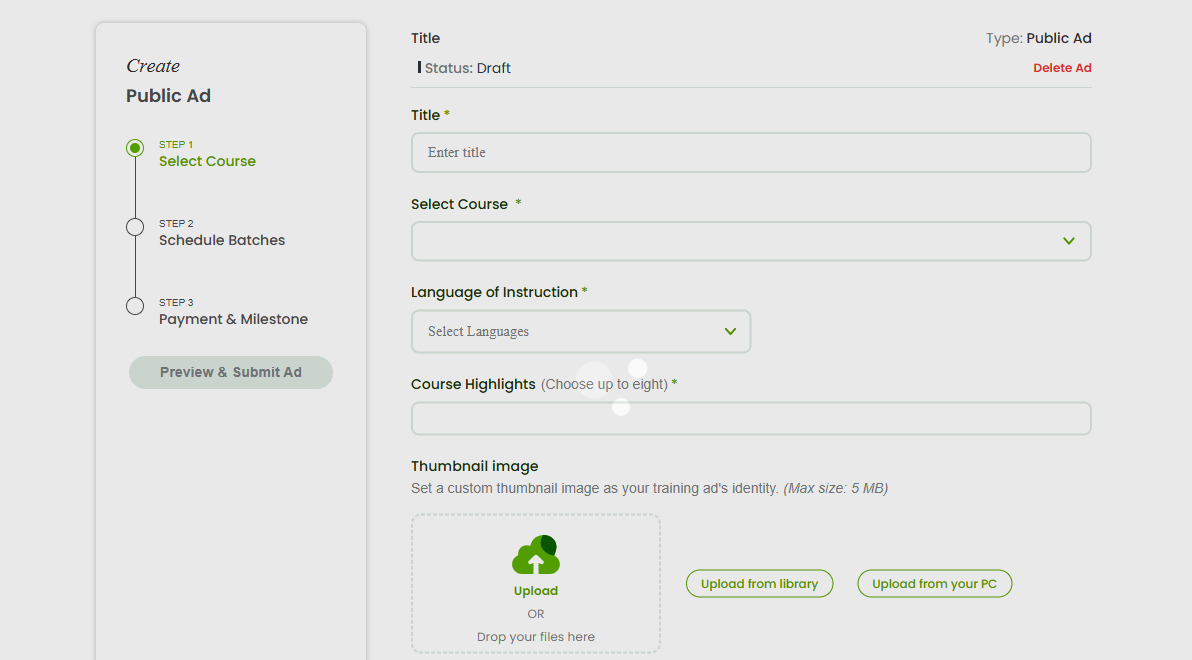
From your dashboard, choose Create Public Training Ad.
Or open My Public Ads and choose + Create Public Ad.
Tutorac then guides you through the steps to set up the ad.
A Public Ad promotes a course
A Public Ad advertises a live training course you offer. Have your course ready first — see the Live Courses section for creating one — so your ad can showcase it to learners.
Add your intro video
Your course’s introduction video is what displays in the Public Ad, so make sure it’s uploaded on the course. A clear, welcoming intro video is the single biggest factor in whether a browsing learner stops and engages.
Create and publish
Follow the on-screen steps and create the ad. Once live, it appears to learners browsing Tutorac and is listed under My Public Ads, where you can manage it.
FAQs
Do I need a course before creating a Public Ad?
Yes — a Public Ad promotes a live training course, so set up your course first.
Why does my ad need an intro video?
The course’s introduction video is what’s shown in the Public Ad. Without it, your ad can’t display properly.
Where do I find my ads after creating them?
Under My Public Ads. See “Managing your Public Ads.”
A secure account protects your earnings, your learners, and your reputation. This article shows how to change your password and keep your tutor account safe.
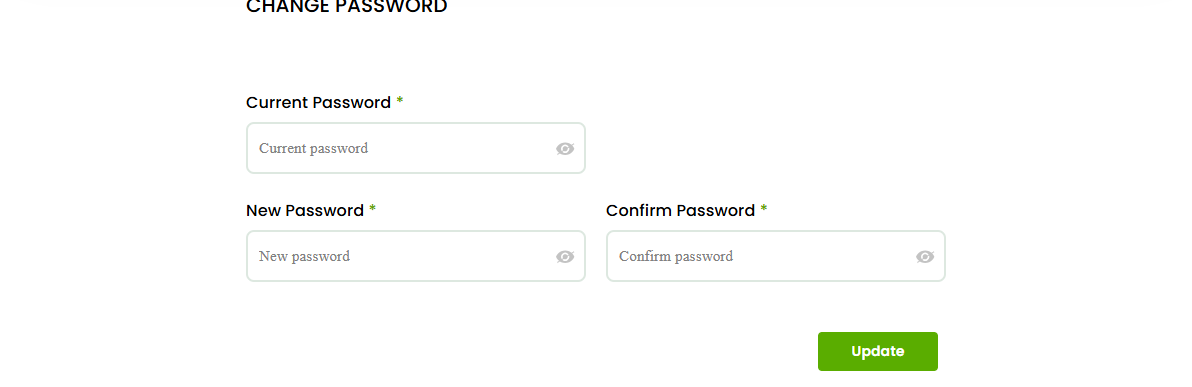
Open My Profile and go to the Change Password section. Enter your new password and save. Change it straight away if you ever think someone else may know it.
Choosing a strong password
Use a long password with a mix of letters, numbers, and symbols.
Don’t reuse a password from another site.
Avoid names, birthdays, or anything easy to guess.
Good security habits
Keep your login details private — Tutorac will never ask for your password by email or message.
Log out on shared or public devices.
Keep payments and conversations on the platform.
Be cautious of links or requests that ask you to sign in elsewhere.
If you can’t sign in
Use the password-reset option on the sign-in page to set a new password. If you still can’t access your account, or you think it’s been compromised, contact support@tutorac.com right away.
FAQs
Where do I change my password?
In the Change Password section of My Profile.
Will Tutorac ever ask for my password?
No. Never share your password with anyone, including people claiming to be from Tutorac.
I think my account was accessed by someone else — what should I do?
Tutorac may suspend an account when something puts learners, other tutors, or the marketplace at risk. Common reasons include breaching Tutorac’s policies, conduct or acceptable-use violations, misleading or inaccurate profile information, or activity that takes payments off-platform. The goal is to keep the marketplace safe and trustworthy for everyone.
What suspension means
While an account is suspended, your access to tutor features may be limited or paused. If this happens, the fastest way to understand the specifics of your case is to contact Tutorac support.
How to work toward reactivation
Contact support@tutorac.com to understand the reason and the steps required.
Resolve the underlying issue — for example, correct inaccurate information or address the policy concern raised.
Provide any details support asks for, and keep communication clear and honest.
Reactivation depends on the situation and Tutorac’s review.
How to avoid suspension
Keep your profile accurate and honest.
Follow Tutorac’s terms, conduct standards, and acceptable-use policy.
Keep payments and communication on the platform.
Treat learners professionally and deliver what you promise.
See the Safety & Policies section for the full standards tutors are expected to meet.
FAQs
Who do I contact if my account is suspended?
Email support@tutorac.com. They can explain the reason and the steps for your specific case.
Will I be told why my account was suspended?
Contact support for the details that apply to your account.
Can a suspended account be reactivated?
It depends on the situation and Tutorac’s review. Resolving the underlying issue and working with support gives you the best chance.
Tutorac is a professional community. These conduct standards describe how tutors are expected to behave so that learners get a great experience and the marketplace stays trustworthy for everyone.
Represent yourself truthfully — your experience, qualifications, and what you can teach. Misleading claims damage trust and can affect your account standing.
Be reliable
Show up on time for sessions, respond to learners promptly, and give notice if something needs to change. Reliability is one of the biggest factors in good reviews and repeat learners.
Communicate with respect
Treat every learner professionally and courteously. Harassment, discrimination, hate speech, and abusive language have no place on Tutorac and can lead to removal from the platform.
Deliver what you promise
Teach the content you agreed to, at the standard a learner can reasonably expect. If scope or schedule needs to change, agree it with the learner openly rather than quietly dropping commitments.
Respect learner privacy
Use any personal information a learner shares only for delivering their training. Don’t share it, and don’t pressure learners to take communication or payment off the platform.
FAQs
What happens if I don’t meet these standards?
Depending on the issue, it can affect your reviews, your visibility, or your account standing, up to suspension for serious or repeated breaches.
A learner behaved badly — what should I do?
Conduct standards apply to learners too. Keep the interaction on Tutorac and report it to support@tutorac.com.
Where are the binding rules?
This article summarises expected conduct. The binding rules are in the Terms of Service and Acceptable Use Policy linked in the footer.
A safe, trustworthy marketplace protects your time, your earnings, and your reputation. This article explains how Tutorac keeps the platform safe and what you can do as a tutor to stay protected.
Tutorac verifies tutors so learners can feel confident about who they’re learning from. Completing verification and keeping your profile honest are the simplest ways to build trust and stand out to learners.
Secure payments on the platform
Payments for training run through Tutorac, with live training paid in milestones. Handling payments on the platform is what lets Tutorac protect both sides and help resolve disputes if something goes wrong. Payments arranged outside Tutorac lose that protection.
Keep communication on Tutorac
Keeping your conversations with learners on Tutorac means there’s a clear record if a question or dispute comes up. Be cautious if anyone pushes to move payment or communication off the platform early on.
Spotting and avoiding scams
Be wary of requests that feel off: pressure to pay or be paid outside Tutorac, requests for sensitive personal or financial details, links to unfamiliar sites, or offers that seem too good to be true. When in doubt, slow down and keep the interaction on the platform.
Reporting a problem
If you encounter behaviour that breaks Tutorac’s rules or makes you uncomfortable, report it. You can reach the team at support@tutorac.com. Reporting helps keep the marketplace safe for every tutor and learner.
FAQs
Why shouldn’t I take payment off the platform?
Off-platform payments aren’t protected by Tutorac and can’t be backed by the platform’s dispute support. Keeping payments on Tutorac protects your earnings.
How do I keep my account secure?
Use a strong, unique password, don’t share your login, and be careful with links or attachments from people you don’t know. The Account section covers security settings.
What should I do if something feels wrong?
Pause, keep the conversation on Tutorac, and contact support@tutorac.com if you’re unsure. It’s always fine to ask before acting.
When you teach on Tutorac, you agree to the Tutorac Terms of Service. This article explains, in plain language, what the Terms mean for you as a tutor. It is a summary for convenience — the Terms of Service linked in the footer are the binding document.
By creating a tutor account and using Tutorac, you accept the Terms of Service. They set out the rules for using the platform, what you can expect from Tutorac, and what Tutorac expects from you. If you don’t agree with them, you shouldn’t use the platform.
Your responsibilities as a tutor
As a tutor you’re expected to provide accurate information about yourself and your expertise, deliver the training you agree to, communicate professionally, and follow Tutorac’s conduct and acceptable-use standards. Keeping your profile honest and your commitments to learners is central to the agreement.
Payments through the platform
Tutorac handles payments between learners and tutors through the platform, including milestone-based payments for live training. Keeping payments on Tutorac is what allows the platform to protect both sides and resolve disputes. The specific fees and payout terms are covered in the pricing and earnings sections and in the Terms.
Your content
You’re responsible for the training content you create and deliver, and for ensuring you have the right to use any materials you share. The Terms explain how content may be used on the platform. Don’t upload material you don’t have permission to use.
Changes and account standing
Tutorac may update the Terms over time, and continued use of the platform means you accept the current version. Serious or repeated breaches of the Terms can affect your account standing. If you’re ever unsure how a rule applies to you, contact support@tutorac.com.
FAQs
Is this summary the same as the Terms of Service?
No. This article is a plain-language summary for convenience. The Terms of Service linked in the footer are the binding agreement.
What happens if I break the Terms?
Depending on the issue, it can affect your account standing, up to suspension. Most issues can be avoided by keeping your profile honest, delivering what you agree to, and following the conduct and acceptable-use standards.
Where can I ask questions about the Terms?
Email support@tutorac.com if you need clarification on how the Terms apply to your situation.
Tutorac is a marketplace where tutors teach learners through live training and video courses. If you’re new here, this overview explains what Tutorac offers tutors, the ways you can teach and earn, and how the rest of this help section is organised.
As a tutor, Tutorac gives you a place to offer your expertise, reach learners looking for training, and get paid securely through the platform. You can teach in real time, publish recorded courses, or both — and Tutorac handles discovery, payments, and the tools you need to deliver training.
Ways to teach and earn
There are several ways to work as a tutor on Tutorac:
Live Courses — scheduled, tutor-led training delivered to a learner one-to-one or to a group, paid in milestones.
Video Courses — pre-recorded courses learners buy or subscribe to, letting you earn from your content over time.
Demos — short introductory sessions that let prospective learners experience your teaching before committing.
Training Jobs — requirements posted by learners that you can submit proposals for and win as contracts.
Ads — public and custom ads you can create to attract learners to your training.
Most tutors combine a few of these — for example, running live training while building a video-course library for passive income.
Your journey at a glance
Sign up as a tutor and set up your account.
Build your profile so learners can see your expertise and experience.
Get verified so learners know you’re a trusted tutor.
Attract learners through demos, training-job proposals, ads, and your profile.
Teach via live courses and video courses.
Get paid through milestones and payouts to your chosen method.
Where to find more help
Each stage has its own help section: onboarding and building your profile, verification, creating live and video courses, running demos, finding training jobs, pricing and discounts, earnings and payouts, taxes, and safety and policies. Use the tutor help categories to jump to the area you need.
FAQs
Do I need to choose just one way to teach?
No. You can run live courses, publish video courses, offer demos, and apply for training jobs in any combination that suits you.
Is there a cost to join as a tutor?
Creating a tutor account and profile is how you get started. Tutorac’s fees are explained in the pricing and earnings sections.
How soon can I start teaching?
Once your profile is complete and verified, you can start attracting learners and delivering training. Building a strong profile early helps you get discovered sooner.