You’ve created your tutor account — now what? This article lays out the first things to do so you can move from signed-up to ready-to-teach as quickly as possible.
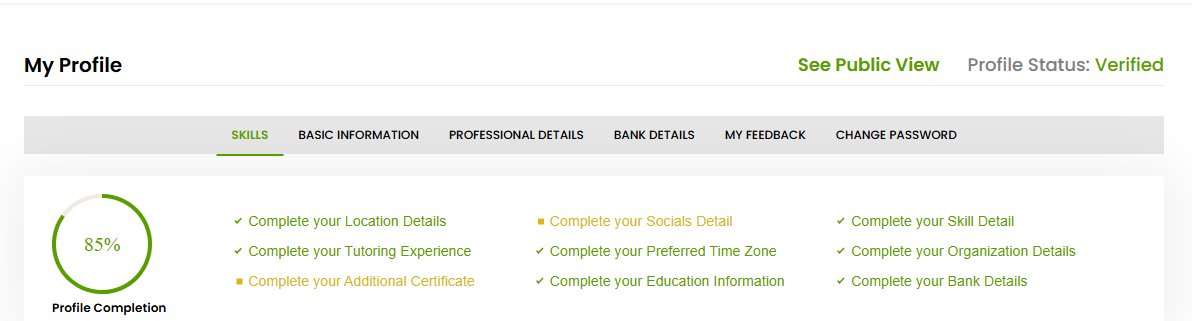
Start by filling out your profile fully — your headline, experience, skills, and the subjects you teach. This is what learners see first, and a complete profile is the foundation for getting discovered. See the Onboarding and Profile & Verification sections for guidance.
2. Complete verification
Work through the verification steps so learners can see you’re a verified tutor. This builds trust and is an important gate before you start receiving students.
3. Set your pricing
Decide how you’ll charge for your training and set it up so learners know what to expect. The Pricing & Discounts section explains your options, including milestones and discounts.
4. Create your first offering
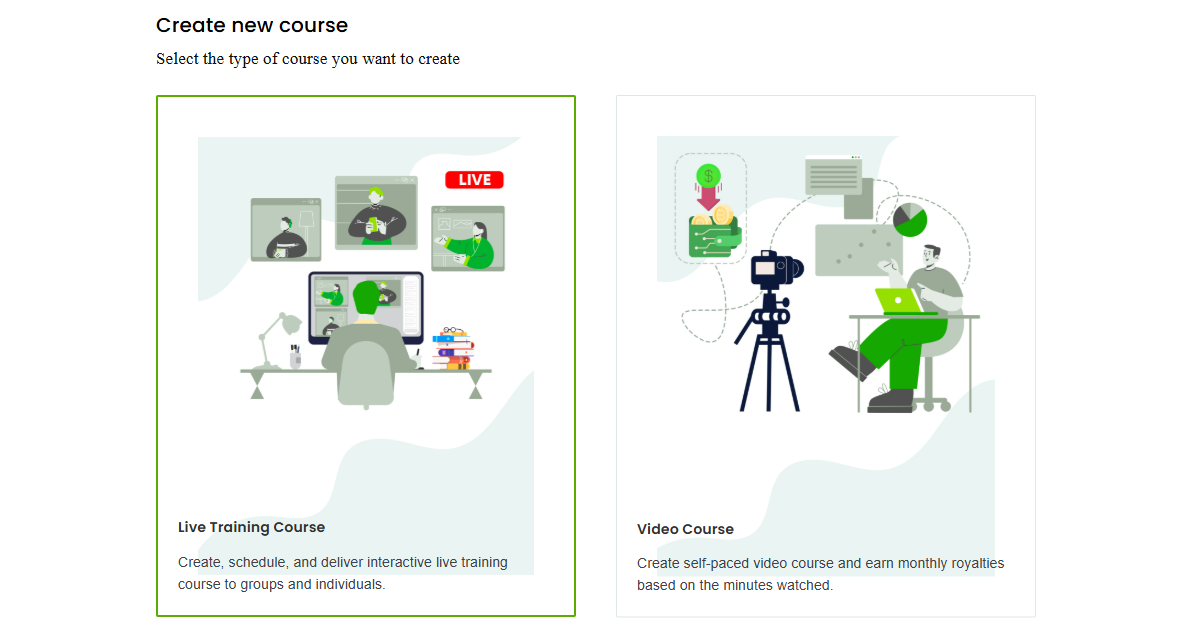
Get something live that learners can engage with: offer a demo, create a live or video course, or start responding to training jobs that match your skills. Pick whichever route suits your strengths to begin attracting learners.
5. Set up payouts
Add your payout method so your earnings can reach you without delay once you start teaching. The Earnings & Payouts section covers the available options.
FAQs
What should I do first?
Complete your profile and verification. Everything else — pricing, offerings, and payouts — builds on having a trusted, discoverable profile.
Do I have to set up everything before I can teach?
You’ll need a profile, verification, pricing, and a payout method to operate fully. Many tutors set these up in their first sitting and refine them as they go.
Where do I get help for each step?
Each step has a dedicated help section — Onboarding, Profile & Verification, Pricing & Discounts, Demos, Live Courses, Video Courses, Training Jobs, and Earnings & Payouts. Use them for the detailed how-to.
Tutorac gives tutors more than one way to teach and earn. This article compares the main options — live courses, video courses, demos, training jobs, and ads — so you can choose the mix that fits your goals.
Scheduled, tutor-led training delivered in real time — one-to-one or to a group. You agree a curriculum and milestones with the learner, teach live sessions, and earn as milestones are completed. Best for hands-on guidance, feedback, and higher-value engagements.
Video Courses
Pre-recorded courses that learners buy individually or access through a subscription. You invest time once to create the content, then earn from it over time. Best for scaling your reach and building passive income alongside live work.
Demos
Short introductory sessions that let prospective learners experience your teaching before they commit. Demos are a powerful way to convert interested learners into paying students.
Training Jobs
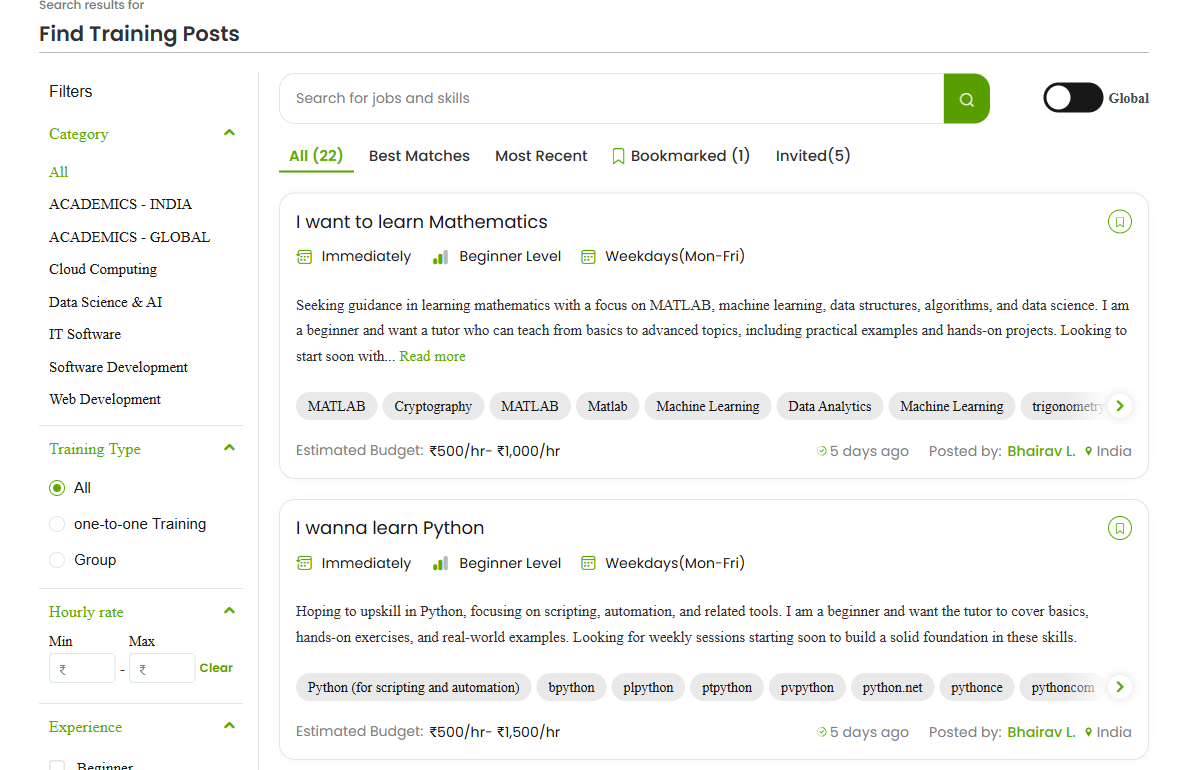
Learners post requirements describing what they want to learn. You can submit proposals for the ones that match your expertise and win them as training contracts. Best for actively finding work that fits your skills.
Ads
Public and custom ads let you promote what you offer to attract learners. They complement your profile and demos as another route to getting discovered.
Choosing your mix
Most successful tutors combine options: live courses for income now, video courses for income over time, and demos, training jobs, and ads to keep a steady flow of new learners. Start with what suits your strengths and expand from there.
FAQs
Which option earns the most?
It depends on your subject and effort. Live courses tend to be higher-value per engagement; video courses can earn passively at scale. Many tutors do best by combining both.
Can I start with just one?
Yes. Many tutors begin with live courses or demos, then add video courses once they’re established. You can expand whenever you’re ready.
Where do I set this all up?
Each option has its own section in this help centre — Live Courses, Video Courses, Demos, Training Jobs, and Ads — with the specifics for creating and managing them.
Before you start teaching on Tutorac, it helps to have a few things ready. This article is a simple checklist of what you need to set yourself up for success as a tutor.
Be clear about what you teach and to whom. Knowing your subjects, the level you teach at, and the outcomes you help learners achieve makes everything else — your profile, pricing, and demos — easier to set up.
A complete profile
Have your professional details ready: a clear headline, a summary of your experience, your skills, and anything that builds credibility. A complete profile is the single biggest factor in getting discovered and chosen.
Verification details
Tutorac verifies tutors to keep the marketplace trustworthy. Be ready to complete the verification steps so learners can see you’re a verified tutor. The Profile & Verification section explains what’s involved.
A payout method
To receive your earnings, you’ll set up a payout method. Having your payout details ready means there’s no delay when you start earning. See the Earnings & Payouts section for the options.
A setup for live sessions
If you plan to teach live, you’ll want a reliable internet connection, a working microphone and camera, and a quiet space. For video courses, you’ll also want a way to record clear audio and video.
FAQs
Do I need all of this before I sign up?
No — you can sign up first and prepare these as you go. But having your expertise, profile details, and payout method ready speeds up your start.
What if I only want to publish video courses?
You’ll still want a complete, verified profile and a payout method. Instead of a live-session setup, focus on a good recording setup for clear video and audio.
Is special software required?
The core tools for delivering training are provided within Tutorac. A standard computer, a stable connection, and basic audio/video equipment are enough to get going.
Becoming a productive tutor on Tutorac follows a clear path. This article walks through the journey from creating your account to landing your first student, so you know what to focus on at each stage.
Create your tutor account to get access to the tutor dashboard and tools. This is the foundation for everything that follows.
2. Build your profile
Your profile is how learners decide whether to choose you. A complete, specific profile — your expertise, experience, and the subjects you teach — makes a strong first impression and helps you get discovered. The Onboarding and Profile sections cover this in detail.
3. Get verified
Verification helps learners trust that you are who you say you are. Completing verification is an important step before you start receiving students. The Profile & Verification section explains the process and how to check your status.
4. Attract your first learners
There are several ways to get in front of learners:
Offer a demo so prospective learners can sample your teaching.
Browse training jobs and submit proposals for requirements that match your skills.
Create ads to promote what you offer.
Keep your profile strong so you show up well when learners search.
5. Deliver and get paid
Once a learner engages you, you deliver training through live courses or video courses. Live training is paid in milestones as you complete agreed portions of work, and your earnings are paid out to your chosen method. The Earnings & Payouts section covers how money reaches you.
FAQs
How long does it take to get my first student?
It varies. Tutors with complete, verified profiles who actively offer demos and respond to training jobs generally get started faster.
Do I need to finish every step before teaching?
Build your profile and complete verification first — these unlock trust and discovery. After that, attracting learners and delivering training happen together as you grow.
What’s the single most important step?
A strong, complete profile. It’s the basis for verification, discovery, and a learner’s decision to choose you.
Tutorac is a marketplace where tutors teach learners through live training and video courses. If you’re new here, this overview explains what Tutorac offers tutors, the ways you can teach and earn, and how the rest of this help section is organised.
As a tutor, Tutorac gives you a place to offer your expertise, reach learners looking for training, and get paid securely through the platform. You can teach in real time, publish recorded courses, or both — and Tutorac handles discovery, payments, and the tools you need to deliver training.
Ways to teach and earn
There are several ways to work as a tutor on Tutorac:
Live Courses — scheduled, tutor-led training delivered to a learner one-to-one or to a group, paid in milestones.
Video Courses — pre-recorded courses learners buy or subscribe to, letting you earn from your content over time.
Demos — short introductory sessions that let prospective learners experience your teaching before committing.
Training Jobs — requirements posted by learners that you can submit proposals for and win as contracts.
Ads — public and custom ads you can create to attract learners to your training.
Most tutors combine a few of these — for example, running live training while building a video-course library for passive income.
Your journey at a glance
Sign up as a tutor and set up your account.
Build your profile so learners can see your expertise and experience.
Get verified so learners know you’re a trusted tutor.
Attract learners through demos, training-job proposals, ads, and your profile.
Teach via live courses and video courses.
Get paid through milestones and payouts to your chosen method.
Where to find more help
Each stage has its own help section: onboarding and building your profile, verification, creating live and video courses, running demos, finding training jobs, pricing and discounts, earnings and payouts, taxes, and safety and policies. Use the tutor help categories to jump to the area you need.
FAQs
Do I need to choose just one way to teach?
No. You can run live courses, publish video courses, offer demos, and apply for training jobs in any combination that suits you.
Is there a cost to join as a tutor?
Creating a tutor account and profile is how you get started. Tutorac’s fees are explained in the pricing and earnings sections.
How soon can I start teaching?
Once your profile is complete and verified, you can start attracting learners and delivering training. Building a strong profile early helps you get discovered sooner.
Every Tutorac Video Course ends with a completion certificate you can download, share, and add to your CV or LinkedIn profile. The certificate is generated automatically once you finish the course — here’s how it works and how to use it.
A Tutorac completion certificate is a personalised, verifiable PDF that confirms you’ve finished a specific video course. Each certificate includes:
Your full name (as set in your Tutorac profile).
The course title.
The completion date.
A unique certificate ID for verification.
The Tutorac signature.
You can preview what the certificate will look like in the Your Certificate Awaits section on any course detail page before you start the course.
How to earn one
A certificate is unlocked when you complete 100% of the course — that is, when you’ve finished every lesson in the curriculum. Tutorac tracks your progress automatically as you watch lessons, so just keep working through the course and the certificate will become available the moment you reach the end.
Tip: you can check your current progress on each course tile in Videos → My Courses → Watch History. The percentage shown on the tile is the amount of the course you’ve completed.
Download your certificate
Once the course is 100% complete:
Open the course detail page (or jump back to My Courses and click the completed course).
Scroll to the Completion Certificate section.
Click the green Download Certificate button.
The certificate downloads as a PDF you can save, print, or share.
Share it on LinkedIn, your CV, or with employers
Ways you can use your Tutorac certificate:
LinkedIn — add it under the Licenses & certifications section of your profile. Use the course title and Tutorac as the issuing organisation.
CV / resume — list it under Certifications or Continuing Education, including the certificate ID.
Job applications — attach the PDF directly to demonstrate skills you’ve completed.
FAQs
Is there a cost to get the certificate?
No. The completion certificate is included with the course — whether you took the course through a subscription or bought it individually, finishing the course unlocks the certificate at no extra charge.
What name will appear on the certificate?
The certificate uses the full name in your Tutorac profile. If you need to change it, go to My Profile → Basic Info, update your name, and then re-download the certificate.
Can I download a certificate before completing the course?
No. The Download Certificate button activates only after the course reaches 100% completion. The Your Certificate Awaits preview on the course page is just a sample showing what the design will look like.
Can employers verify the certificate?
Yes. Each certificate carries a unique ID that can be matched back to the issuing record. If a verification process is required, you can share the certificate ID along with the PDF.
What if I lose the PDF?
You can always re-download the certificate from the same course page — the Download Certificate button stays available for any course you’ve completed.
Do live training batches also issue certificates?
This article covers Video Courses only. Live training batches and tutor-led courses have their own completion process. Reach out to your tutor at the end of your batch to discuss any certificate of completion they may provide.
When you click Hire Now on a tutor’s profile, Tutorac asks you to propose the structure of the training — including how to split the total cost into milestones. Getting this right at the start protects you, keeps the tutor motivated, and saves a lot of back-and-forth later. Here’s how to do it.
Milestones are defined at the moment of hire — they go into the offer the tutor reviews before accepting. The hire form is what you fill in after clicking Hire Now on a tutor profile.
Both you and the tutor see the full milestone structure before the tutor accepts. If the tutor wants different milestones, they can counter-propose on Messages before accepting — once accepted, the structure is locked.
Filling out the hire form
The hire form (opened from the tutor’s Hire Now button) asks for:
Course title / topic — what you want to learn (e.g., “Python for data analysis”).
Course description — a few sentences on goals, your starting level, any deliverables.
Number of sessions & session duration — e.g., 12 sessions of 60 minutes.
Tutorac creates the Training Batch with the milestones you proposed.
You fund the first milestone immediately. The tutor sees it as Funded in their dashboard and starts work.
Subsequent milestones can be funded as you go — or all up-front, your choice.
Each milestone’s scope, amount, and status are visible on the batch’s Payment tab.
If you need to change milestone amounts or scope after acceptance, the tutor can propose a revised milestone on Messages and you fund it like a new one. Original milestones stay frozen.
FAQs
Can the tutor change milestone amounts before they accept?
Not from inside the offer — but they can ask you on Messages to revise it. You’d withdraw the original hire and resubmit with the agreed numbers.
Can I fund all milestones up-front?
Yes — many learners pay the full amount in one go for convenience. Tutorac still holds each milestone in escrow separately; the tutor only receives them as you release each.
What if I don’t know the scope clearly when I hire?
Book a free demo session with the tutor first — their profile usually has a Schedule 30-Min Free Session link. Use it to clarify scope, then come back to Hire Now with confidence.
Tutorac’s safety guarantees — escrow, refunds, dispute resolution — only work for activity that happens on the platform. The moment money or important conversations move off Tutorac, every protection is gone. This guide explains why, the most common scam patterns to watch for, and what to do if a tutor pushes you off-platform.
Tutorac Payment Protection covers payments made through Tutorac and conversations held on Tutorac Messages. If you pay via UPI, bank transfer, wallet, or any other channel directly to a tutor, Tutorac has:
No record of the transaction.
No way to refund the money.
No leverage with the tutor — they’ve already been paid in full.
No basis for a dispute or chargeback.
Same goes for chats: a conversation on WhatsApp, Telegram, personal email, or any external app is invisible to Tutorac. If the tutor later denies promises or refuses to deliver, Tutorac can only see what happened in Tutorac Messages. Without that evidence, there’s no case to make.
Common scam patterns
These are the patterns to recognise — not all are obvious malice; sometimes a well-meaning tutor just wants to skip the platform. The risk to you is the same either way.
“Pay directly and I’ll give you a discount” — the “saving” vanishes the moment something goes wrong. There’s already zero platform fee for learners.
UPI / bank account / GPay request in the chat — legitimate Tutorac payments never happen this way.
Gift cards / crypto / wire transfers — classic scam channels because they’re irreversible. No legitimate tutor will ask for these.
“Move our chat to WhatsApp / Telegram” — if they want a back-channel, ask why. Promises made there can’t be enforced by Tutorac.
Fake invoices / payment links sent over email claiming to be from Tutorac — only pay via the Tutorac batch payment tab. Tutorac doesn’t email payment links.
Urgency tactics — “Pay now, the seat is closing”, “the discount expires in an hour”. Real Tutorac contracts don’t expire in minutes.
Tutor asks for personal financial info — card numbers, OTPs, banking passwords, your Tutorac password. Never share any of these, with anyone, ever.
Free demo extending into “just a couple more free sessions” — once the contract is set up, all paid work goes through milestones. Endless free extensions are a red flag.
Red-flag phrases
If a tutor sends any of these, treat it as a clear signal something’s off:
“Tutorac takes too much commission, just pay me directly.”
“I’ll give you my UPI / IBAN / wallet for the payment.”
“Let’s continue on WhatsApp, it’s easier.”
“Send the money first, I’ll create the contract after.”
“Send your card details / OTP / Tutorac password so I can set it up for you.”
“Pay in cryptocurrency / via gift card to lock the discount.”
What to do if a tutor asks you off-platform
Decline politely but firmly, in Tutorac Messages: “I’d like to keep everything on Tutorac for safety. Please send a contract through the platform.”
Do not share any payment, banking, or password info, even “just to test”.
Screenshot the chat if anything pressured or suspicious was said — useful evidence later.
Report the tutor to Tutorac Support with the screenshot and a short description.
If you’re uncomfortable continuing, find a different tutor. The Find Tutors page has many options for any skill.
There’s nothing to save by going off-platform
A common pitch is “going direct saves you the platform fee”. This is misleading on Tutorac:
Learners pay zero platform fee. The amount on the contract is the entire amount you owe.
The demo is already free. You don’t need to negotiate around it.
Refunds, escrow, dispute resolution — these are valuable and they vanish off-platform. The risk vastly outweighs any “discount”.
If the price is the issue, negotiate on the contract, not around the platform. Tutors can offer Tutorac-side discounts via lower milestone amounts when sending the offer.
FAQs
A tutor I trust says off-platform is fine. Why is Tutorac warning me?
Tutorac isn’t doubting the tutor — it’s protecting you. Even genuine tutors don’t have escrow, refund flows, or dispute systems on UPI / WhatsApp. If anything goes wrong (illness, schedule change, a misunderstanding), you have no fallback. Keep it on-platform and the tutor gets paid the same.
I already paid a tutor outside Tutorac. Can Tutorac help me get it back?
Unfortunately no — Tutorac can’t access or refund money that didn’t go through it. Report the tutor so Tutorac can review their account, but the only path for the lost money is directly with your bank (chargeback) or local consumer-protection authorities. Don’t pay more in the hope of recovering the original payment.
Is it OK to add a tutor on LinkedIn or follow their YouTube?
Yes — following public content is fine. The line is around money and training-related promises: those have to be on Tutorac to be protected. Casual professional follow-up isn’t the issue.
My tutor wants to email me PDFs and resources directly. Is that off-platform?
Use Tutorac’s in-batch Drive for course materials so they’re archived against the contract. One-off emails are fine if it’s a quick share, but anything you might need to reference in a dispute should go through the platform.
A site claiming to be Tutorac sent me a payment link. Is it real?
Almost certainly phishing. The only place to make a Tutorac payment is from inside your batch’s payment tab, while signed in to tutorac.com (or tutorac.org for non-India accounts). Never pay from a link in an email or SMS without first signing in directly via your browser and confirming the payment lives in your batch.
When you hire a tutor on Tutorac you’re trusting a stranger with both your money and your time. Tutorac Payment Protection is a set of platform guarantees designed to make that trust safe — escrow, refunds, demos, and zero platform fees. This article walks through what each piece means and where to see it in the app.
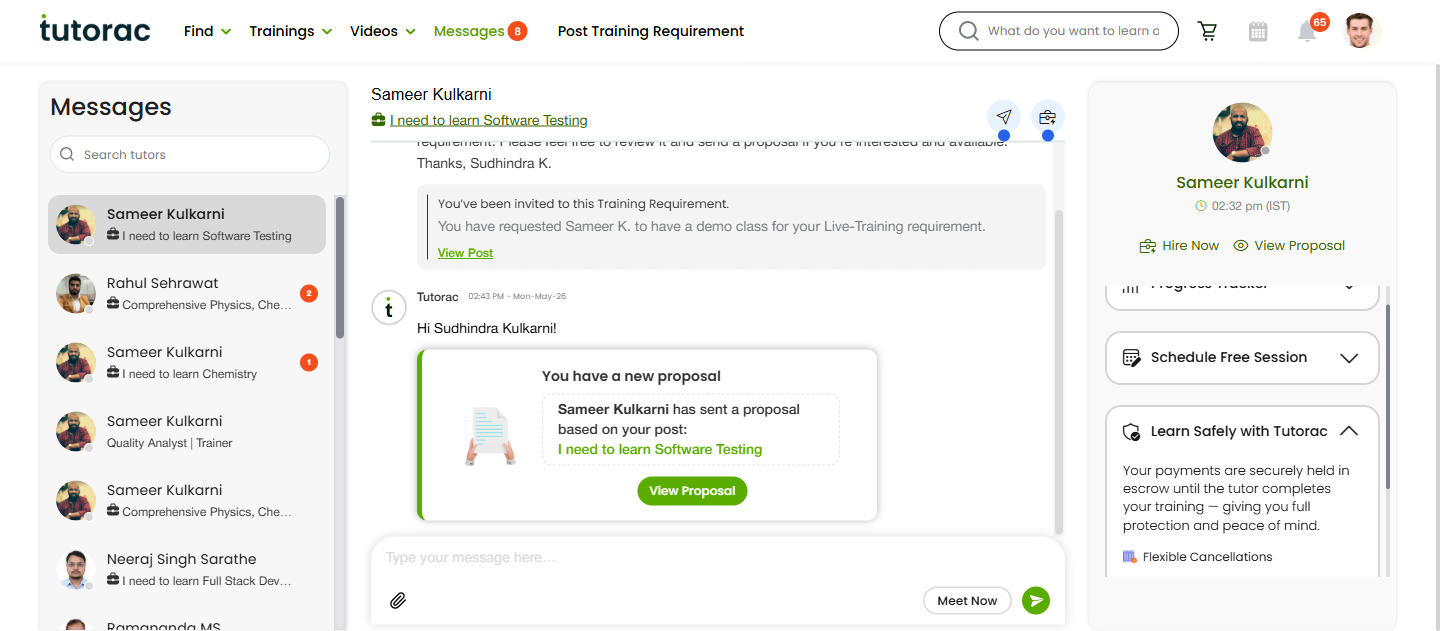
Open any chat thread in Messages. On the right side of the conversation you’ll see a panel titled Learn Safely with Tutorac. Click the header to expand it — it summarises Tutorac’s payment protection in four bullet points and one important reminder about scams.
The panel reads:
Your payments are securely held in escrow until the tutor completes your training — giving you full protection and peace of mind.
• Flexible Cancellations • Instant Refunds • Zero Platform Fees • Try Before You Hire
Avoid scams — always communicate and pay through Tutorac.
Escrow: payments held until training is done
The core of Tutorac Payment Protection is escrow. When you pay for a milestone, Tutorac holds the money in a neutral account — it doesn’t go to the tutor straight away. The tutor sees that you’ve paid, so they know it’s safe to teach. Funds only reach the tutor after you click Release Payment at the end of the milestone (or after an automatic release window if you forget).
This protects you from upfront-only scams and protects the tutor from teaching without payment. Read the full mechanics in How payments work on Tutorac.
Flexible cancellations
You can cancel a milestone partway through if the tutor isn’t a fit, doesn’t deliver, or your circumstances change. The escrowed amount is then split between you and the tutor based on the percentage of the milestone already completed, per the rules in the Tutorac User Agreement (“Cancellation by Learner” / “Cancellation by Tutor”). The earlier you cancel, the more you get back — a very early cancel typically returns most or all of the milestone amount.
Instant refunds
When a refund is owed (failed transaction, approved cancellation, tutor-side cancel), Tutorac initiates it within 1–2 business days. The actual credit on your bank statement depends on your card issuer (typically 5–10 business days). Refunds always go back to the original payment method in the original currency — ₹ INR for India accounts, $ USD for accounts elsewhere.
Zero platform fees
Tutorac advertises zero platform fee for learners. The amount shown on the contract is what you pay — nothing extra is added at checkout for using the platform. The tutor’s side handles its own fees with Tutorac, so the price you see is the price you owe.
Try before you hire (free demo)
Before you commit any money you can book a free 30-minute demo session with most tutors. Open a tutor’s profile from Find Tutors and click Book Free Session — you can check teaching style, pace, and communication before paying for anything. If they’re not a fit, simply don’t hire them.
Always pay and communicate through Tutorac
None of these protections apply if you pay or talk to a tutor outside Tutorac. Off-platform payments are unrecoverable — Tutorac cannot mediate, refund, or dispute money that didn’t go through it. If anyone asks you to pay via UPI directly, bank transfer, gift cards, crypto, or any external wallet — that’s a red flag. Stay on platform.
Same with conversations: use Tutorac Messages so disputes have a record. WhatsApp / Telegram / personal email chats can’t be referenced in a Tutorac dispute.
FAQs
Is Tutorac Payment Protection automatic?
Yes — it applies to every milestone payment you make on Tutorac. You don’t opt in or buy anything extra; it’s built into how payments work.
Does Payment Protection cover the demo session?
The 30-minute demo is free, so there’s nothing to protect. Payment Protection kicks in the moment you pay for your first milestone.
What if the tutor and I agreed on something special that isn’t in the contract?
If it’s not on the contract, Tutorac can’t enforce it. Get any custom arrangement (extra sessions, custom assignment review, post-training mentoring) written into the contract milestones before you pay.
A tutor said off-platform is cheaper because there’s no platform fee. Should I do it?
No. There’s already zero platform fee for learners on Tutorac — the tutor’s pitch is misleading. Worse, going off-platform means zero escrow, zero refund rights, and zero dispute resolution. The “savings” vanish the moment something goes wrong.
How do I know my payment is actually in escrow?
Open your Training Batch → payment tab. A paid milestone that hasn’t been released shows as “in escrow” (or equivalent), and the Release Payment button is active. Once you click Release, the status updates to released / completed.
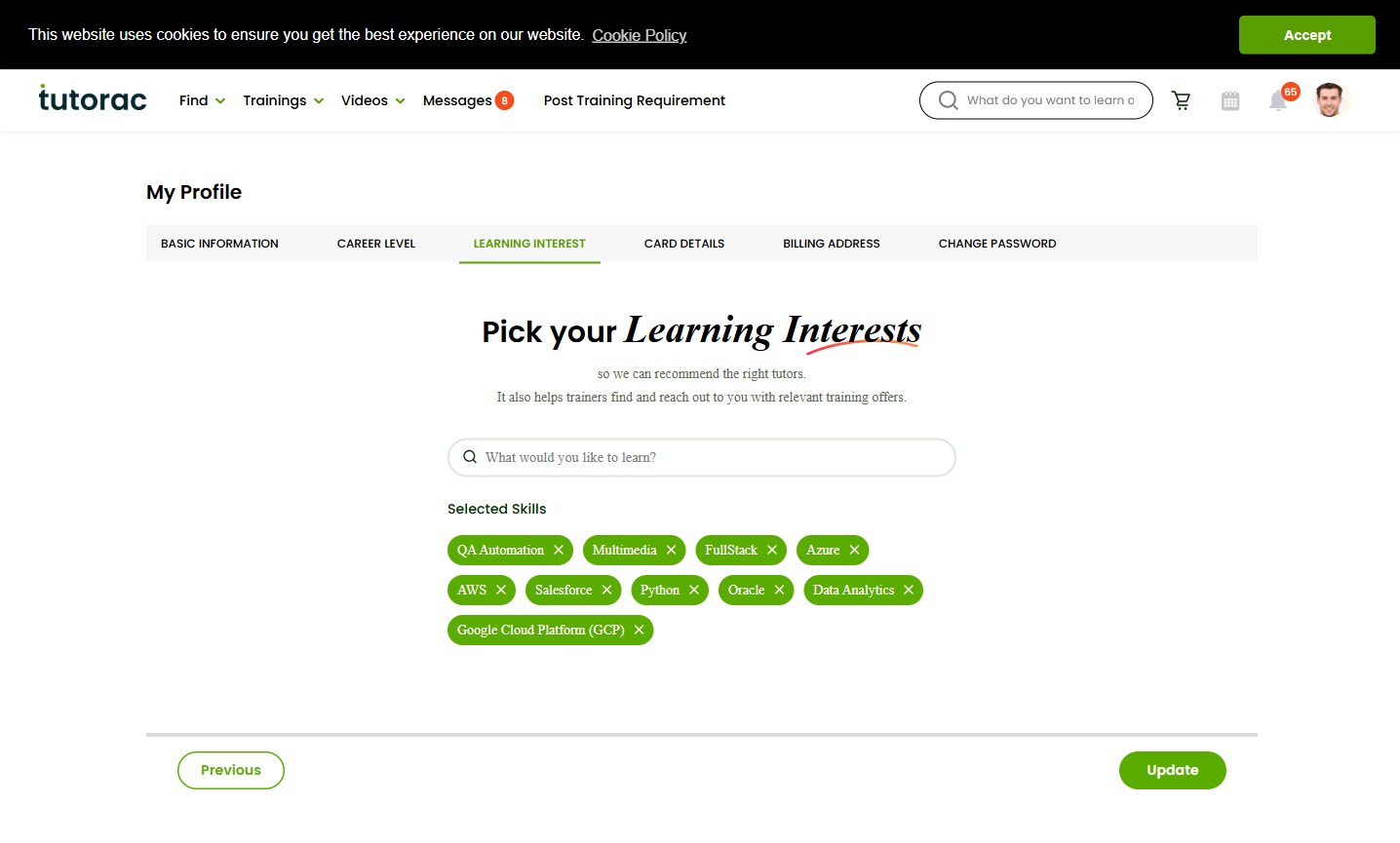
Learning Interests tell Tutorac which technologies and skills you want to learn. The platform uses them to recommend the right tutors, and tutors use them to send you relevant training offers and invites.
In the left sidebar, click LEARNING INTEREST (URL: /student/profile/skills).
Pick your interests
The page header reads “Pick your Learning Interests so we can recommend the right tutors. It also helps trainers find and reach out to you with relevant training offers.”
Browse the skill list (examples include QA Automation, Multimedia, FullStack, Azure, AWS, Salesforce, Python, Oracle, Data Analytics, Google Cloud Platform (GCP), and many more).
Click each skill you want to learn. Selected skills appear under the Selected Skills heading at the top.
To remove a skill, click it again to deselect.
Once your list reflects what you actually want to learn, click Update at the bottom.
There’s no minimum, but picking 3–6 specific interests usually gives the best signal — broad enough to surface options, narrow enough to stay relevant.
Add or remove an interest later
You can change Learning Interests anytime — e.g., when you finish a course on one stack and want to move to the next. Click extra skills to add, click selected chips to remove, then Update.
New tutor recommendations reflect the change immediately. Ongoing batches you’ve already paid for continue under their original scope.
Why your interests matter
Tutor recommendations — Find Tutors and the dashboard surface tutors matched to your interests first.
Inbound offers — Tutors searching for learners on the platform can find you via skills and send invites or relevant training offers.
Personalised dashboard — Videos, courses, and training requirements you see are filtered by your interests.
Profile completeness — Counts toward the “Your profile is X% Complete” bar. A complete profile gets surfaced more often.
FAQs
What if my exact skill isn’t in the list?
Pick the closest broader category (e.g., choose “Python” if “FastAPI” isn’t listed, or “AWS” if a specific AWS service isn’t there). You can mention the specific tech in your Training Requirement when posting one.
Is there a limit on how many interests I can pick?
There’s no strict cap, but picking everything dilutes the signal. Stick to skills you actually plan to learn in the next 6–12 months.
Will tutors see my interests?
Yes — tutors who match your interests can see them and reach out via the Send Invite flow. Your interests are how they discover you.
Does picking an interest sign me up for anything?
No. Selecting a skill is purely a preference signal — it doesn’t enrol you in any course or commit you to any tutor. Nothing happens until you book a demo or accept a contract.
My interests have changed completely — should I clear everything?
Yes — deselect old skills you no longer care about and pick new ones, then Update. The cleaner your list, the better your recommendations.