A complete learner profile helps Tutorac match you with the right tutors and surface training opportunities that fit your goals. This guide walks you through all three sections — Basic Information, Career Level, and Learning Interest — so you can finish setup in one sitting.
In this article
- Why your learner profile matters
- Step 1: Fill in your Basic Information
- Step 2: Choose your Career Level
- Step 3: Pick your Learning Interests
- FAQs
Why your learner profile matters
Tutorac uses your profile to recommend tutors, surface relevant Live Courses and Video Courses, and let trainers send you tailored proposals when you post a Training Requirement. The more accurate and complete your profile, the better your matches — and the faster you find the right tutor.
To get to your profile from anywhere on Tutorac, click your avatar in the top-right corner and choose My Profile. You can also go directly to tutorac.com/student/profile/personal-info.
Step 1: Fill in your Basic Information
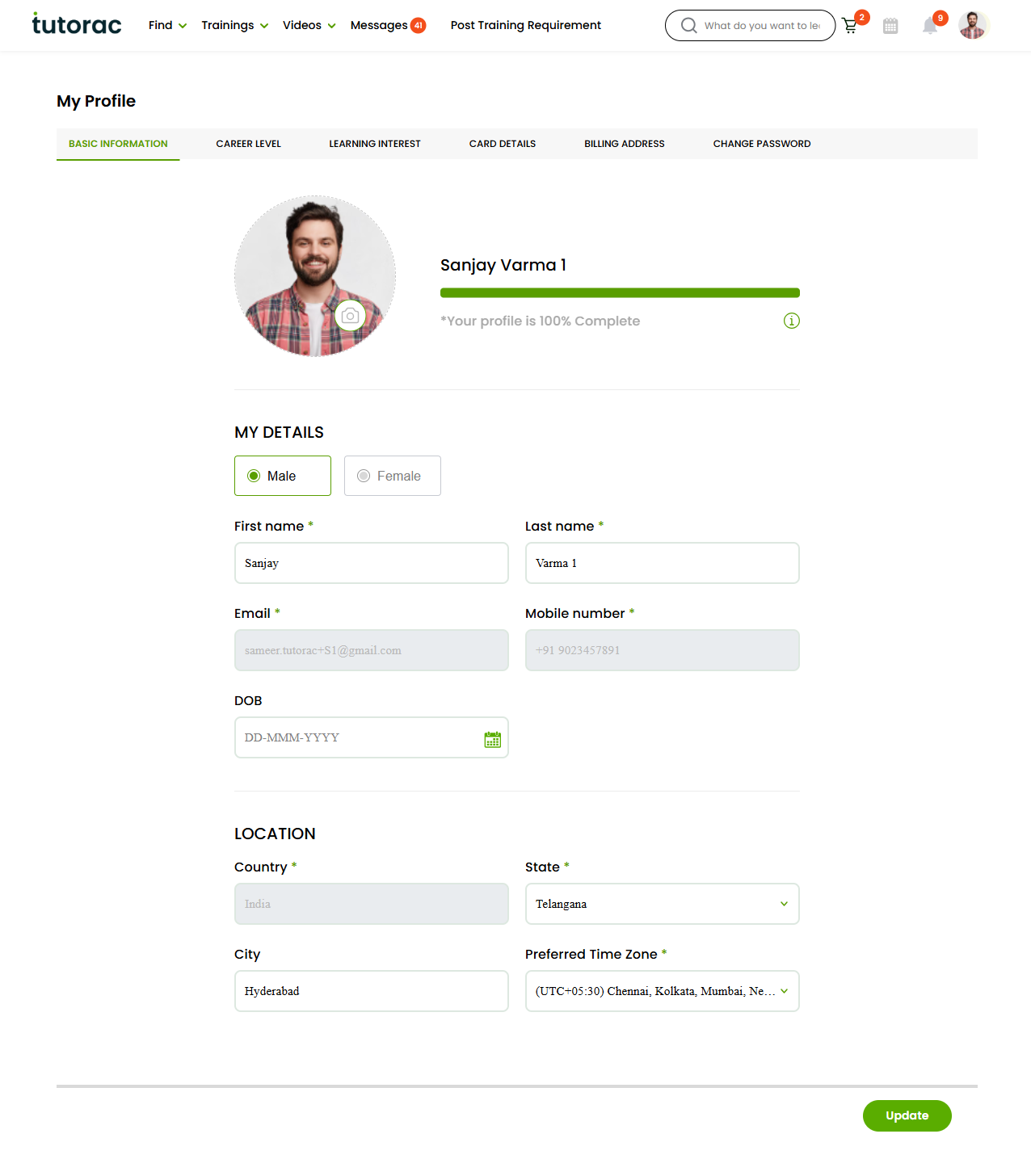
The Basic Information tab is the first section in your profile sidebar. Fill in these fields one by one:
- Profile photo — Click the circular image at the top. Upload a clear headshot (JPG or PNG). A real photo builds trust with tutors.
- Gender — Select Male or Female.
- First name & Last name — Required. Use the name you want tutors to address you with.
- Email — Pre-filled from your sign-in. It is locked here — to change it, contact Tutorac support.
- Mobile number — Required. Used for OTP, class reminders, and tutor coordination.
- DOB — Optional. Format: DD-MMM-YYYY.
- Country, State, City — Sets your location for tutor matching and time-zone defaults.
- Preferred Time Zone — Required. All session times you see on Tutorac are converted to this zone.
When you’re done, scroll down and click the green Update button to save.
Step 2: Choose your Career Level
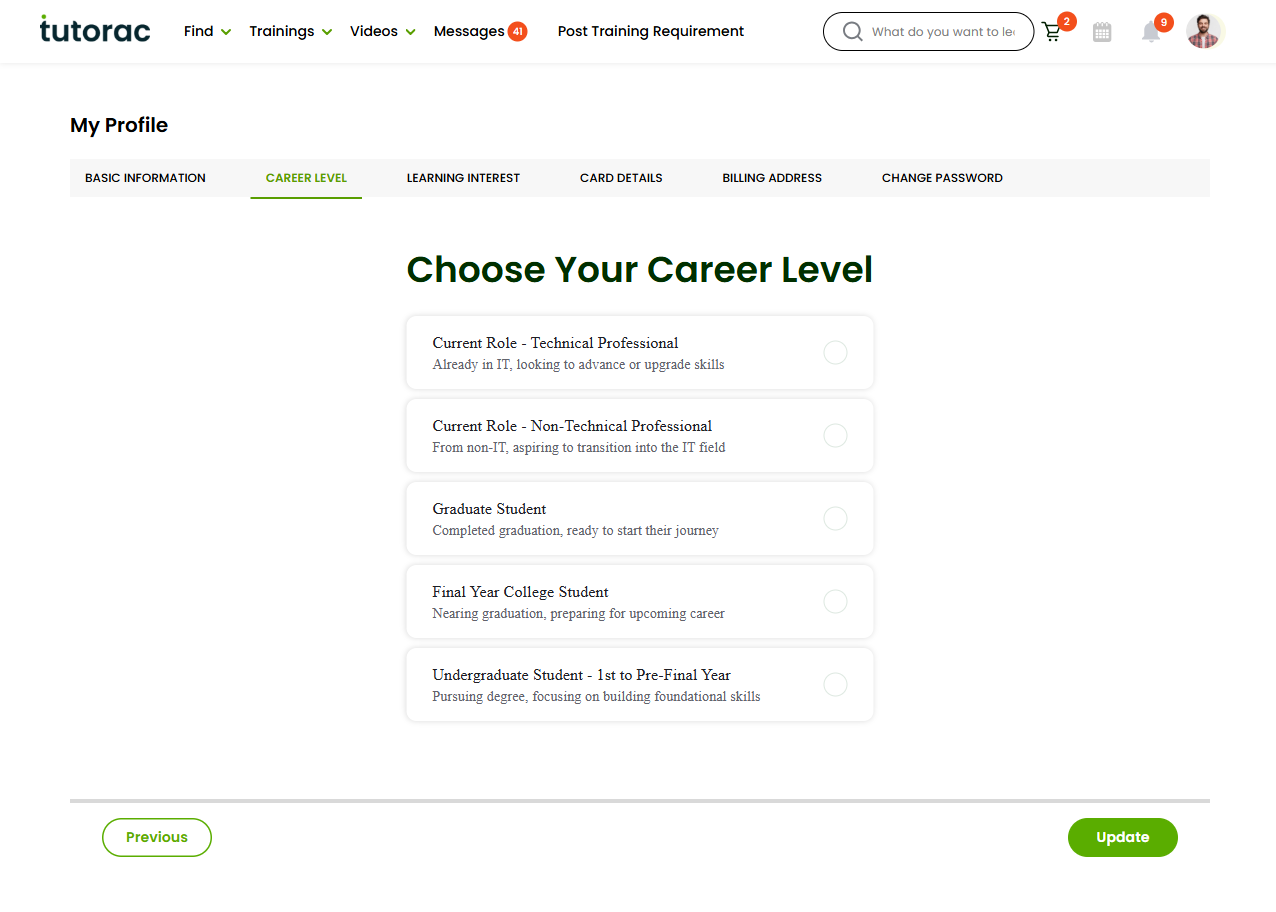
Click CAREER LEVEL in the sidebar. Pick the single option that best describes you right now:
- Current Role — Technical Professional — Already working in IT, looking to advance or upgrade your skills.
- Current Role — Non-Technical Professional — Working in a non-IT role, aspiring to transition into IT.
- Graduate Student — Completed graduation, ready to start your career.
- Final Year College Student — Nearing graduation, preparing for your first job.
- Undergraduate Student — 1st to Pre-Final Year — Pursuing your degree, focused on building foundations.
Click Update to save. You can change this any time as your situation changes.
Why it matters: tutors use your career level to set the right depth for proposals, pricing tiers, and content suggestions. A working professional and a first-year undergraduate often need very different lessons on the same topic.
Step 3: Pick your Learning Interests
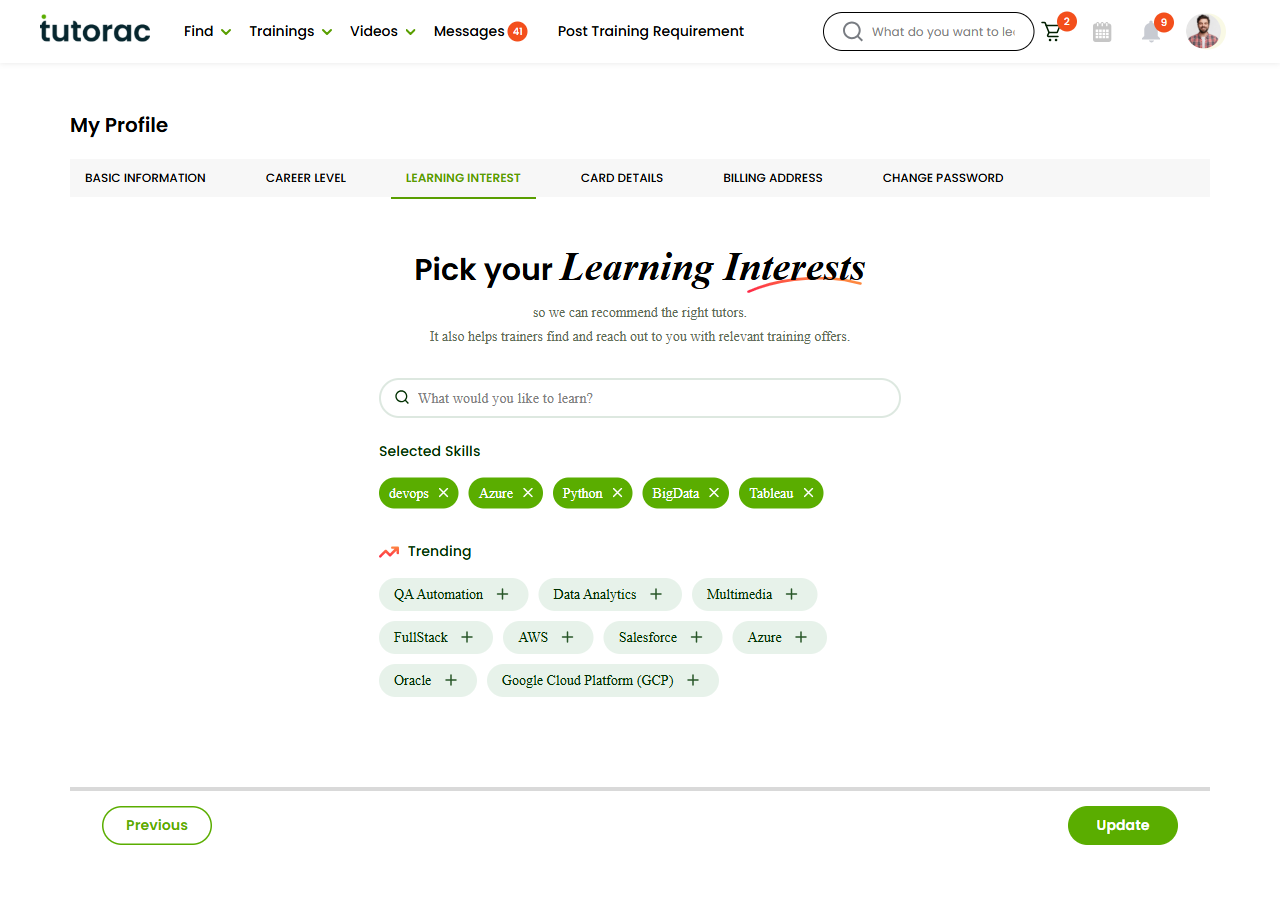
Click LEARNING INTEREST in the sidebar. This is where you tell Tutorac what you actually want to learn so the platform can recommend tutors and so trainers can reach you with relevant offers.
- Type a topic in the “What would you like to learn?” search box, then click the suggestion that appears.
- Or pick from the Trending list below (QA Automation, Data Analytics, Multimedia, FullStack, AWS, Salesforce, Azure, Oracle, Google Cloud Platform, and more).
- Each interest you add appears in the Selected Skills area at the top of the page.
- To remove a skill, click the × on its chip in Selected Skills.
Aim for 3 to 7 skills that reflect your real goals. Too few and you get fewer matches; too many and your recommendations become unfocused. Click Update to save.
FAQs
Can I update my profile later?
Yes. All three sections — Basic Information, Career Level, and Learning Interest — can be edited any time from your My Profile page.
Why is my email locked?
Your email is your sign-in identity on Tutorac. To change it, contact Tutorac support from the Help Center so we can verify the new address and update it safely.
How many Learning Interests should I select?
Pick 3 to 7 skills that reflect what you actually want to learn now. You can always come back and update the list as your goals evolve.
Who can see my profile information?
Tutors and agencies can see your name, profile photo, location, career level, and learning interests when you message them, send a hiring invite, or post a Training Requirement. Your email, mobile number, DOB, and payment details are never shared with tutors.
Do I have to complete all three sections?
Basic Information and Learning Interest are the most important — without them Tutorac cannot recommend tutors. Career Level is strongly recommended so proposals are pitched at the right depth.
Can I change my profile photo?
Yes. Go to Basic Information and click the circular photo at the top to upload a new one. The change is live as soon as you click Update.
Related articles
- More Account & Profile articles
- How to find and hire a tutor on Tutorac
- How to enroll in a Live Course on Tutorac
- Safety & Trust on Tutorac
Last updated: 20 May 2026